
Render queue
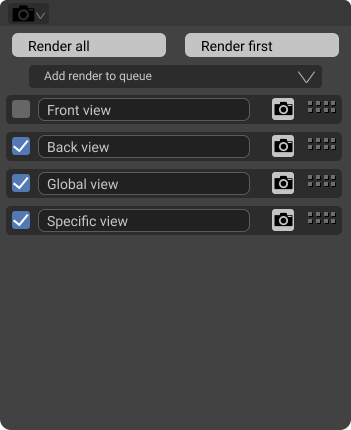
The current problem is mainly for the props artist : when putting cameras all around the object, we have to manually render each image. A tricky solution is to bind a camera to a marker for few frames and to render as an image sequence. This workflow could be improved by a render queue. The artist will configure the scene, the active camera, the shown object and then add a new element to the render queue. The artist will do it for every cameras and then click on render all. The export settings will be the same as the main one, but the file name will be the camera name.
I think I'm able to do it, as a new little area within blender. The idea would first be to make a little python script that could be shipped within blender addons. And maybe then making this in c++ if needed. But the c++ conversion is probably useless.
I made a little mockup of how it could work.
 This post is to get your ideas and thought about this little project. IF you think it is useless, let me know
9 Comments
Native would be good. To help you quickly, I recommend this addon blendermarket.com/products/photographer
This is marked as "in develeopment" Does anyone have a link to any task(s)?
* @rex_kungolos * I'm actually experimenting developer.blender.org/D11274 . I will probably restart from scratch, because I did not go the good way.
Try this: github.com/atticus-lv/RenderNode
blendermarket.com/products/renderstacknode
You might find this useful creativeshrimp.com/renderburst.html
they have to bring back the render button!
there's a good addon for this github.com/luckykadam/render-strip
* @Thane5 * That is not totally what I mean. I think it is good for separating and managing some strips, but blender should have a little area that can do it easily for images. In my concepts, there is no specification of frame or animation.
For example, in archviz, this is mainly images that are used, and the artist have to render each camera manually. It brings a solution to this problem.