
Simple UI improvements for windows management
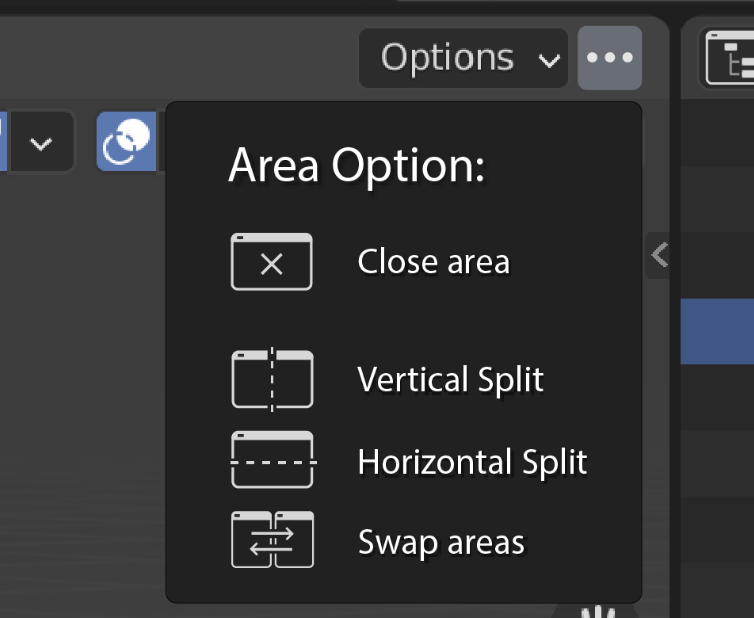
Windows/area customization is a big part of the experience of blender but for a new user it's not very intuitive. I tried to improve 2 parts of it.


HD images here: drive.google.com/drive/folders/1Dv0d7a3rcZtkZ7qwFzM-lOEyeBzg-JvP
20 Comments
Yah ... add icons for " specific " kinda people who don't understand what swap area mean. Blender become more popular, more come this " for idiots stuff " suggestion... Less words, more pictures. YESSSSSS!!! +100 500, throw everything away, we can't work without this another icons, need it right here & right now.
.... but for a new user it's not very intuitive. Swap area is not enough intuitive. Of course.... Toooo complicated. Looks like only two kinds of new users exist - mentally retarded or kids elementary school.
* @IIIFGIII * I don't understand what your problem is man, bashing on every single suggestion that someone offers to make the software more intuitive or better or add a new feature or update a current one for easier and better use. People come from different softwares and are taking their time to upload ideas and feature requests to make this Blender better than the competition in every single way and yet you bash everyone and want to keep Blender as it was since idk 2.4 days or something. If it wasn't for these people to invest their personal funds and ideas to make Blender a better software, it wouldn't get the recognition it has today. Please be more positive about new ideas and see the good from them. Yes there surely are some dumb ideas around but things to make the UI cleaner and easier to read and use is a must for newcomers and even more experienced users.
In this feature request I would love the 3 dot menu for splitting more than the rest as it will provide an easier way to split the screen than hitting the corner of the window so you can toggle the menu.
Thank you and stay positive after all we are all here for the best of the future of Blender. :)
Hi, I do User Experience design for living, I hear comments like this every time.
I get that "swap area" is already clear, but is clear for you that already know Blender, you already know that in order to add/close/split windows you need to right-click the line between two windows
and even learned so, it's not clear how to close a window because it's simply not written anywhere "close the window".
I bet many beginners Googled "how to close a window" and this question is so silly that show us that there is a problem and people don't find the UI familiar and intuitive.
If the software became easier to navigate and accessible to everyone is only better, it's always better. Image if blender was so easy to use that even kids from elementary school could use it.
So, is this stuff for idiots? Or retarded? No, it's just easier to learn.
* @IIIFGIII *
* @Zodiac * My problem is that I remember times when this website was for suggestions, real suggestions. Today it's for everyday, mostly not voted, flood...
To "upload" more images you can upload them to imgur (or any other image hosting website) and then do a bit of html right in the post text. to share an image type this
<img src="url here" alt="alternative description">When I want to close some area opened it's very frustrating, so I love this new solution :)
I typed left side, I meant right side
dislike it, cause we dont have enough place for every subject in the program
make the 3-dot icon vertical dots to save space and you have my vote
Unfortunately I can rotate the icon in vertical but the button will still be squared. Buttons are always square or horizontal. * @thinsoldier *
perfect new icon, I love it
YES!! i am still ashamed everytime I show blender to my collegues and not being able to manage/ move the interface because of how fiddly it is, it is always a shame, this would really help! ive been using blender for a decade almost, and still cant move windows consistently...
* @Frederico Martins * In what way? Every time I've tried to show Maya to people (or just use it in genera) I have to avoid using most of it's window management and sub-window layout features because they are the #2 most reliable way to instantly crash Maya. Rearranging windows/panels/editors in Blender is literally ORGASMIC.
* @thinsoldier * I have never heard about this before. Nor do I have ever had a crash from manipulating, rearranging windows or something like this in Maya for years of using it. Also don't understand most people who say that Maya crashes like every 10 minutes. I never experience crashes unless I purposely try to break the software. I don't know and before you say anything that I do scenes with several hundred polys and that's the reason it hasn't been crashing you will be wrong. I think it's more of a hardware issue with all the crashes because majority of people I tend to see online use laptops for some reason which of course can crash easily. But we won't get into this, just adding my opinion even though no one asked lol.
* @Zodiac * The last 2 years with the free student edition on 3 windows laptops and 1 macbook pro (purchsed in 2019, 2016, 2014, and 2012 ) something as simple as adding and then deleting a light in an empty scene would crash maya. Switch to quad view would crash maya. Opening the hypershade window would crash maya. Tearing off a panel to a new window would crash maya. Switching menu set would crash maya, resizing the attribute editor would crash maya.
That was 2017 and 2018. Rewind to the era of Maya 5 through to about 2008 and then one last try in 2012 across several store-bought and custom-built gaming pc's and some Dell and IBM workstations (with student editions, fully paid for editions, and bootleg warez editions) and my experience back then was roughly the same (but not quite as bad) as 2017 - 2018.
I can't think of anything I've successfully done in maya with more than 1 object and more than a few dozen polygons because the bastard would not stay working long enough for me to accomplish a damn thing. I've been able to create more renders in ONE year of Blender than in all of 2003 - 2008 and more than in all of 2017-2018.
I'm nothing but an amateur hobbyist graphic designer who had several friends who made a living building and maintaining a large number of computers and networks but no matter how good the PC was they helped me build or suggested that I buy, Maya refused to cooperate.
* @thinsoldier * I don't know man, me personally have never gotten crashes from Maya if I wasn't doing something ridiculous, this is my case and experience over the years. I have always been using a powerful desktop PC throughout. Laptop for some really lite work if needed but mostly my tower has done the job and never had maya crashing especially for things like you pointed out. For me Blender crashes a lot when I get something heavier in the scene possibly for retopology or doing a complex scene. This is a big spot for me where Blender needs more improvement and that is performance with high scale scenes and heavy meshes but I know will happen in time.
blenderartists.org/t/notes-to-self-about-re-learning-maya-ignore-this/1281543/4
I like this idea, looks very intuitive especially the split screen options. Will be a lot easier than trying to hit the edge to do a split imo.
Please make the google drive available by link
* @zanqdo * Thanks, just done it