
Colour Management - Recognise ICC monitor profiles
So we finally have great colour management on the output-file-side (thanks Filmic!), however Blender's interface is still not colour-managed. This means for those of us with wide-gamut monitors (sRGB 100%+) Blender's panels, viewports and render output are inaccurate.
To explain a little: Colours are generally understood as RGB values (Pure red is 255,0,0 for example). A colour-managed app understands that a wide-gamut monitor goes beyond the limits of sRGB (the most-used colour space and the one used all over the web), and references the appropriate ICC profile to display full-red as only the brightest red in the sRGB spectrum. An unmanaged app will send the most pure red the monitor can produce, since it doesn't know what the monitor understands to be pure red in sRGB. Thus, apps without colour management will display as over-saturated on wide-gamut monitors, since they can push well beyond sRGB in terms of saturation. You can imagine how much of a headache this is for color-critical 3D work.
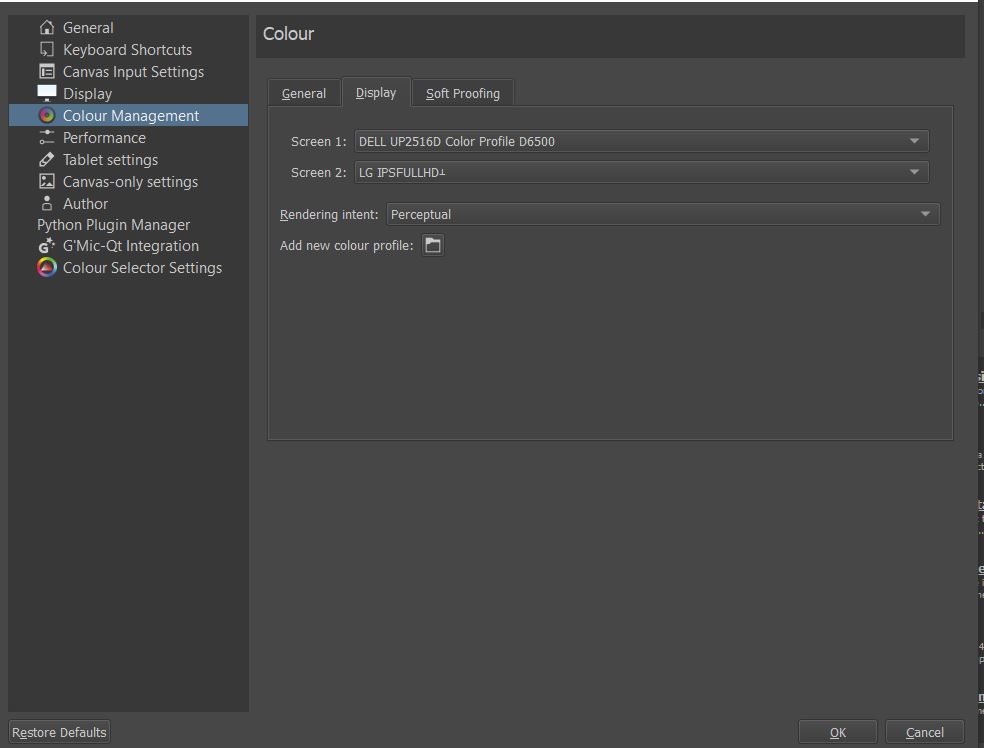
Krita, Photoshop, Firefox etc. are all colour-managed and either recognize the monitor profile loaded into the operating system or have the ability to load a profile straight into the software. I have attached the profile loading dialogue for Krita for example.
Windows 7 and OSX are colour managed across the operating system, so this is a non-issue. Windows 10 however is not, even though monitor profiles can be loaded into it, and therefore requires the app to do the legwork.
I propose that a "colour management" option be added to Blender much like the one in Krita, so that monitor profiles may be loaded and interface colours displayed exactly as they should on wide-gamut monitors (which are increasing wildly in popularity and becoming very cheap).
4 Comments
That is what different classes of Displays are for. If you try the GitHub variant, you’ll see I’ve included Apple Display P3 and Broadcast BT.1886 in the display types.
In terms of finer grained ICC based characterizations, you can tack those into a transform via a 3D LUT.
By and large, ICC management is one form of colour management, and in being such, it remains incompatible with OCIO beyond broad strokes. V2 will bring a limited subset of ICC monitor characterization to the table, but some will remain incompatible, and for good reason.
Also, Windows is a crap operating system and is not colour managed; icons and wallpapers and UI isn’t. macOS is the only operating system with full colour management. Linux? Don’t even ask...
* @troy_s * Resorting to GitHub variants isn't exactly convenient or productive. Being able to load profiles straight into vanilla Blender and have it adjust it's interface would be far better.
I'd like to encourage the use of tact around user's chosen operating systems. Windows is used by the greatest majority of professionals and is far from a "crap" OS, although I personally prefer OSX. Unfortunately, OSX performance and price leaves a lot to be desired. I know full well that Windows 10 is not colour-managed and I stated that in my proposal. Windows 7, however, DOES have colour management when it comes to desktop, icons and UI. The regression is frustrating, but that's the situation and hyperbole isn't necessary.
Are you saying there's no way to include monitor profile recognition in Blender at all? Just to impress again that I am talking about the interface and viewports here, and not the file or render output. What special aspects of Krita, Firefox and Photoshop allow them to load monitor profiles that Blender can't have?
* @Logan Preshaw *
That’s Blender’s problem for not doing things very well, which in turn is a cultural problem. If the culture doesn’t care, then the developers don’t.
Windows never has been managed. Yes it’s crap.
Integrating ICCs at the tail end of the chain would be possible, but given how broken up the entire colour pipeline is and has been in Blender, do you think it matters at this point? It would also more greatly complexify the situation given that a majority of the current hobby users have no clue and don’t care.
In the end, no one cares, so here we are. It will take much more education before things change.
Getting a proper display selection into Blender would be a good first step, and negate the broad stroke issues that ICCs can help to resolve via the alternative CMS approach.
* @troy_s * Well then, that also becomes part of my proposal. If that's what it takes to get it in, then it needs to be done.
Plenty of things have become part of Blender that hobby users don't know or care about. I don't care about that. I'm a pro user, as are many others joining the community with 2.8. I use it in a professional capacity. Professionals require colour accuracy. There's enough reason for it right there.
You're right though. Too few know about this issue, but they will. With the advent of high-gamut monitors becoming widespread I'm already seeing posts of people confused with colour discrepancies between their interface and output. With OSX being the only colour-managed modern OS, the issue isn't going away on its own.