
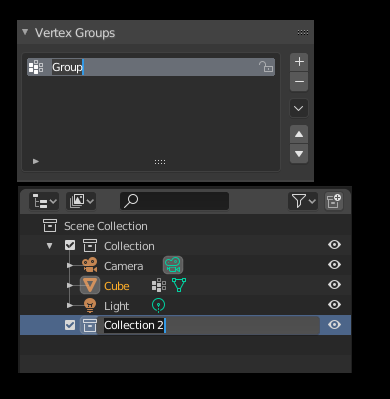
When you create new collection/vertex group/uvmap/etc. it should be focused and renameable instantly
For example you create a vertex group by pressing +. New vertex group is created. If you have lots of vertex groups the new one is created somewhere in the list outside of the view. Annoying because you need to manually find it by scrolling back and forth (pressing "," does not work in those kind of menus). Also if you create a vertex group or collection I'd imagine in 99% cases you want to rename it because "Collection 6" or "Group.012" is not descriptive. This adds lots of unnecessary work when you need to scroll and find and rename something every time you add something.
So when user creates new vertex group/uvmap/collection/material/etc. blender should
- find it on the list (outliner or its own list menu. Where the addition was made.)
- focus on it
- highlight it
- and make it renameable by default (text selected) so you can change its name by just starting to type the name. At worst this adds just one more "enter" button as you can exit out of the renaming by just pressing enter whether you chose to rename it or not.
This is for for things like vertex group/uvmap/collection/etc. Obviously not for when the user adds new objects, particle groups are created or modifiers as those names have other context to make them distinguishable. Bevel modifier and curve modifier are easy to tell apart in their own list but vertex groups like Group.003 and Group.001 or collections are not.
Also if you have one item of these list highlighted pressing enter should enter into renaming mode. Now you need to double click to enter renaming mode with vertex groups for example.
0 Comments