
Solidify modifier - Add option to control bevel weight for rim.
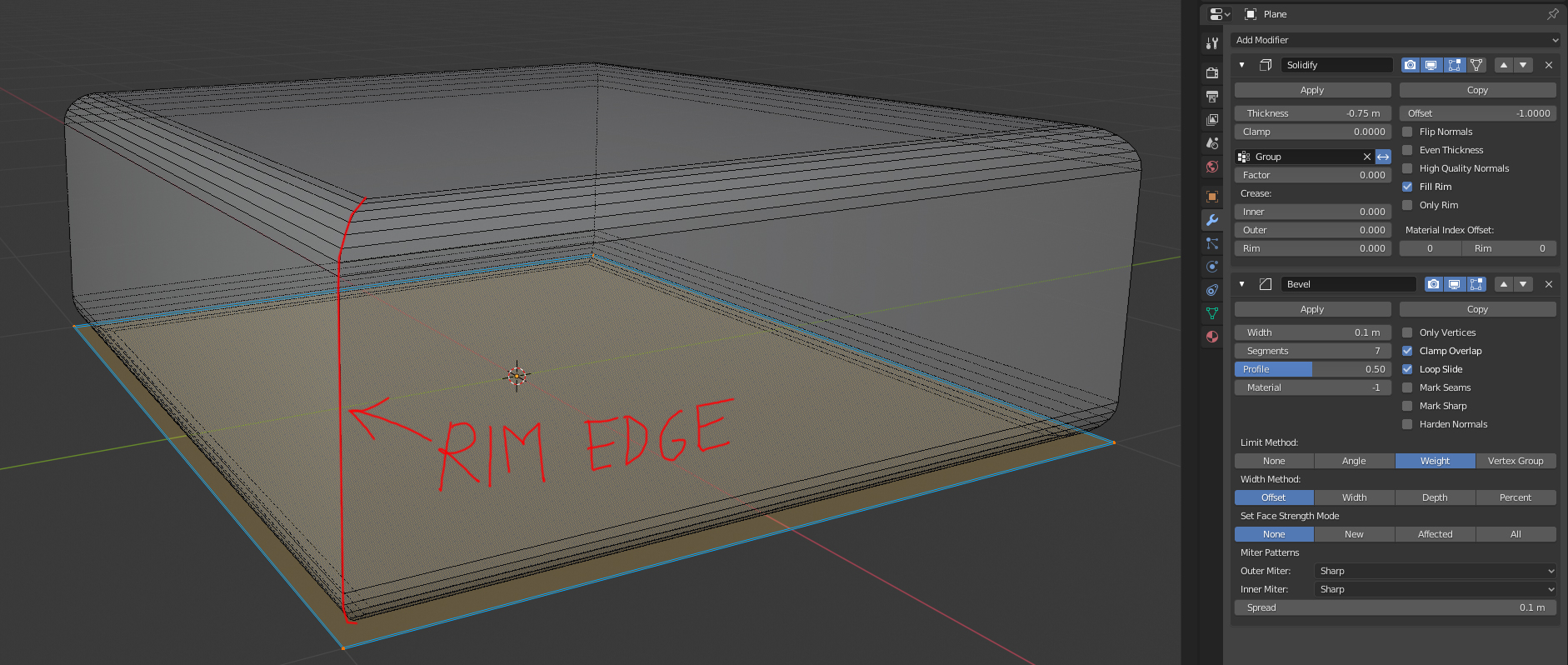
When you add a bevel modifier with weight as a limit method on top of a solidify modifier, the weight on the rim edges cannot be controlled. It would be amazing to add an option on the solidify modifier to set the weight on the resulting rim edges.
18 Comments
And how about option to add Loops
This proposal is done. Have a look at developer.blender.org/D7334
Why? you don't need it.
you could just add another Bevel modifier set to "Only vertices" and add vertex weights
I'd say this is pretty much a non-issue
edit: the Only vertices should be "before" the Solidify
Why? you don't need it.
you could just add another Bevel modifier set to "Only vertices" and add vertex weights
I'd say this is pretty much a non-issue
edit: the Only vertices should be "before" the Solidify
* @meutzitzu * Hi! Thanks for your suggestion! I gave it a try and while it works perfectly on a single quad, it fails in more complex situations, like two quads for example.
* @b4sh-3r * aaaah, see, but it fails because you bevel ALL vertices, and that's no good. you need to use set the bevel mode to WEIGHT and then select each vertex you want to bevel in edit mode and in thr top right menu, the one you get by pressing N, you should see "vertex bevel weight" and "edge bevel weight"
I always use these whenever I want to bevel something, as it not only makes the bevel selective, but you can also control the radius of each bevel independently, so you have true CAD-like integration. just set the bevel in the modifier to a nice, round number that's bigger than all the bevels you need, say 1cm, 10cm, 1M, 10M and so on, and then just use the vertex bevel weights to get an exact decimal fraction of that number
edit: conclusion I still think this is not needed
* @meutzitzu * I am not sure that you can see the situation clearly since what you just described would not solve my problem. Please check out the related forum post with more specific example on: blenderartists.org/t/bevel-modifier-on-top-of-solidify-modifier-doesnt-affect-the-rim-with-weight-limit-method/1178397
* @b4sh-3r * use the bevel modifier before the solidify
also, your rim edhe you showed in this post is perpendicular to the edhe you have a problem with ... they are not the same "type" of edge, so even if the thing described in this post would get done, this will still not solve your problem
edit : I'm serious about this : if you can prove to me that this would not be redundant I'll happily upvote the proposal. but If I an prove to you that it's not needed, I'll do so by solving your problem : win-win wither way.
so, how about you send the .blend along with some useful annotations so I can see if I can fix it ?
* @meutzitzu * I don't have to prove it because it's obvious, just follow the link I sent you in the previus msg to the belnderartist forum. Thanks for taking your time to try to solve this though!
* @b4sh-3r * that link does not lead to a file
upload a file describing the exact edges you want beveled, with annotations
* @meutzitzu * I uploaded the blend file. I hope you can solve this, it would be really amazing if it was an oversight on my part. I am noob to this software after all. :) Link to the blend file: b4sh-3r.nl/wp-content/uploads/solidify_issue.blend
* @b4sh-3r * drive.google.com/open
DONE, fixed
and it only took 6 minutes and 3 months at the same time
edit: there's 2 ways to do what you require : 1: if the thickness is more than the radius, use "LEFT", but if the thickness is smaller than the radius, use "RIGHT"
* @b4sh-3r * yo, can you give me feedback on your issue ? have I fixed your problem ?
* @meutzitzu * Thanks for your help! Yeah I wanted the bevel to have the same radius everywhere, so solution 2 is not a solution unfortuantely. Of course I could come up with these ideas myself. But thanks for your effort!
* @b4sh-3r * okay, then you should use option 1 (option 1 is more like a solid object with the edges rounded off, option 2 is more like a sheet that's being bent) they both have different uses
* @meutzitzu * Please understand that your solutions are not very difficult to come up with, and I tried them myself before I posted this suggestion on rightclickselect. What I want to achieve is impossible with the current solidify modifier.
* @b4sh-3r * you could try bringing in the big guns : vertex groups
This would be a nice addition when the modifiers move into node :)