
An option for turning on/off the delete confirmation popup
This is now done in Blender 2.8! If you use the delete key it deletes without confirmation. There is an option in the input settings to disable confirmation.
The problem
Every time you try to delete something Blender asks for a confirmation in a popup with no option for turning it off.
It's an operation that is used very often and in case of a mistake one can just undo it.
Deleting an object in Inkscape, deleting nodes in Natron, a selection/layer in Photoshop, After Effects, objects in Maya etc. are all without confirmation.
Nowadays even when you delete files in Gnome's file manager or in Windows 10 they go directly in the trash bin, no popups.
I guess it's something that comes form the times when Blender had no undo. And Blender users got used to it. But an option for turning it off would be nice.
Solution
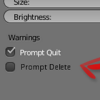
A checkbox in "Blender User Preferences":

Workaround
Create your own delete operator with python and assign a hotkey to it.
4 Comments
Bforartists just removed these. But it would be nice to toggle, for those who feel insecure about deleting.
How about double pressing X (X+X) to delete right away without fear or mistake or any confirmation?
@arantxa.hurtadoruiz: Now in Blender 2.8 looks like the confirmation is removed.
* @Oskar * It wasnt unfortunately continues the same for the keyframes :(