
Proportional Edit/Soft-selection should behave like Brush
Proportional Edit (Soft Selection) should be more like Brush painting.
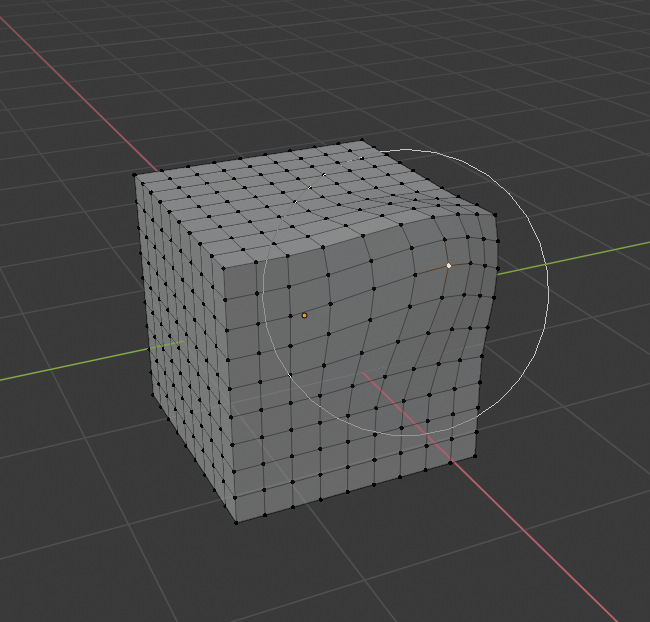
. Show circle cursor at all times when active. This both clarifies to the user they are in soft-selection mode AND shows current brush size. Easier to understand.
. Allow adjusting brush size without transforming . Currently you can only change brush size (with PGUP/DOWN or mousewheel) while already moving, which is highly impractical, frequently causing you to unintentionally move things while just trying to adjust the radius.
. Add a slider for selection brush Radius.
Since it's basically a brush, it would be more consistent if this soft-selection method behaved more like other Brush tools in Blender and will be less confusing to users if they can clearly see when they are in Proportional Edit mode and when they are not.
7 Comments
What I want is being able to activate or deactivate proportional editing while grabbing. Right now you have to escape the transform operation first to do so.
* @xorrito * Yeah! It's already possible to do this with snapping!
It would be also nice to see "temperature" gradient on affected vertices like in Maya
I agree the soft selection tools in blender need some love.
You can look at what Modo and maya are doing in that respect.
Falloffs in modo are great, and masking using your face selectin and then applying a falloff on top of that is super powerful.
Blender already has the grab brush but you have to switch to the sculpting workspace...not great when you are not really sculpting but working with lowpoly stuff. Sometimes you just want to move things organically in that workspace.
I don't like the circle being visible all the time., at least not unless it looks significantly different from the circle select. And of course, I want to see where my mouse actually is at all times, too.
Maya has a cool-looking feature that pre-visualizes soft select with a color ramp. It's pretty but it's not really useful.
It would be awesome to be able to edit the strength(or rather falloff) and radius of the selection "brush"- but how to handle conflict with existing modelling hotkeys? F is resize brush, but it's also fill polygon.
* @Josephbburg * The circle is necessary because you're not selecting precisely and the cursor should reflect that, plus otherwise you cannot see which mode you are in without checking the proportional edit button.
* @Christiaan Moleman * I think something needs to be there. The little circle isn't enough and I often confuse myself by making the circle so small it does nothing, and I turn it on and off again without realizing the problem. It needs to be better than pre-selection highlighting in Maya and sufficiently different from circle select and brushes to not be confusing.
Things are either selected or they aren't- that's something I need to see clearly at all times. That's why I don't like how it's done in Maya- there's nothing to convey what's actually selected. Everything that's being affected above a certain threshold is bright yellow. Expecially in Blender, where operators act on what's selected, and active selection is relevant to many of them, it's important to convey it clearly.
I'd like to see at least a different color circle for the selection radius (maybe a blue circle, since the icon is blue) and a dot/crosshair/arrow/circle/something in the center that shows where the cursor actually is. Maybe there could be an overlay on the mesh to show what it'll affect, too- but that's not what you're proposing so I'll only mention it. I would want to be able to control the radius in a similar way to sculpt/texture paint tools but the F key is already being used.
I am going to vote for the proposal, hopefully the suggestions I have can also be considered.