
Selection Mouse Pointers
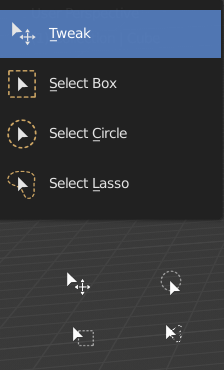
Unique mouse pointers for the different selection tools.
It's easy to inadvertently toggle to a different select tool by hitting the W key for select when already on the select tool. This gets annoying, especially when it toggles to the "tweak" mode, because then it moves things when you are trying to box select them
Having unique mouse pointers would help mitigate this problem, as well as adding general usability improvement
3 Comments
Personally not a fan of this as default behavior because a more complex mouse cursor obstructs my view more than I'd like.
Other options would be:
* @jon * Agreed. In Photoshop they use shift to cycle through the tools. Also the tweak tool lets you select multiple items so it should have some of the same options the other move tools have: new/extend/subtract from current selection