
Select Grouped / Collections
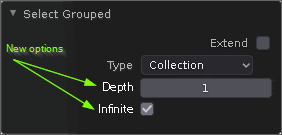
If we want to use collections as some kind of grouping - I think this is the reason for collections - we want to select the objects within. OK. In outliner you can right-click a collection and choose "Select objects". This automatically selects all objects within the collection including all sub collections and their objects. If in 3D-View we select any object and shift+G opens a menu where we select "Collection". This only selects the sibling objects within the collection. There you see a different behaviour which is not obvious! So my proposal: Give the "Select Grouped" tweaking box (see thumb) two more options:
- a depth parameter where you decide the selection depth of collections. Default would be 1
- and an all or infinite checkmark to override the depth and easily select all objects within all child collections.
2 Comments
Depth 0 should be infinity. This is consistent with other behaviour in Blender (for example sampling) and makes that button redundant and allows for an elegant default value.
* @alf * OK, but please let it say "infinite" not "0" because of readability