
Align view to nearest plane. Fast and efficient navigation method
This would be an alternative method to using the numpad keys for looking from front/side/etc views. I've seen a lot of forum posts about this and this actually already exists in an addon called sensei format. Basically, by pressing a key, the viewport rotates to the closest 90-degree view. This is just so much faster and better than having to reach for the numpad keys and looking which way you want to look at an object. Personally, I like having my blender pretty bare bones, so I don't use the addon. Instead, I recreated it as a script (you need to assign the operator to a key, ask in the comments if you need help) pastebin.com/Egi7xqRD
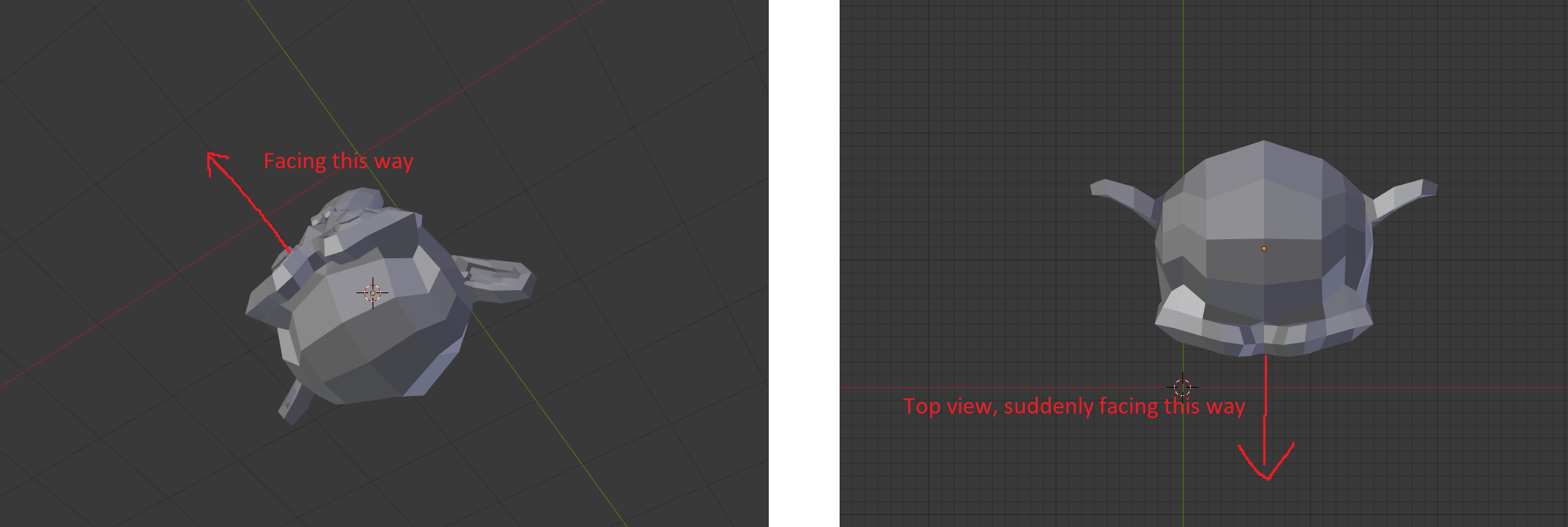
Now, I'm not here to advertise my script, because there's a lot that could be improved on and obviously it would be awesome to have it in blender by default. When you're viewing an asset from top and align the view, it snaps the roll of the camera to be 0 which makes you have to think for a while about how the asset is now rotated. Even worse, if you have a cube for example, there's no way to tell which way you are facing now. So the roll should also snap to the closest 90 degree angle. Right now you lose the sense of direction.
As for the keybinding, I have this set to shift right mouse button and I think it works great. By default in curve edit mode this already is used to draw curves by hand, but I just set that to shift left mouse button.
3 Comments
I wonder if another way to approach this would be a "Snap to View" option for rotating the viewport. For instance if you are using MMB to rotate the view and you get close to Front View it snaps into place?
I'm not sure if I'm understanding your proposal exactly, but it sound like a feature that 2.8 actually has added already. I don't remember the hotkeys to activate it exactly but I think if you hold shift while middle-click-dragging, it will rotate the view to the nearest 90° view based on your mouse drag direction.
[edit: nevermind, I see that the key to your proposal is that the ortho view is aligned differently. in 2.8 a top ortho view always points +y toward the top of the screen]
@eldee.smith: Interesting. The way the middle click drag system works seems counter intuitive though. If I'm nearly facing bottom, to get the top ortho view, I have to shift drag up and down, because the shift drag adds 90 degrees to the closest rotation to the direction you're dragging. How is this helpful? Why can't I just regularly rotate my view 90 degrees and then press a key to snap to an orthographic view?
But yeah. The roll thing is my main takeaway I guess