
EEVEE OpenGL equivalent rendering
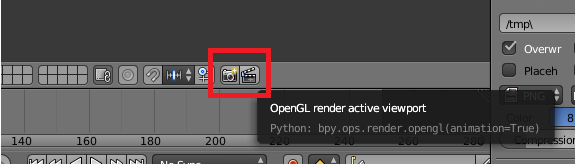
Blender 2.7 has a button where you can render what your viewport sees , simply and clearly
in 2.8 , there is no such thing its kinda annoying , rendering with OPENGL renderer ,just , changes the render entirely
if i go in "render mode" and just press play , in Eevee render ,it does work fantasticly ,not oil smooth on a 1070 but acceptable to preview an animation!
but when i try to render the same 2219 frames with the Render animation button ,it takes less than 2 hours
Eevee should have a Viewport Rendering Equivalent , something that just takes in account that
So we aren't oblidged to use OBS or Camtasia to record our screen insthead of pressing the Render Button that takes too long
4 Comments
Why in the menu is written "open gl" while the rendering is clearly EEVEE (opengl + effects) when this engine is activated? Would not it be more consistent to call it "Viewport Render"?
@valentinwn: Exactly one of my points too , i've been told to use that but since its called OpenGl it confuses a ton
Maybe it would be better to have a reminder of the display settings such as: "Overlays" and "Shading" corresponding to the custom options of the rendering and not display options in the viewport. Below the render engine selector, when in EEVEE mode. Sorry for the translation...