
Prevent Remesh Modifier from Crashing Blender (by setting an adaptive default)
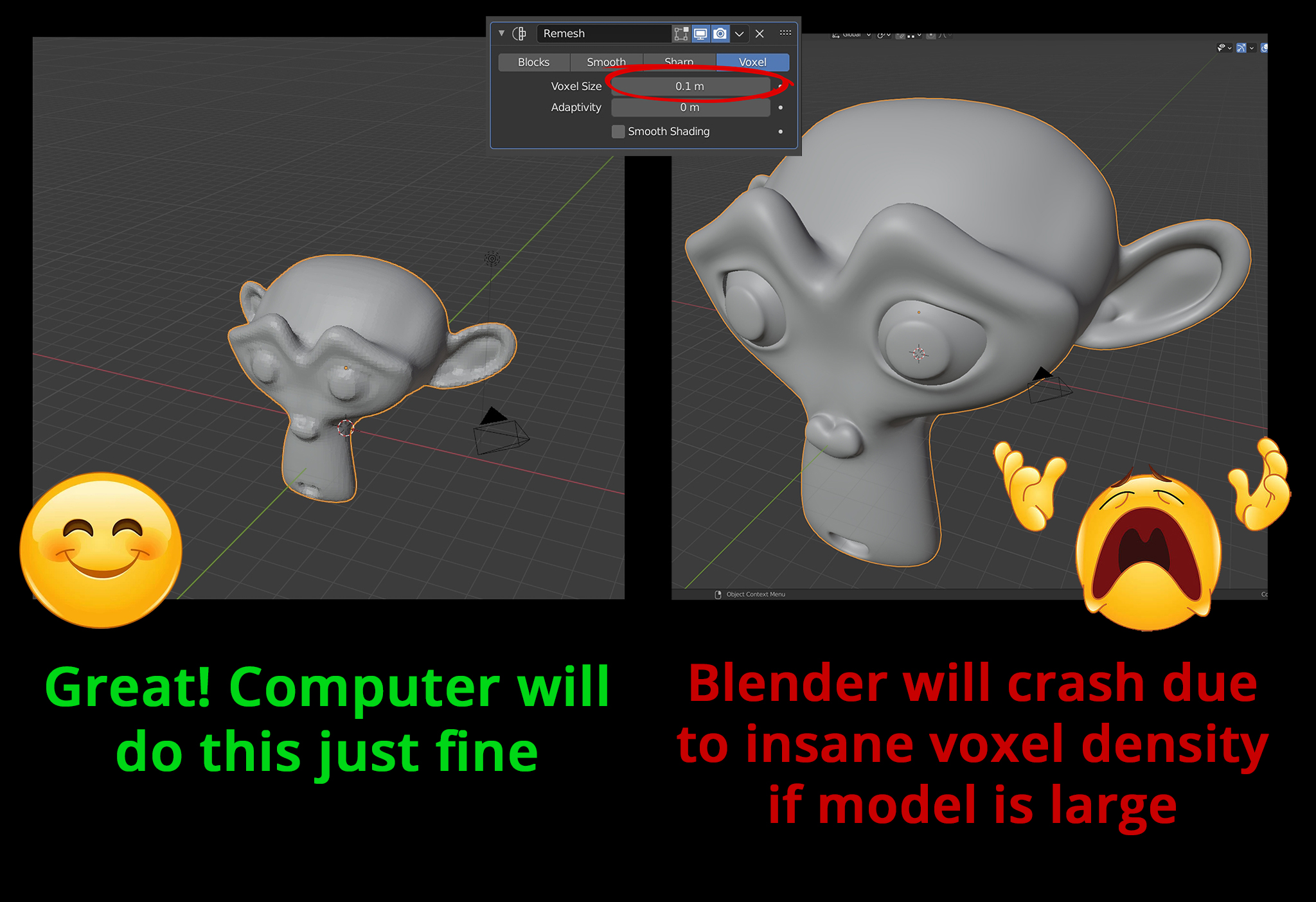
Whenever a new Remesh modifier is created it is set to Voxel by default at a Voxel Size of 0.1m. This is fine with smaller models, but will crash Blender on larger models. Numerous times I have simply hit "remesh" and found myself sitting for 10 minutes as my session burns to death.
I propose that the Voxel Size default is either reduced to a ludicrously low size, or changed to be adaptive to the scene. Optimally it would set an easy-to-calculate size depending on the objects scale.
So for example if a small model utilizes 100 voxels to calculate, ensure that the Voxel Size is set to use 100 voxels regardless of the model's scale. After the modifier is activated, the user may then set their preferred size. This optimal default Voxel Size per model could be determined by referencing their bounding box dimensions, potentially.
12 Comments
And it should limit the dragging input range so that you won't accidentally drag to 0.01 and freeze blender, waiting for it to remesh on every tiny movement along the slider.
Since it does'nt seem like the perfect solution exist to get around this problem, which is what I was looking for while ending up on this post. I tought I'd share my "not perfect" one that I hope someday I can stop using if it's one day possible to change the default voxel size of the remesh modifier in user preferences. What I do is I keep just a basic cube somewhere in the scene with a remesh modifier on it. I set the voxel size of this one to high value like 5m. Then when I want to put a remesh modifier to a mesh I know it's gonna crash with the default 0.1m value, I select both object (shift select the basic cube after the other one) and use the "copy to selected" option (dropdown menu on the modifier) to transfer it. That way, it prevents blender from crashing since it is copying it with the high value of 5m.
Thank youu!!!
Just signed up to the forum to say thanks! That was driving me crazy :)
For the love of god this is a terrible terrible thing to have to deal with. If it weren't for auto save this would've ruined me more than half a dozen times
Yeah, sitting down to finally learn blender and crashing it within minutes by dragging a slider too far to the left feels bad man. If this crashes on a simple shape on a PC with 32GB of memory, there's no way the lower limit can be reasonable...
has this issue been removed from newer versions of blender? its ridiculious makes me want to try different software
Still around as far as I'm aware. It's not great and does make Blender appear a bit unforgiving.
I think this should be fixed sooner. I'm teaching Blender and this make it looks bad.
This sucks.
I think adding a "voxel amount" option should be the solution, like the current mesh to volume modifier
Exposing this setting upfront could be a nice way to fix it. At the very least a reasonable default setting for this could be used in the background to produce a safer Voxel Size for any newly created Remesh modifier.