
Blender Outline rendering
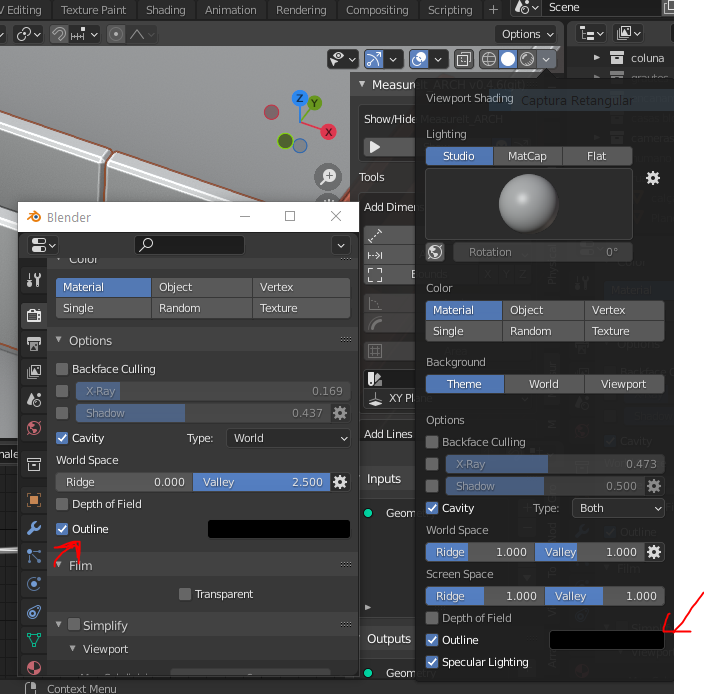
Why can't blender render outlines like in the viewport. When you select an object, an orange outline is drawn. Realtime. Something like that, with width option could be implemented to final render in eevee and cycles. Freestyle isn't realtime and lineart is still very slowwww and processing consuming. We have an outline button option in viewport but its has a fixed width and doesn't show up in the final render. In blender 2.79 blender had a edge rendering feature docs.blender.org/manual/en/2.79/render/blender_render/post_processing/edges.html
And the old blender render had a material option to render in wireframe. Very strait foward. docs.blender.org/manual/en/2.79/render/blender_render/materials/special_effects/wire.html
6 Comments
"realtime" yes and no. Try to do animation with the outline overlay enabled, and say goodbye to realtime. Actually, any heavy object/scene + outline is a performance kill.
* @-L0Lock- * Yeah, but sure more realtime than line art or freestyle, cause in direct comparison, I can see the orange outline in my heavy scene updating realtime without crashing, but if I only create a lineart object my pc starts lagging and when I select the object I want to outline, it crashes. Same PC, and the selection outline overlay is light-years ahead in performance
Lineart can render lines as outline selection. This feature can be test in Blender 2.93Beta - builder.blender.org/download/
* @NiCapp * Yea, I know, but as I said to @-L0Lock-, it's still very slow, at least on my computer. But the selection outline isnt. It uses another process to achieve the same result. It's already there. Why reinvent the wheel?
Outlines can be rendered in workbench renderer. It would be really nice if cycles also had this option.
* @zorro.weaver * Yeah I know, in fact I'm using the workbench renderer in the print I took, but you can't control the line width