
mouse button preferences: include a "Navigate With" setting, and add MMB to list of configurable buttons
By default, Blender's viewport navigation, and the navigation of 2D views, is set to the middle mouse button (MMB). I prefer to reassign this to the right mouse button (RMB), for ergonomic reasons:
- The MMB on many mice can be hard to push, while the RMB is easier. Considering how much time a user spends navigating around the various 3D and 2D views, this can take a big toll if using the MMB.
- I tend to use my index finger for both LMB and MMB, which puts a lot of strain on it. If I reassign navigation to the RMB, I can use my middle finger instead, which offloads a lot of the stress that the index finger would normally take on.
I've accomplished reassigning navigation to the RMB myself by fiddling with hotkey bindings in Python, but this was a huge and tangled undertaking: Blender has many other functions assigned to RMB by default, and I had to spend lots of time hunting them down and reassigning them to the MMB, or to the RMB with modifier keys tacked on.
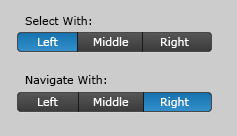
I propose the Preferences window > Input tab area be modified to include a "Navigate With" setting, right below the "Select With" setting. This new area would let the user choose a mouse button for 3D and 2D navigation, and Blender would handle the automatic reassignment of the other buttons' functions.
2 Comments
I know this is old, but I would love to have the ability to do this!
This would be quite useful for people looking for seamless compatibility with other software packages