
Principled Shader: Rename "Specular" socket to "Specular Level" to prevent confusion
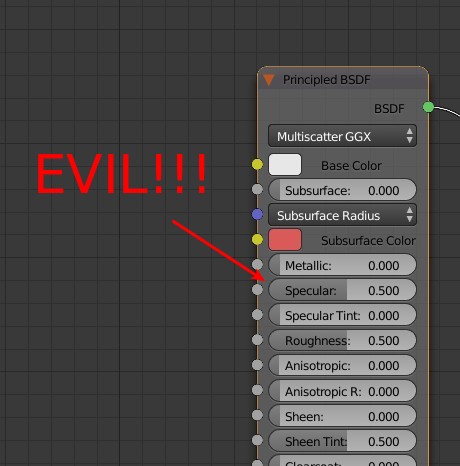
The specular socket of the Principled Shader is arguably among the least understood and most misused parts of the Principled Shader. To prevent further confusion, I propose renaming it to "Specular Level", which is the term used by Allegorithmic in their Substance tools (see here ).
To understand what the specular socket really does, one needs to know the basics of PBR, for which I recommend reading the following introductions:
For those not in the know, here's the gist of it:
- The light reflected off a material is a combination of diffuse and specular reflection. Metals have no diffuse reflection (= black diffuse color). All their color is in the specular reflection. For non-metals, it's almost the other way around: They have very little, uncolored specular reflection (2-5%), the rest is diffuse reflection.
- In the spec/gloss PBR workflow, the diffuse and specular reflection each get their own map. Blender's Principled Shader on the other hand follows the metalness workflow, which basically means that diffuse and specular reflection are combined into a single map, known as "base color" or "albedo", and the metalness map is used as a mask to extract diffuse and specular reflection.
- This "2 maps in 1 map" approach works because almost all the color information is either in the diffuse reflection (in the case of non-metals) or in the specular reflection (in the case of metals). So you can have one map that represents both, plus a metalness map that tells the renderer for any given pixel whether that pixel's color represents a diffuse or a specular color.
- Now, recall that non-metals aren't just all diffuse reflection, they also have a small amount of specular reflection. But this information is neither in the base color map nor in the metalness map. So what if you want to adjust it? That's what the specular socket of the Principled Shader is for.
- To be precise, moving the value of the specular socket in the [0, 1] range will give you 0-8% specular reflection, which is the typical range for most non-metals. The default value of 0.5 will give you 4% specular reflection.
- There's also a formula in the Blender docs that tells you how to calculate the correct value for the specular socket from a known IOR value. An example of how it's done is here .
Now that we've cleared up what the specular socket does, here's how you should NOT use it:
- No, you can NOT plug a specular map from older, non-PBR workflows into this socket. These are most likely totally different things.
- No, you can NOT just plug a specular map from the spec/gloss PBR workflow into this socket. (Recall that the range [0, 1] of the specular socket corresponds to 0-8% of "actual" specular reflection!)
I've seen the two mistakes above in two Blender addons so far, and I should add that I didn't understand the specular socket myself before I investigated it a few days ago. This leads me to believe that confusion about the specular socket is actually quite common.
It's rather obvious that the name "specular" is at the root of the confusion, which is why I propose renaming it to "Specular Level".
I also propose adding a new hint box under "Specular" (or "Specular Level") on the Principled Shader page in the Blender docs. Here's some text for the hint box:
Do not confuse this value with specular values from non-PBR workflows; these are most likely completely different things.
Furthermore, do not plug specular maps (also known as reflection maps) from the spec/gloss PBR workflow directly into this socket. This socket's value only applies to dielectrics, does not support color data, and has a different range.
7 Comments
Evil!?!?!?!? No. But not the best description of what's going on. Nor is it a good enough warning of how easily you can veer outside of physically correct shading.
@dpdpforlife: I only meant that the naming of the slider is evil, not the slider itself :-)
Maybe the specular amount should be drive by the fresnel, but having a 0 - 1 slider for this make absolutely no sense to me
@Shimoon: In the principled shader, "Specularity" is driven by Fresnel, and is set by the Roughness slider. Specularity slider here is a non physically correct extra control to Add or reduce the amount of glossiness.
@visprotis: Yes. It's a little bit of non-phisically-correctness (I'm ok with this made up adjective) in an otherwise pretty accurate shader. That's not to say that the control shouldn't be there, it should just be made more clear that adjusting the slider may make artistic sense, but it is at the expense of physical accuracy.
@visprotis: This is basically what I was saying, just not well formulated :p This "specular" slider, how it is made and how it is used right now make no sense compare to how it should be really used and understand. For now its just more confusing than anything else !
I have to admit, I have been confused by this system. Unreal Engine either makes you use Specular like traditional shaders like Phong OR metallness + roughness like normal PBR, but one turns the other off. I was immediately confused to notice that this drove both the metallicity and roughness.