
Sculpt Mode: Falloff has no toggle shortcut, or option to quick favorite or assign a hotkey
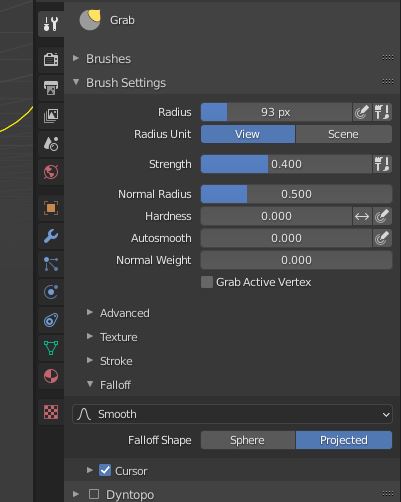
Hi everyone. I’ve been in sculpt mode a lot recently and found a lot of value switching between the Falloff’s "Sphere" and "Projected" modes. But I noticed neither have a hotkey option to toggle between the two.
While in sculpt mode, you’ll see the option in the header under Falloff as well under the Properties menu >> Active Tool >> Brush Settings >> Falloff then the two options I like to toggle between are “Sphere” and “Projected” but neither offer the ability to assign a hotkey, add to quick favorites, or toggle quickly. This is a suggestion for speedy comfort and ease of use :)
3 Comments
Edit -> Preferences -> 3D View -> Sculpt -> Sculpt(Global) -> +Add New -> where it says "none": wm.context_menu_enum -> where it says "Context Attributes": tool_settings.sculpt.brush.curve_preset.
Now just put a new shortcut not yet used, I put "U"
Have a nice day
This is to change the curves. The topic was about toggling between "Sphere" and "Projected". Would that be possible?
I tried my hand, but didn't manage
Replace tool_settings.sculpt.brush.curve_preset with tool_settings.sculpt.brush.falloff_shape