
2.8+ Material Node Related Proposal: Node Injection + Minor Improvements
Inject Common Nodes: Faster Faster Faster!
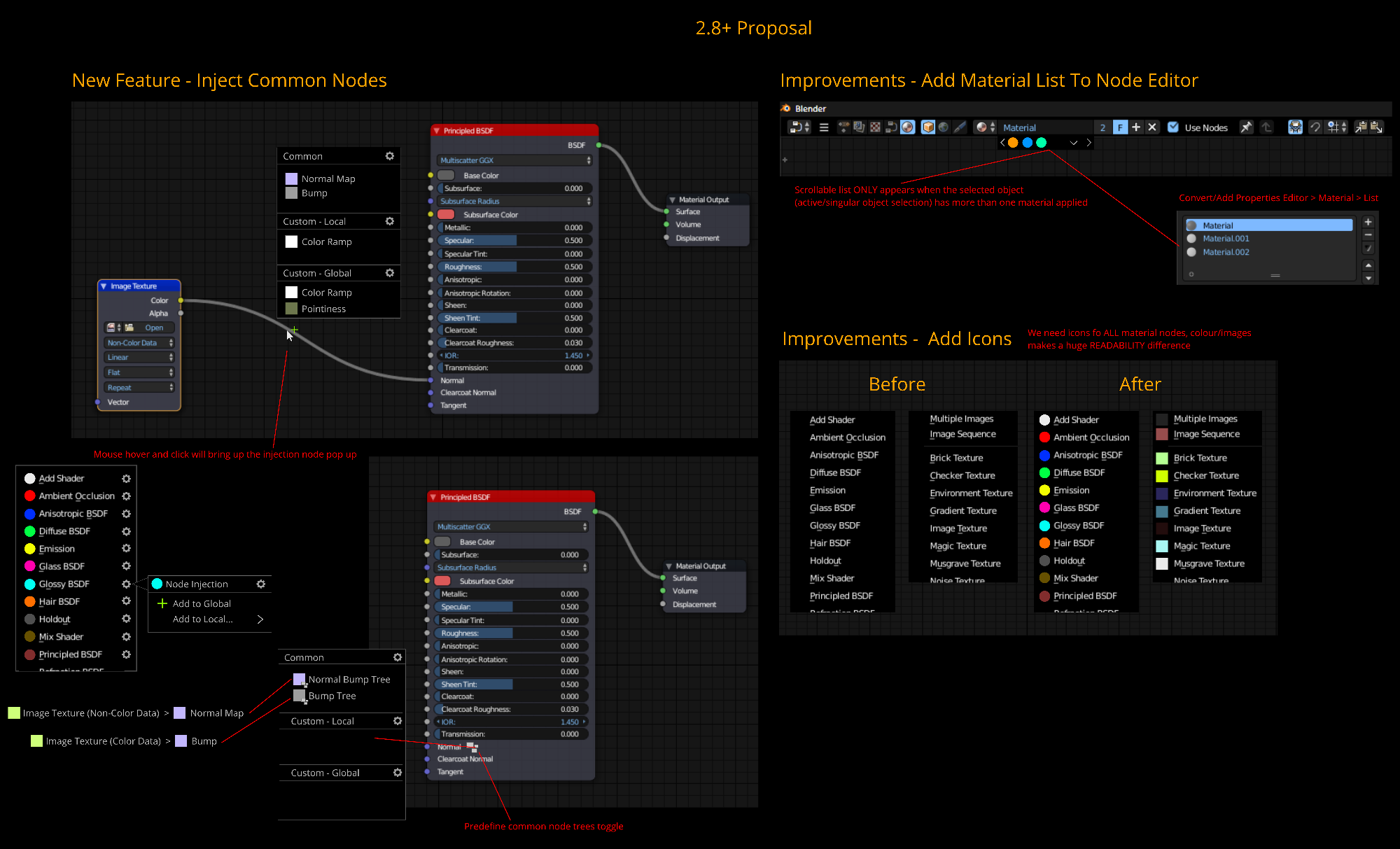
- Upon mouse hover within the median area of the node curve, Blender will recognize its a 'Image Texture' Node connected to a 'Normal' input.
- This is a frequently made node used in this case hence in the example below in the diagram under 'Common' a 'Normal Map' & 'Bump' Nodes are listed, since these nodes are most likely to be placed in this scenario.
- 'Custom - Local' refers to user chosen nodes that will only appear in between Image Texture' > 'Normal' input.
- 'Custom - Global' refers to user chosen nodes that will appear in between any connection.
- In terms of pop up interaction it could possibly be a simple left click once on the plus icon once it appears? What do you guys think? If this is the case, the hot spot must be set at a reasonable level.
- A problem that can occur is what happens if the nodes are too close together? Does this mean the function will disable or only work when there is a reasonable amount of curve length is available.
Improvements: Add Icons
- Adding icons next to the nodes in the Shift A menu will greatly provide clearer distinction. It will be easier to identify each node. See mock up below.
Improvements: Material List To Node Editor
- If you have assign more than one material to a SINGLE mesh and you want to edit the materials in the 'Node Editor' but do not want to change the assign material to a particular selection, you have go to the 'Properties Editor > Material' and in the list, cycle through there to prevent miss assigning the wrong material when working with the 'Node Editor'.
- Adding a horizontal scroll and drop down menu arrow (list for large amount of materials) to keep workflow within the node editor. See diagram below.
4 Comments
an easy one: if you click on an empty input, bring up filteres add node menu with options relevant to the clicked input (gray - math inputs etc, blue vector stuff and so on)
@: Good idea. Or also if you drag out an empty slot to an empty space on the screen.
Don't use a dark theme for a proposal!
Another one: