
In "Annotate line" tool, the "Start" and "End" drop-down menus should show the actual shapes, not description
The "Annotate line" tool allows us to select different shapes as the "start" and "end". This is fantastic.
However, there is a hitch: We have to read the description of all shapes, and select the shape!
Only 4 shapes are included at present (None, Open Arrow, Segment, Square), but soon a lot more will be added (according to Pablo). When the list becomes large, it would be very tedious to read through the entire list and pick a shape.
As more complex shapes are added, it would not be easy to even describe them properly.
It would be far easier if the drop-down lists show the actual shape as icons.
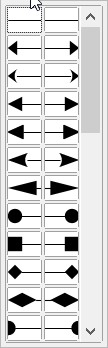
LibreOffice offers 30+ shapes using only icons (no description at all), and it is extremely efficient to pick the EXACT shape we want.
Just to illustrate the point, LibreOffice has 10+ varieties of "triangular arrowheads". It would be impossible to just describe each shape. The user must be able to see them before he can make a choice!
3 Comments
It has already been partially implemented : developer.blender.org/rB668dd146f6475f97339aff3d80d019af4d816ee1
medium.com/supahands-techblog/what-is-image-annotation-caf4107601b7
* @othoap * Sorry, I could not see how imagge annotation is useful in this context. Could you please elaborate?
Thanks in advance!