
Parralax Occlusion Mapping for blender 2.81-2.82 ?
Why this is a good idea:
-
there's no displacement like feature through node for eevee.
-
actual geometry displacement is really really heavy for a computer to handle (and i don't even talk about adaptive micro displacement).
bringing a technique like parralax occlusion mapping for blender could really improve the speed of both the render and the artist viewport/iterations. No more millions of polygons to handle driving us crazy, just performance friendly heights maps that make the realistic geometric detail shine through our scenes.
-
blender is the best game engine friendly software, lets even go further and bringing the whole game industry on our side with this extremely important feature for game engines. game artist's could have a true representation of what the parralax texture will look like on their game's in blender witouth the need to export it to the engine at all.
-
it's so cool
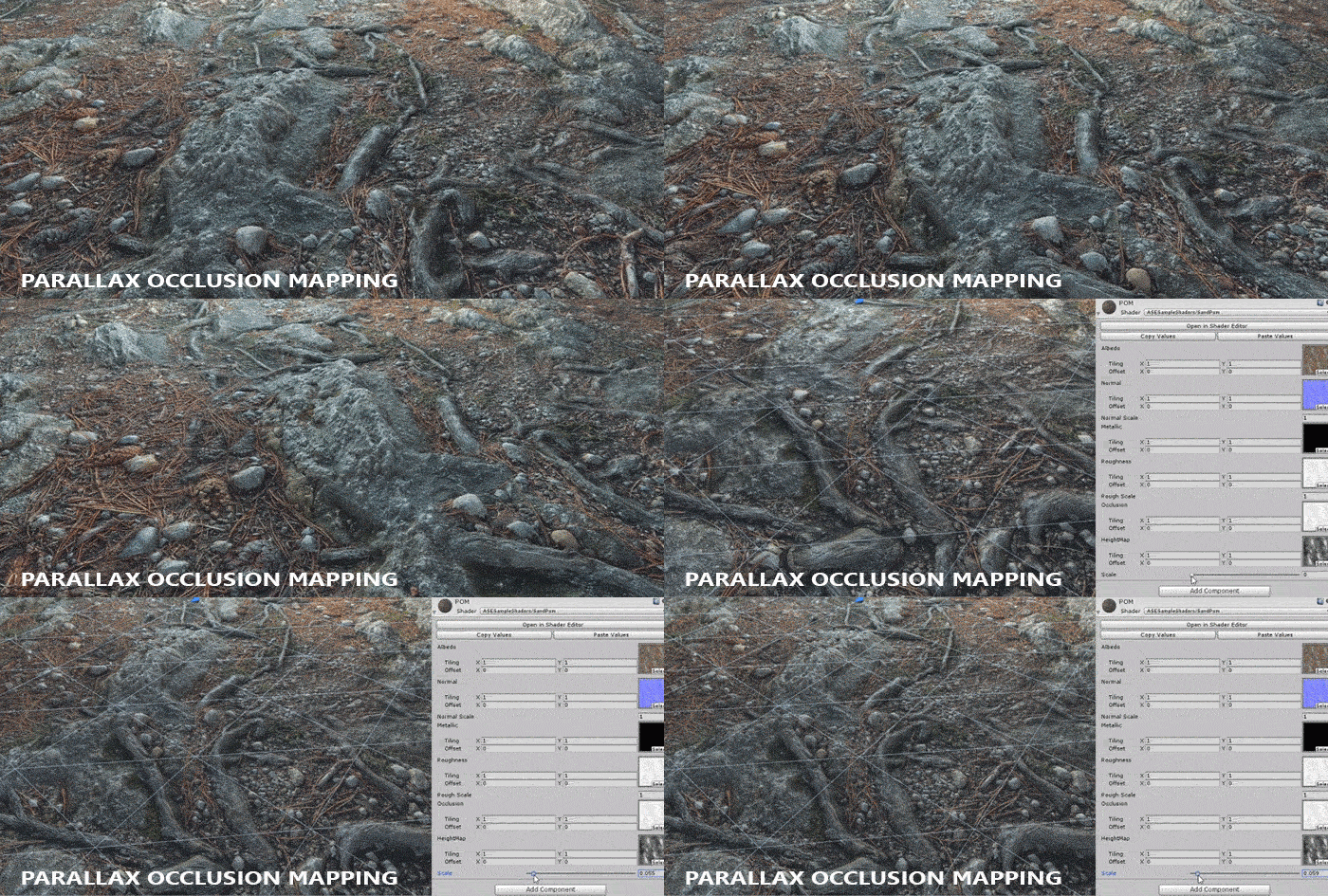
-
some advance node users can already do that with the node system, and i heard that it's relatively easy to do.
after that why not going for adaptive tesselation? this could be the perfect combo
blender dev thread:
devtalk.blender.org/t/parralax-occlusion-for-blender-2-8/3641
its in dev? what ? not shure about that
devtalk.blender.org/t/parralax-occlusion-mapping-in-development/6099
38 Comments
woaw we need this to eevee
Honestly the effect is so relatively cheap on the graphics processing compared adding a hundred thousand verts, I'm still surprised they haven't added it yet- and look how hot this post still is 5 months later! Blender 2.8 users such as myself are clearly hungry for something like this.
They dumped the development and there seems no interest and no reply other than, "the development stopped".
On the contrary- it is now part of the EEVEE rewrite! 🥳 developer.blender.org/T93220
do you know i there is a current build of this?
This did not age well
plus adaptive tessellation
The improved version is called Parrallax Occlusion Mapping (POM), you should rename your post and suggestion.
You should add this options in the suggestion:
PDO (Pixel Depth Offset): 0 by default, if 1 it improves the intersections
Height: 0 to infinite
Max step: 0 to 32
Min step: 0 to 32
Offset: 0 to 1 (by default 1 meaning that everything is pushed downward, at 0 it's pushed upward and at 0.5 it uses both directions).
Discard edges: yes or no
More informations: youtu.be/4gBAOB7b5Mg
Also you should add that this technique is great for oceans because it uses an huge flat geometry.
Parallax would be a dream come true in EEVEE. Right now I got a node from someone that can do the effect but in Cycles only. Substance Designer has it and it's my only choice right now because I am on Mac and tessellation is not yet available for OSX. Unbelievable but true. Neither Marmoset has it available on Mac. I guess tesselation would be too expensive to have in a complex scene but I think it would be amazing to be able to have both if possible. One for making materials or simple scenes but very realistic maybe and then the fake parallax which is good enough for more complex scenes.
@luisburdallo: here devtalk.blender.org/t/parralax-occlusion-for-blender-2-8/3641 i think youre quite enthusiastic about this subject , i transfer this post directly to the official dev forum , you may join to the discussion ? i put your useful link too ! thanks a lot
So Cool
Parallax already works in Eevee FYI. You just need the right nodes for it. But I agree it needs to be simpler and probably the current method doesn't look too satisfying to me. Not 100% sure yet if this looks satisfyin to me as the Unreal looks like displacement.
@luisburdallo: where to find this node ?
@dodododorian: Here blenderartists.org/uploads/default/original/4X/7/2/7/727bf3d649254219cf02b4b6e23902ef26062086.blend The problem I find is that this method makes the textures to fluctuate and not very solid looking in comparison to Unreal as I said above. There is also another guy who posted a parallax method that works only in 2.79 Blender Engine and it looks much more solid to me. blenderartists.org/t/parallax-mapping-with-silhouette-clipping-shader-node/561285 even tho the Unreal one just looks... Unreal.
* @luisburdallo * yeah but it doesn't have shadows like this youtube.com/watch
* @zslit * I think you are comparing 2 different light sources.
would be really sweet to have this kind of settings added in eevee. Workflow within Blender would be more simple with that !
OMG! Finally in development! I hope for PDO with selfshading. Will be great for microsculpting and prototyping
* @ Vyacheslav * in devloppement ? what ?
* @dorianborremans * status
I vote Option 3. Just because that's needed for decalMachine I think. And I really want it to work in Eevee.
Yes, please. It would be fantastic to have parallax in Eevee.
Hi dddd,
This RCS should be change to "in development".
See this dev talk thread :
devtalk.blender.org/t/parallax-occlusion-mapping/15774/58
Thx
Parallax occlusion mapping works in cycles and eevee using nodes... blendermarket.com/products/parallax-node-pack
It would be awesome for this to at least make it as a stopgap for 'True' displacement option in Cycles.
It would be ideal if it were a node compatible with both, but that's taking it to another level.
Fundamental paper developer.amd.com/wordpress/media/2012/10/Tatarchuk-ParallaxOcclusionMapping-Sketch-print.pdf
another great instruction for parallax in GLSL
sunandblackcat.com/tipFullView.php
who can put the code into eevee ? : -)
a good article about parallax here: learnopengl.com/Advanced-Lighting/Parallax-Mapping
@em.rumpf: Very interesting. Here you have a parallax dedicated video from Unreal. Their parallax quality is just amazing. youtu.be/4gBAOB7b5Mg
@luisburdallo: we need an official parralax node , and switching to parralax in material propreties setting in displacement method
@dodododorian: I agree.
Parallax Occlusion Mapping would be awesome for Cycles aswell!
test
hopefully this comes to EEVEE Next as a displacement option someday
Well, this is exciting: youtu.be/73yMW_Ax0MQ Cool Vid Francis.
decal machine work something similar, they can use those codes too.
blender.community/c/graphicall/sqbbbc/ — windows build for this feature
Is it ready? Is it??