
Film Exposure improvements
Currently, Exposure can be controlled in two ways:
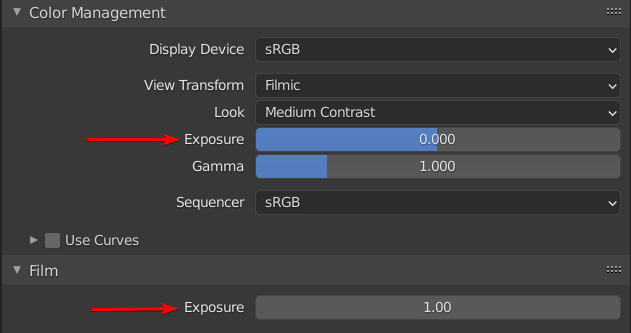
- Inside the Render > Color Management panel, as a display transform that is not saved in the raw EXR image.
- Inside the Render > Film panel, which is burnt into the EXR image.
It is good to have the choice to burn the exposure into the saved EXR or not. However, the two settings are not consistent.
- The Color Management Exposure is a correct Exposure scale as in real cameras: a base-2 logarithmic scale. Each step doubles (or halves) the brightness of the image. en.wikipedia.org/wiki/Exposure_value
- The Film Exposure however is a simple brightness multiplier, clamped between 0 and 10. The name Exposure is misleading, and the max value of 10 is extremely low to cover the possible range of exposure of a physically-based scene.
The suggestion would be to replace the Film Exposure to a base-2 logarithmic scale to make it identical to the Color Management Exposure. To avoid breaking old scenes, the old Exposure setting could still be available on the side, but labeled Brightness, or Luminance multiplier. A short-term improvement could be to remove the max value of 10, to at least be able to convert Exposure values properly.
7 Comments
It's mostly working like it's intended. You might have noticed, that when changing the exposure under film, it has to re-render, which doesn't happen if you change the exposure under color management. This is why. Short excerpt from the docs: docs.blender.org/manual/en/latest/render/cycles/render_settings/film.html
Exposure
This can be used to change the brightness of an image. Different than the Exposure option found in the Color management panel, this exposure option works on the data while the Color management exposure is on the view.
You have to ask yourself if you work in Scene-referred data or display referred data. Color Management only touches the display-referred data and leaves the underlying data intact! This is what you want, if you want a non-clipping exr in the end with linear color-space. "Burning" the color-management wouldn't make sense if you want to save to an exr, because it's inherently different data. (already crushed to fir your monitors 8bit sRGB range) Same goes for "looks" or LUTs. dont use them, only for preview, plz.
And for sake of sanity, color-grade in an external software. Blender has a lot of problems, when it comes to color. This video might be interesting to anyone, how still uses the compositor to color-grade. youtube.com/watch (Blender conference - Color Management for Humans)
* @fabi.schindler * It's mostly working like it's intended, except it's not exposure, and it's crippled to the points it is not usable :) In my case, a customer wants to develop his EXR in Corona Image Editor because it has nice color correction, highlight compression, glare tools... He'd like to be able to export EXRs with the correct Blender exposure so he doesn't have to redo it in the editor again. I could easily give him that if Film Exposure was working as intended. For now I provided a compositing node to do the Exposure math but it's a bit cumbersome.
And I'm not for burning the entire Color Management, just Exposure or curves. Burning the view LUTs in 32bits EXRs make no sense.
100% approved, EXR files not incorporating the color management options is a real issue!
I'd like better: remove the film-thing, use only color management that's already better in any way, and put a checkbox in the file output settings to burn in the color management.
Right now you can burn color management in only when manually saving a render from the image editor by checking the "save as render" option in the file explorer. That's annoying, time-consuming and impossible to do when rendering sequences.
* @-L0Lock- * Even with this operation, EXR files are still without the color management burnt in, so it's even worse, and we absolutely need this to be fixed!
that's what I'm talking about
* @-L0Lock- * I think the best would be to have a Color Management node in the Compositor, that you can add to burn it into the saved file. I find the Save as Render option quite hidden and confusing?