
custom presets path
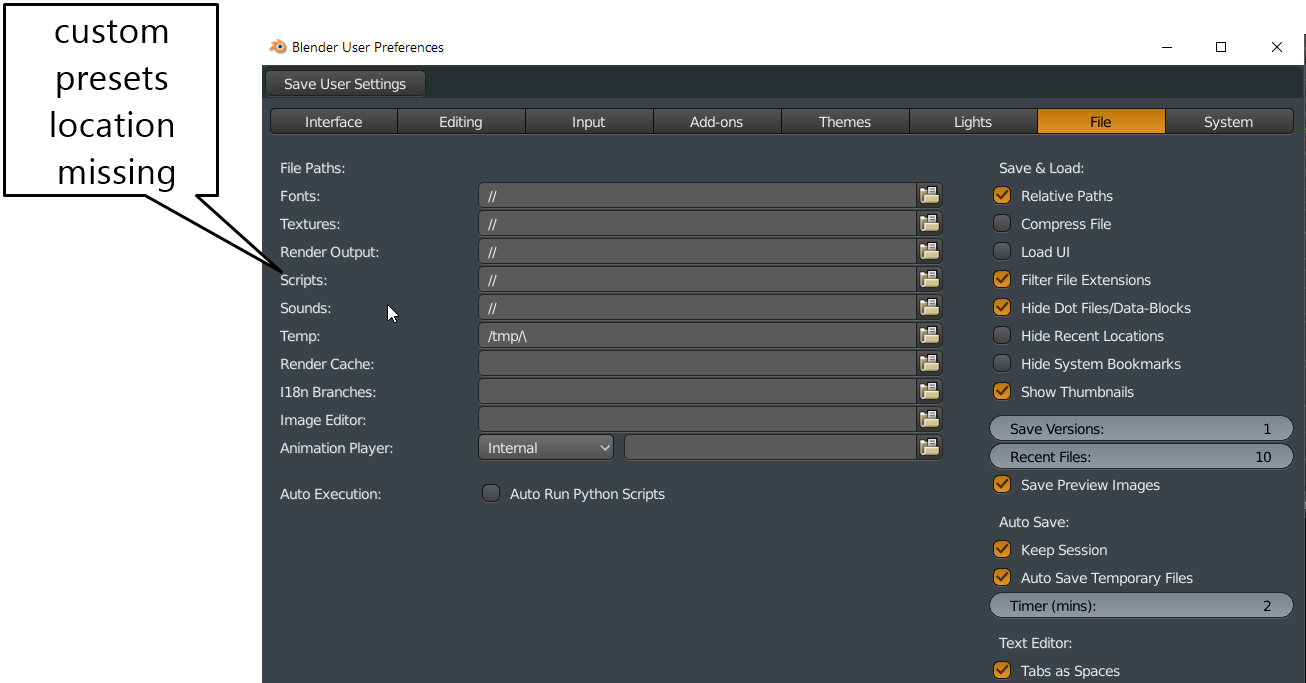
It would be useful to have a custom presets setting, when working in a team its good to be able to share presets that are made in blender. At the moment everybody would need to copy his presets from the user folder and then synchronizing all the files would be quite the task.
9 Comments
I think you can already do this though it's far from obvious.
Have you tried making a folder somewhere (let's call it your_custom_folder), then inside that folder a presets folder. Then set the scripts folder path to the parent folder your_custom_folder. Structure should look like this:
I use this to develop addons and have them auto-load. Never tried it with presets though but it should work.
@alansartlog:
it doesnt work due to some internal structure of blender that will force it to the default location and will create a scripts folder in the user prefs which then in turn messes up the whole folder location thing. we wrote a custom operator that will force the location to a specified one but a proper solution would be preferred that is available in the properties panel.
@grauer.d: I just tried it with my keyboard shortcuts and it works fine? It doesn't auto switch to them, but it automatically loads them into the list of presets (duplicated as expected).
Not sure what you're describing is going wrong. It resets the path?
@alansartlog: in my experience as soon as the local scripts path exists and that can be created by a user not being super careful all the presets get written to the local path for some reason unless something changed here with 2.8. we are fighting with this isse for years at work since we try to keep our presets synced on a centralized server and i have to do maintenance rounds every now and then to remove local scripts paths. so separating the presets from the scripts path would be great for us^^ i will probably need to do some testing again to see the current behavior but im also willing to pay a developer to change this if needed (yes im that desperate for this change^^)
@grauer.d: I'm not sure what you mean by the local path?
There's four types of paths: the per user path (e.g. in AppData), let's call it userprefs, then the custom path, which can be anywhere, then there's technically also a per install path (local to the blender install), and finally, on some but not all OSs a "System" path (see here ).
Not sure how the last two work, but for the first two, you put stuff in the custom path and it should load in Blender. You add a new preset from Blender and it should NOT go to the custom path, it should go to the userprefs.
Is that what you mean? That presets don't get written to the custom path but to the userprefs?
What's your use case? Do you want all the presets everyone creates to be completely shared? (e.g. someone creates a preset on one computer, it gets synced to everyone else's)
@alansartlog:
that is exactly what i mean, the presets get written to the userprefs folder "sometimes".
since we work in a big team i want the presets to be shared across the whole team, if that is not working people can be using some presets that do something else and that leads to problems. lets say we have our specific export presets and someone does a change to adapt to some changes of our software, but his path somehow got corrupted and puts it in his userprefs but as he trusts the system he expects that the whole team has it and then everybody starts producing wrong output.
to avoid that we need to check every time we want to do some changes if blender for some reason created a scripts folder in the userprefs (which happens for some reasons and then everything gets routed to this folder no matter if a custom one is specified) and delete that scripts folder so it gets written in the correct presets folder in the specified scripts path.
and if someone needs to do a change one of the presets you do not want to go by everybody and help them install the new preset and clean up their local userprefs folder.
maybe in the end the issue really is that sometimes blender ignores the specified scripts path as the new "userprefs" and recreates a new folder which then overrides the specified scripts path and messes with the whole thing or at least the saving part. ive seen it happen when using certain addons that they will create a new scripts folder and there are probably other scenarios.
@grauer.d: That sounds like how it's supposed to work. The only time it shouldn't save to userprefs (I think) even if it exists is if you're using the per install path (I think so you can try nightly builds, betas, etc, without messing with your settings). Having a presets folder option was not going to save you from this happening.
But if you share ALL the things in the scripts folder, then isn't the easiest solution to not use custom locations at all and just symlink the folder in the userprefs manually to wherever you want? If you only want a part of the scripts folder, like the presets, you could just symlink that part? Or if you have many small parts (individuals have their own shortcuts but want to share everything else) you could write a script to just symlink those parts? You would do it once and just forget.
PS: Maybe you should make a proposal regarding easier sharing of settings/etc across teams? That's a bit more general, easy to understand, and will likely get more votes.
@alansartlog: i believe this is something that blender should be able to do and using something like symlinks with many users is a bit scary^^ you are right i should probably make a proposal for team usage/sharing, i was just trying to get it to work with minimal changes which should be the case if the presets folder would be split from the scripts folder behavior. It might be the intended way its working but its definitely not the desired way from a team perspective.
@grauer.d:
Like I said though I think you would still have problems. I think Blender was only ever writing to your custom folder because you were deleting the scripts folder in the userprefs (which if I understood correctly it would occasionally recreate). You would have had the same problem just with the presets folder. Anyways, will upvote a new proposal if you make it :)