
Wifi Nodes: Let's clear the mess
>Do you know messy node-setups where connections go into all directions and it simply isn't fun to work with them any more beside the fact that you don't really know anymore what is going on..Well, Wifi Nodes could fix exactly that!
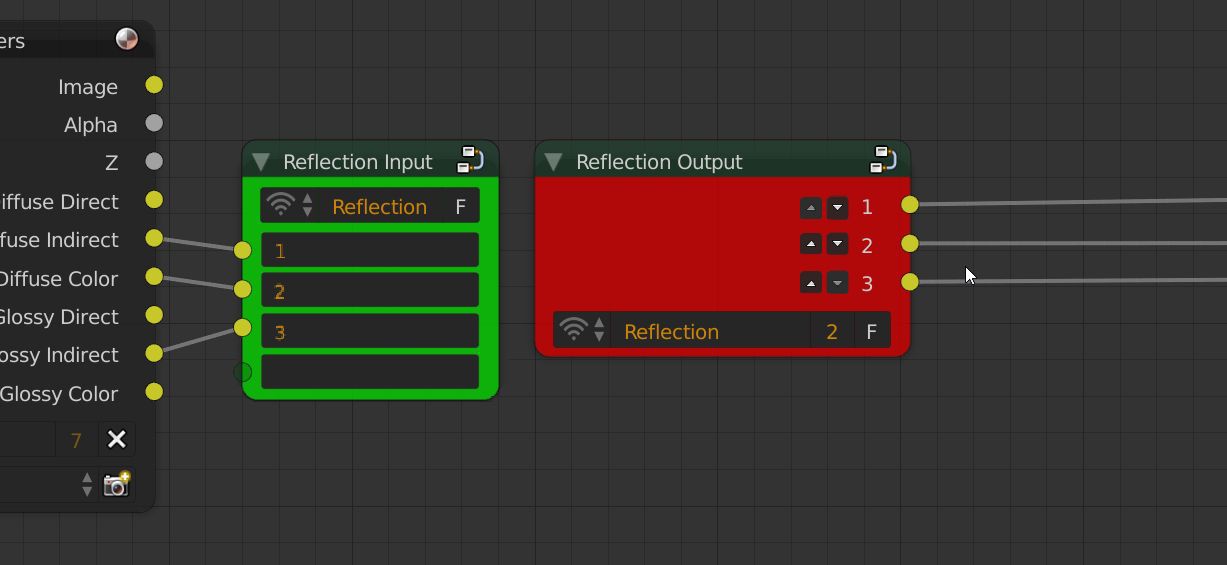
###Here is a first design idea:
##The input node
The main concept behind this should be that you have an input-node with x sockets and an output-node where you can use these. So the link works correctly we have to give each input-node a unique name. This allows the output-node to refer to the right "link"(Here in the example the name is "Reflection"). Also each input-socket of the input-node could have it's own name, so when using it in the output node you know what is what. In the mock up above the names are simply 1,2,3.
##The output node
This node links to one of the input nodes in the node-tree. Of course an output-node can get used several in the node-tree. The little remove icon on the left of the output node is to hide/remove an output. This is useful when you only need e.g 1 of the x outputs(But maybe it's a more elegant way to solve this with CTRL+H which already works quite well). The up and down buttons are for sorting the outputs. This is really useful when using the output node on multiple places. In once place the order could be just fine, but on the second place for example your "node lines" or however they are called cross each other several times. And because we want to make our node setups better readable we want to avoid exactly that. So here is an example of what I'm talking about (I didn't apply the mock up to the nodes for these two images, but you get the idea):
And now short the outputs(node the order 3,2,1 vs. 1,2,3 in the first one):
##Where should this get used? Well basically in every editor where we have nodes.
A working example: Sverchok
If you want to test out some really well working wifi nodes then check out the Sverchok Addon . Enable the addon and then add the nodes by pressing Shift+A->Layout->Wifi in/out. 
> Before leaving you with this idea and you probably playing around with Sverchok I just wanted to invite you to post any ideas/improvements/thoughts down below! Thank you for reading this post
5 Comments
I like the concept... but do we have to call them wifi nodes?
of course not :D
In Buzz we used to call this Aux Send and Aux Return. They could also be one-to-many, e.g. send something into one input and have it return in multiple places.
3pointedit brings up a good point - it should be easy to understand the relationships between sends and returns. Visual would be best, e.g. showing lines between send and return(s) when a send or return node is selected, or something like that. You only see it as long as you need to see it.
maybe colorcode the nodes
The point of nodes is to provide a visual flow diagram of a program, breaking that flow may make reading the nodes more difficult. I find that the animation nodes addon has the same problem.