
Enhanced View Manipulator Widget Proposal
After much consideration and work; I am pleased present a proposal for an enhanced view manipulator widget.
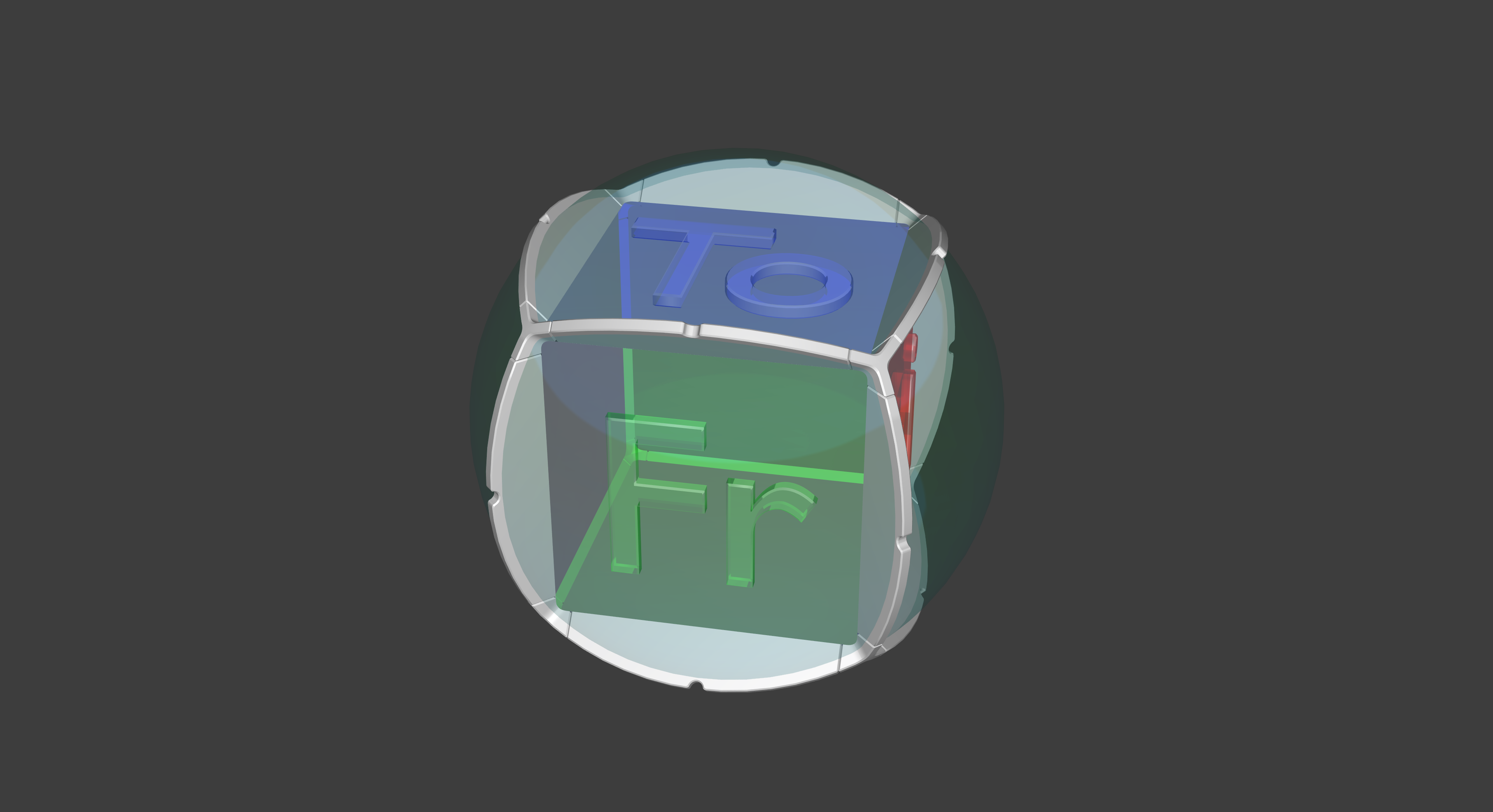
The shape is designed to maximize how the User can switch to views easily that often would be more difficult to perform in single clicks. Additional rotation controls allow for fine tuning a camera view based on 9 different axis.
This view widget has much improved control over the viewport camera; enabling the user to not only quickly lock into desired flat orthographic views, but as well as many other perspective view presets based on cube orientations. There are also "Rotating Sliders" which appear when the mouse hovers over certain features for a short duration to reveal them. (More updates on how that works coming soon.)
Note that the colors are not really as intended. They should be more"Toon/NPR Style", but I don't have any experience with those types of materials. I was more interested in sharing the overall concept, and looking for feedback.
Update 6/6/18: I added some more clarification of how the interaction works. I have not yet gotten around to creating one for the pop-out rotation sliders. (they pop-out after hovering over the indentation for a user specified time.)
Thanks for Looking!
Blend File for anyone who wants to work with this to improve it here:
<A HREF="https://app.box.com/s/wvhp4ieuhqrharatp17byzi2p2t4zlqs"> www.box.com </A>
 make art & design GIFs like this at MakeaGif
 make art & design GIFs like this at MakeaGif
 make art & design GIFs like this at MakeaGif
 make art & design GIFs like this at MakeaGif
<img src=' s15.postimg.cc/hd38wockb/2.8_Viewport_Manipulator_Proposal_Perspective_View.png' border='0' alt='2.8_Viewport_Manipulator_Proposal_Perspective_View'/>
<img src=' s15.postimg.cc/zfwbnzg5n/2.8_Viewport_Manipulator_Proposal_Front_View.png' border='0' alt='2.8_Viewport_Manipulator_Proposal_Front_View'/>
10 Comments
I like your design on this, but contrast is your biggest problem, and size second to that as mentioned in the comments. Both of which are easily remedied. You just need to make the handles thicker (to click on the right thing without hassle) and the text have more visibility (so its legible even at really small sizes). Also, you didn't submit a reply address...
@marius.oberholster: Thanks for your feedback; and After I started pulling this all together, I actually concluded similar to your points:
I definitely agree that the shaders needs to be more NPR Based; but as I stated, that's not my area of expertise.
I also agree that what I will call the "Flower Petal Handles" need to be thicker to be more usable at the scale it will be in its final application size.
As far as a reply address; I'm not sure I understand what you mean. Can you link an example?
I am updating the original post also to include the mesh file I created if people want to play with it.
@mcolinp: You submitted a contact form and didn't include an e-mail reply address.
@marius.oberholster: Ahh; I just remembered that I sent you a message thru your website (eternal from here). I was lost for a minute.
I will send another with my email, Thank you.
I must be the only one who thinks the view Manipulator could be improved . . .
@mcolinp: Absolutely not. The problem with this one is that it's hard to read the letters when it doesn't take up an 8th of your screen. If it makes you feel any better, they have acknowledged that the manipulator needs work, and they plan on fixing it!
@simontmonroe:
I'll admit this could use some tweaking. It really was just an initial exploration. I mainly wanted to share my ideas of how the combination of a sphere and an inboard cube would provide some interesting new possibilities for interaction.
I also realize this likely isn't at the top of the priority list at the moment with the code quest. I would hope that when the manipulator is reconsidered for further improvement; that the developers would consider me to be happy to contribute some ideas and concept development.
(I'm not a developer or programmer; but have lots of experience in industrial design . . . )
@mcolinp: Perhaps another possibility is that the icon could be greatly reduced in size while not using it; then become larger when the mouse moves within close proximity to it . . .
I also used only the first "two" letters of each word; in order to make the letters larger; as well as making them look somewhat like the periodic table of elements.
@mcolinp: That sounds amazing. That way it wouldn't be annoying when not using it, but it would also be functional and easy to click when you need to.
@simontmonroe: Excatly! The whole idea I'm shooting for, is to have advanced functionality through an intuitive interactive experience; while being engaging for new users targeted by the 101 project.