
[Rigify] Isolate Next/Previous Bone collection buttons.
A couple buttons could be made in the UI, in the form of an additional addon, so when you press these buttons, you travel next and previous Rigify bone collections, isolating them, as if you were cycling weapons in a first person shooter, with previous and next weapon.
I cannot code. I am not a developer. But instead of just asking you to do it, I have asked Gemini to build a prototype of this addon, and it has worked!
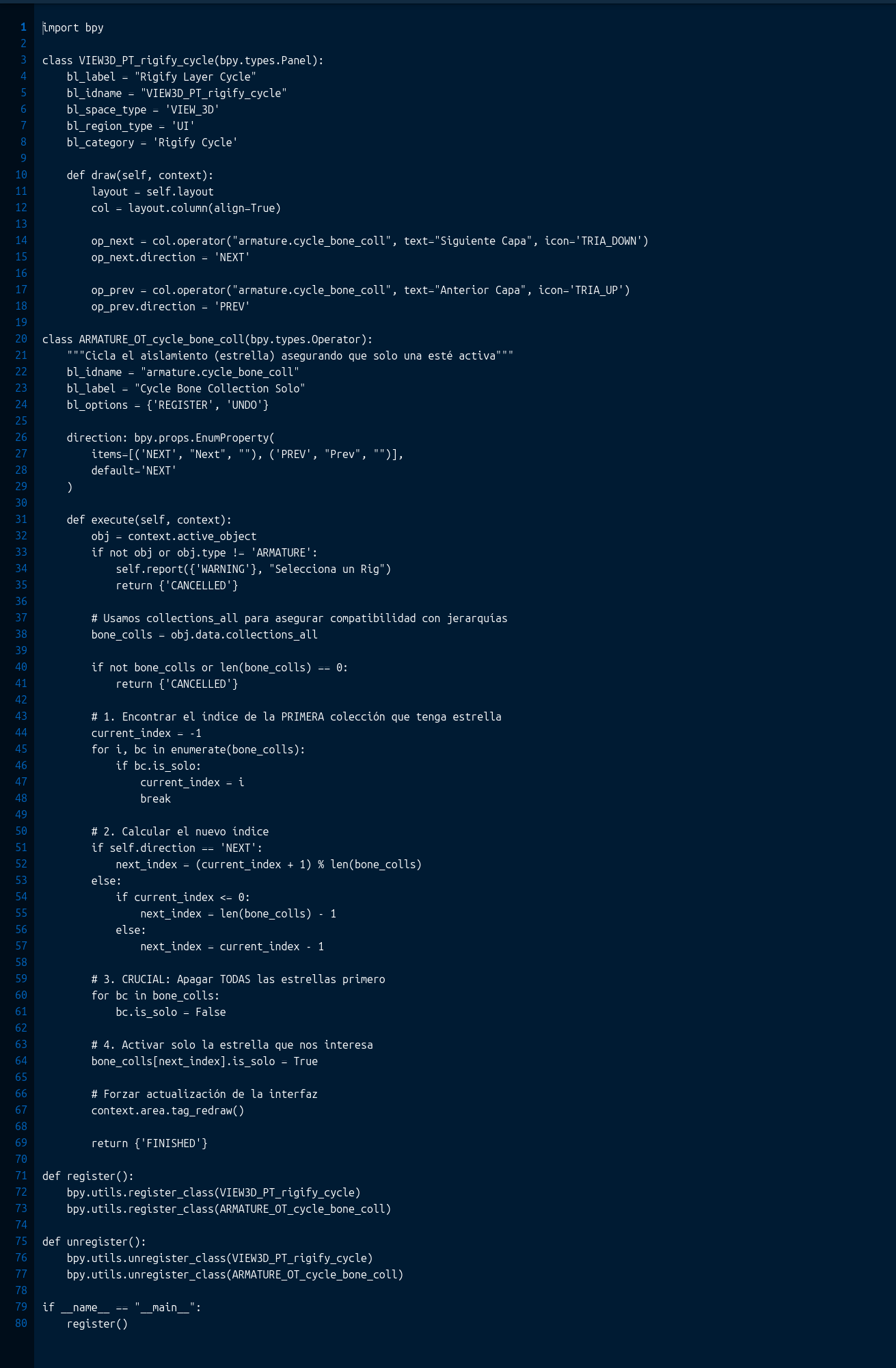
The code is these 79 lines of code. And to see it in action, just watch the attached video.
If you want to use it, just go to Blender's scripting panel. Open a new text file. Copypaste the code, and execute it (the play button).
Then create a rigify metarig, and hit 'generate' to go to the rig. On this rig, go pose mode. Then, in the viewport, press N, and go to the Rigify Cycle panel, and press the next and previous buttons to do what can be seen in the video.
Current limitations:
The code has buttons names and comments in spanish, since I was talking to Gemini in Spanish. I am from Spain.
Since I am not a programmer, I don't know how to make this code to become an independent addon. And the creation of shortcuts with right click of the button, doesn't work.
But at the moment you could attach these actions to both keyboard keys, you would travel between bone collections in no time! You could insta filter bone layers and animate much more easily!
Please! Add this as an official Blender Addon. Or shortcuts. Or whatever!
Thank you!.
1 Comment
import bpy
class VIEW3D_PT_rigify_cycle(bpy.types.Panel): bl_label = "Rigify Layer Cycle" bl_idname = "VIEW3D_PT_rigify_cycle" bl_space_type = 'VIEW_3D' bl_region_type = 'UI' bl_category = 'Rigify Cycle'
class ARMATURE_OT_cycle_bone_coll(bpy.types.Operator): """Cicla el aislamiento (estrella) asegurando que solo una esté activa""" bl_idname = "armature.cycle_bone_coll" bl_label = "Cycle Bone Collection Solo" bl_options = {'REGISTER', 'UNDO'}
def register(): bpy.utils.register_class(VIEW3D_PT_rigify_cycle) bpy.utils.register_class(ARMATURE_OT_cycle_bone_coll)
def unregister(): bpy.utils.unregister_class(VIEW3D_PT_rigify_cycle) bpy.utils.unregister_class(ARMATURE_OT_cycle_bone_coll)
if name == " main ": register()