
Maths on Mix shader and/or "Shader to RGB" for Cycles.
In some jobs it's really useful to have a node to properly mix some differents shaders in the node tree. As far as I know, in Cycles, is possible to mix 2 shaders, but only mix, without any kind of maths like multiply, additive, etc...
It would be perfect if those maths options are added to the mix shader node.
Another option would be to add a "Shader to RGB" node to cycles. It would be a way to workaround that so you can use the "mix_RGB" node as it can do those operations.
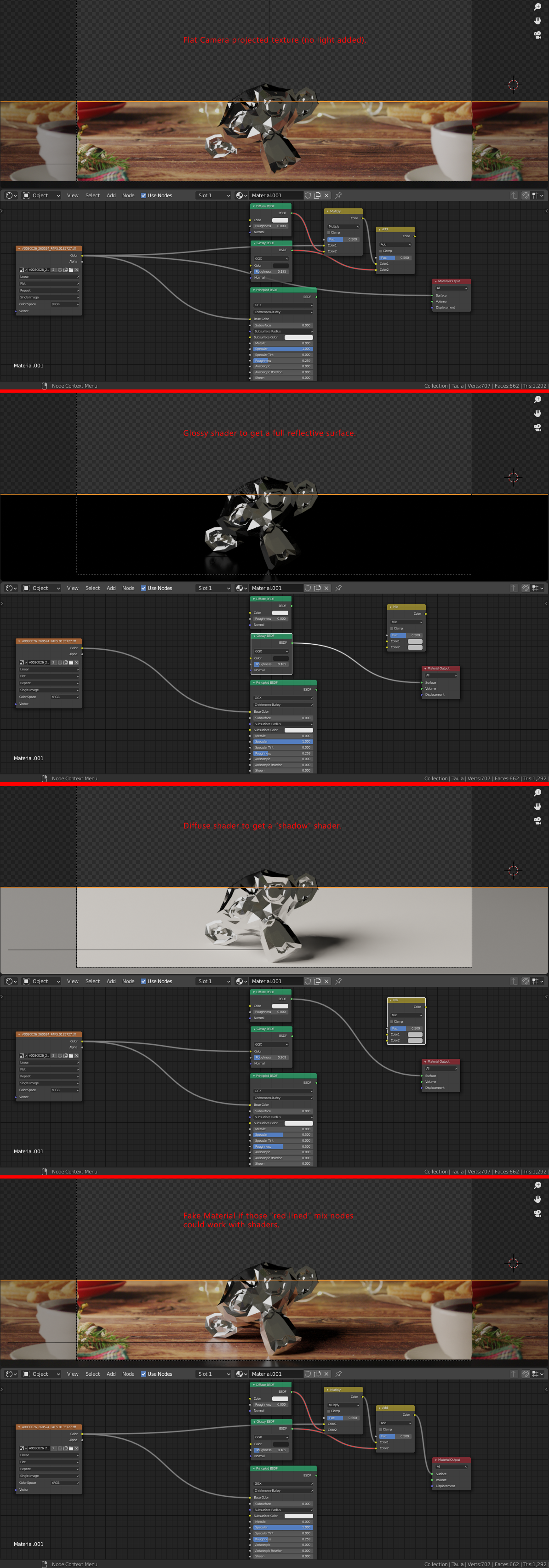
As an example imagine a product placed on a table. I can create a plane as table and camera project the texture without shader to get a "flat" rgb (without adding light to it). Then I model the product and place it in top of it. On the table nodes I create a white diffuse to get shadows and a full glossy shader to get reflections. Then with mix nodes I compose the three shaders this way: Flat shader, Shadow shader in multiply and Glossy shader in Additive. The result is like a composition done in the node tree so I see how everything mix together.
10 Comments
{attachment Mental_Raypng}{attachment Arnoldpng}
Shader is not value or vector. It is complex rule for light behaviour. So it can't be «multiplied».
* @ Vyacheslav * That's why I'm asking for a converter from shading info to RGB, that way we would be abble to mix. Other softwares do it, so it's doable for sure... ;)
* @Topeich * eevee have shader to RGB. For cycles such conversion — is baking. Render can`t bake and render baked at the same time, because baked will influence to scene another way.
* @ Vyacheslav * Baking is not what I'm asking for, obviously.
* @Topeich * so describe, how it should work with Cycles without infinite cycles.
* @ Vyacheslav * I can't not describe what you are asking because I have no idea as I'm not a developer. And I have no idea how other render engines can do it for the same reason, I'm not a developer. But as a 3D user I have been using that trick in Softimage and Maya with MentalRay and Arnold with no trouble... that's why I'm asking for a feature like this :D
*Added a couple of screenshots with the described behavior in Softimage using MentalRay and Arnold.
* @Topeich * okay. Screenshots are small and looks unreadable. I suppose, those engines just mix passes, doing compositing from shader tree. In blender compositor is separate.
At one hand it is bad fashion to mix shader and compositing. At another it will be handy to have easy way to make fast automask for shader result and have it inside compositor. Now I can only suggest to use AOV output as such mask. It will allow you compose even parts of surface.
* @ Vyacheslav * Images are much higer resolution than it shows in forum, I think you can open them in another tab or download it to look at them in full res.
* @Topeich * already opened. But still non-readable blender.community/api/storage/file/59/59ee2b501de2fb001513f45c/80/80bd8a46f2104f6b93ad245fee2b9edc-l.jpg