
Keyframe Icons in Timeline view
After hovering around Blender for a while, I finally jumped in and am using it in production on a feature film titles sequence. I love it and the results have been really excellent.
I make use of the timeline view extensively. One thing that would be really helpful would be different keyframe icons in the timeline view to allow users to quickly identify constant, linear, and bezier keyframes - much like what you have in After Effects.
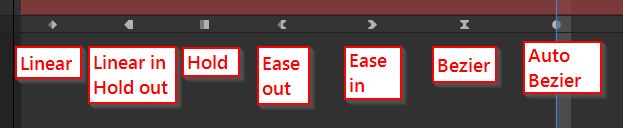
Here is an example of different timeline keyframe icons from after effects. This allows users to quickly identify what type of keyframe is being used.
I look forward to the continued development of Blender. It is a truly inspiring tool to work with.
2 Comments
This concept is already implemented. Icons are less obvious, but You can't just copy it from another software.
If those are icons from After Effects and not Your own custom design from scratch then it CAN'T be implemented in Blender.
Well it's kind of the case already
Keyframe Types — Blender Manual