
2.8 dev: Proposal for optimizing high poly count object outline
Problem:
Blender currently draws an outline in viewport by drawing the selected object (as any other) normally and then again in a different way to only draw the outline around it. You may not notice this when you have your standard scene open. But when you get in to sculpting or photo scanning and you are in millions of faces and you do not have the most powerful GPU; you'll see a major performance improvement if you deselect the high poly model or disable outline. This is because instead of needing to draw let's say 2 million triangles, your gpu has to work with 4 million. (real world example: on my laptop this is a 10-20 to steady 60 fps improvement) ___ Solution:
Now in 2.8 blender has the power of OpenGL 3.3. (please hold on, gonna get nerdy for the devs)
Blender can now use a multiple target FBO targets (FBO = image that GPU draws to) where FBO 1 would have color+depth and FBO 2 would have depth (imagine a number from 0-1 representing how far something is from the camera). Now you have your standard image that would be displayed on screen plus a gray copy that is more or less flat but it's important that the copy of the object is not 0 (aka black) and everything else is 0.
FBO 1: (color)
 FBO 2: (approximated with photoshop)

Note: the FBO 2 is extremely cheap to draw as practically all GPUs have special processing units for this kind of a draw. (to put it simply)
Now... What does this have to do with outline? Well, now we have an easy to digest data of where the object is. Now all blender has to do is take this new data and apply it over the FBO 1 (color) in a way so each pixel on screen asks surrounding pixels in a radius if any of them are not 0. (not all but in a strategic way to reduce the load on GPU)
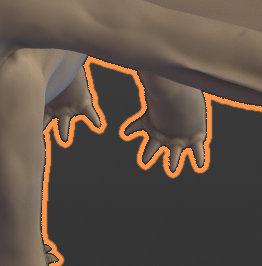
To visualize it, it would look something like this:
 ___
___
Pros and cons:
Drawing object 2 times:
- is really fast in low poly object situations
- farely easy to implement
- preforms horribly as object count goes up
Using depth (FBO 2) checking:
- has a constant cost no matter if you have a singular triangle or a 70 million triangle model (cost that is directly related to resolution of viewport)
- preforms worse in low poly situations
- is more complex to implement than drawing objects
My opinion:
Both methods are valid and both have some problems. If it was up to me I wold keep both implementations of an outline and use the appropriate method in needed context. The method that I specified was a simplified one. You could get better performance with extra steps (such as half resolution sampling with linear interpolation). ___
Additional notes for the curious:
- "Why can't you use the color? Why do you need a dedicated image for it?" In this example I put only 1 object on screen to simplify things. If there were multiple objects drawn, the outline would go around all objects, not only the selected one.
- "Wouldn't this get rid of AA? (anti aliasing)" yes and no. To get back AA you would need to do multiple samples of the pixels that are near the object. I'd imagine that this could be an option or simply bound to if viewport is using AA.
4 Comments
Not a coder myself, but i believe this gets complex when selecting multiple objects (each should appear selected, yet the outlines of objects behind other selected objects should be hidden). Even rendering a different frame for each object (which is basically unreasonable) gets problematic if you consider how an object can be both in front and behind another object.
@rex_kungolos: Hmm... that's a good point. But it's not really an issue. This can be easily scaled up by simply clearing the depth image for each color of an outline that you need. So 0 times cleared for 1 object and 1 time clear after first object if there is more. Before each clear you would do the coloring.
@rex_kungolos: Should not be an issue at all, only fill dark pixels with selected objects and you're done whatever the number of selected objects and you also get hidden parts for free.
Everything that can improve blender performance is excellent. Performance is the weak part of the blender