
Blender displays memory stats wrongly and doubles it in edit mode!
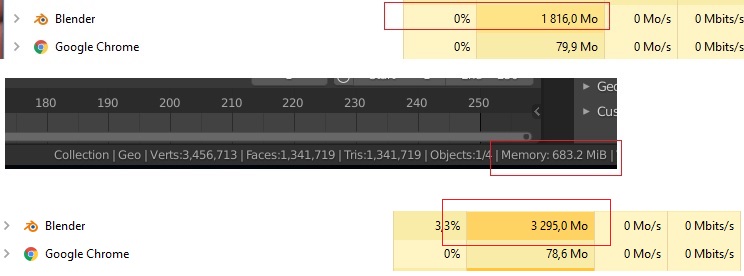
In the image below I have one single mesh with 3.4 million verts blender displays the memory usage in the stats 683.2MB but in the task manager 1.8 GB so it's almost triple to what it should be or am I missing something like that's not actually the same memory we're talking about!.
And if I enter edit mode it increases to 3.29 GB, so I'm not sure if this is a well known issue or not since i only saw it happen with Blender and large mesh files, so IMHO it should be optimized for such models.
Thanks.
9 Comments
first off- this is not a proposal.
second- if i'm not mistaken, that's memory being used by mesh data (which is why it's down there with all of the mesh statistics). It does not include images or other data that is being stored. As far as edit mode goes, yeah- when you go into edit mode, a bmesh is created for that object, which is significantly more complex than the object mode data structure because additional information needs to be stored about each face/loop in order to make mesh editing faster and easier to write operators for.
Well , it might not be a "new" proposal but it's a suggestion to investigate what's going on . What other data being stored that leads to this huge difference in numbers?
At least if you're going to show stats that says " memory" which implies system RAM then show everyting including this extra data with it to get an accurate count because then it'll create confusion as you think u still have enough memory when in reality you're about to hit the max.
the file is a simple sculpted model with no extra stuff not even UVs, to me that seems very strange because i did import the file to other softwares to check edit mode and I didn't see this big discrepancies, it's only unique to Blender.
Report this as bug, You have in blender menu option for this - then in system is forward info about version blender, os, etc.
BTW I can confirm this bug.
Yes according to the manual it is supposed to be an estimation of RAM usage: docs.blender.org/manual/en/latest/interface/window_system/status_bar.html
Though a bug should be reported on the tracker. No dev will look up for bugs elsewhere.
I don't think this will be considered as a bug.
This is not a bug but probably by design.
IMO No need to report a bug. Windows also reports on memory allocated internally by your GPU driver and other related packages. Memory in the status bar only contains the memory directly allocated by Blender in a not virtual manner.
In edit mode the memory increase is expected as it uses a different data structure to efficiently edit meshes. Also here the driver needs to allocate more memory for keeping track of the edit mode buffers.
The memory I am referring to that GPU drivers are using are stored in CPU RAM. Often geometry buffers are kept on CPU side to keep GPU memory free for texture, framebuffers and buffers that are accessed more often.
developer.blender.org is the place to submit bug reports, not right click select. RCS is just for idea proposals.
And this is not a bug either, it's a suggestion for improvements.