
dis/enabling collection resets visible obj logic consistency
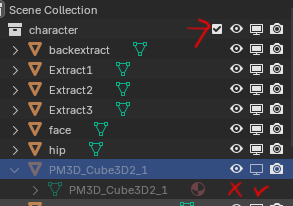 This logic irks me a bit. Like there's a hidden situation when I want to retain the visibility state of these objects after I disable the collections they are stored in. There is a solution to this where I have to use 'render in viewport' instead. But I would rather keep all of these state logic consistent cause I always forget this quirk. Otherwise I honestly see no reason for this and would cause me to doubt others that can be retained or not without having to double-check them in the future if I were to use them.
2 Comments
AFAIK the way it works is that the "hide in viewport" (eye icon) is meant as a temporary thing. Whereas the "disable in viewport" is a permanent action, that survives collection reloading, but also data linking, "Show Hidden Objects" ( ⎇ Alt H , very useful) and maybe other things like this. It's a fairly useful and consistent system that gives plenty of flexibility, though at the cost of a tiny extra learning.
IMHO it's the fact that it's hidden by default in the outliner and that there's no keyboard shortcut to control it either that it's hard to even discover, let alone take the habit to do the right thing for the right task.
i took quite a long time to get used to this behaviour, but it can also be used to ones advantage. I use the eye icon only as a temporary solution (e.g. when a object hides another object i currently want to edit), then just dis-/enabling the collection gives me again all my objects visible. For a permanent solution i use a inside collection "hidden" for e.g. boolean cutout objets, placeholders etc.