
Undo and Redo buttons on the toolbar
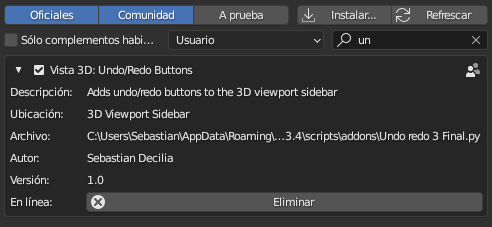
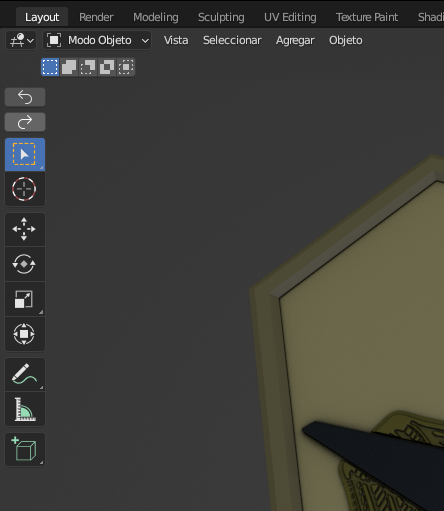 I put two buttons on the toolbar, it is very comfortable when using a graphic tablet or touch screen. I made an addon with a very simple script and it works perfect.
I put two buttons on the toolbar, it is very comfortable when using a graphic tablet or touch screen. I made an addon with a very simple script and it works perfect.
I put two buttons on the toolbar, it is very comfortable when using a graphic tablet or touch screen. I made an addon with a very simple script and it works perfect.
Español: Puse dos botones en la barra de herramientas, es de mucha comodidad a la hora de usar una tableta grafica o pantalla tactil. Hice un addon con un script muy sensillo y funciona perfecto.
:D
This idea was marked as a duplicate of Would be great! 🙄.
17 Comments
Personally, I do miss a undo/redo button when I'm using my tablet, also a save.
Even though these can be done with the keyboard, I often have one hand on the tablet and the other on a specific spot on the keyboard, and I wish I could stay in that state for as long as possible. To keep working fluidly. Plus like many lefties, I am left-handed when using a pen but not on the keyboard/mouse. So when using a tablet, my right hand is the one having to stretch a long way to do anything on the keyboard.
Customizing the existing keyboard layout is always limited and not everyone has buttons on their tablet or is able to map them (i.e. many workplaces I've been don't allow much customization with hardware).
Though, I don't think it makes sense to have it in the active tools' toolbar, since they are not active tools for the viewport. It would make more sense before the main windows menus, next to the Blender icon. It would remain consistent with the current UI and not take up much space.
This is a good point - this idea could be part of a bigger "touchscreen-friendly" UI layout feature.
There was this experiment which among other things added undo / redo to topbar. But I think only structure changes part were accepted.
???? that doesn't look like anything. it's totally uncomfortable. 👎
It's not for my use case but I can see it being useful. Not cluttered, looks cool.
Is this addon still available somewhere?
Operators should not be among active tools. While it is easier to press a button then to find the operator in a menu, the use of hotkeys should be encouraged, instead of cluttering the UI with more and more top layer buttons. if there was buttons for undo/redo, the only consistent location would be on the main header, between the help menu and the workspace tabs.
I have undo on a button on my tablet and in the unlikely event I need to redo, I have access to my keyboard
EDIT: There seems to be some confusion. I'm not saying that all on-screen buttons should be replaced with hotkeys, I'm just saying that in my experience using hotkeys for common actions such as undoing and redoing increases workflow speed and productivity. If other people have other experiences or opinions, they can let me know the specific reasons why they disagree or why hotkeys aren't the answer in their specific situation.
And the fact that you have it means that others enjoy your configuration? So let's get all the buttons out and use the keyboard! You should put yourself in the shoes of people who are just learning. Not everyone thinks like you.
Chill man. I'm just saying I don't want the ui cluttered with unnecessary buttons, you don't have to take it as a personal attack. Graphics tablets with buttons are very common, and I don't know how you're running blender without access to a keyboard. I really don't see how my configuration is so exclusive, or how people who are just learning wouldn't have it.
Sorry for your sensitivity, some of us use touch screens or graphics tablets. So we are going to ask that they remove all the dynamic tools, since we would do everything with the keyboard, like in the 80s. You could raise more constructive ideas and not be criticizing the things that some of us would like to have by default in the interface.
Many people like toolbars and buttons, and don't consider them an unnecessary part of UI.
And the fun thing is - when it's a 3D application that makes it easy for the artist to modify the UI (cough-so-many-other-3D-applications), you can show/hide as many of them as you like.
Or in this particular case, don't install the addon.
@Sebastian I'm not being sensitive. Trust me, I'm not going to get my feelings hurt by some random person on the internet. I just want to have a productive and professional discussion about your proposal. Being combative makes that very difficult, and makes the discussion devolve into an argument. I don't have the time of day for arguments.
When I saw your proposal, it obviously wasn't for me and I didn't want it added because it would just clutter my ui with buttons that I would never use. I could have just given it a down vote and moved on with my day. Do you want to know why I didn't do that? Because even though it seemed to me that the solution to your problem would be to just use physical buttons for common actions such as undoing and redoing, I thought that maybe you had good reasons for why you aren't doing that. And, if you have good enough reasons, I might up vote it instead. So I commented with my configuration that gives me a faster workflow than with on-screen buttons with the expectation that you would tell me exactly why it wasn't for you, instead of just saying that you didn't like my comment.
All I want to know is your actual, detailed reasons for why you don't use physical buttons. Unless you're somehow using an Ipad or something like that, I assume your touch screen is attached to a keyboard somehow, and I use a graphics tablet too and still use a keyboard so those aren't very good reasons. Just because keyboards were used in the 80s, doesn't mean they're not still the best option. Hotkeys are objectively faster than using on-screen buttons in almost all applications. Of course I'm not saying that all buttons should be replaced with hotkeys, I'm just saying that common actions such as undoing are best with hotkeys.
@thorn I also like toolbars and buttons, and don't consider them an unnecessary part of UI. If I didn't, I could just hit T to hide the toolbar and never have to worry about it. Toolbar buttons are great for things that you don't use commonly enough to warrant using hotkey real-estate to speed up your workflow. Undoing and redoing don't fall under that category.
I didn't know that you could hide specific buttons in the toolbar. If you could tell me how, I'd be grateful.
In this particular case, the op isn't on a forum announcing his addon. If that were the case, then you would be right. I wouldn't have commented, and could have just not installed the addon. The op posted this on RCS as a suggestion that his addon be implemented as default behavior in vanilla Blender.
I think yours is not constructive. I am a teacher and I teach Blender in Argentina for more than 8 years, in each course I have more than 30 students every 3 months. This addon that I made (without being a programmer) besides being for personal use, is at the request of all of them and I assure you that they need it. Clearly this is not for you, it is for whoever wants to use it.
@Sebastian Friendly advises if you want to propose a change in Blender that actually does get people interested to the point of having it into Blender:
Oh really? You came up with the most awkward place, friend. we are looking for comfort.