
Edit Mode > Two Selected Vertices Symmetrization Hotkey[Addon/Macros]
Hello. It's always been a problem for me in blender, that after sculpting or shaping model with posing and applying pose as default all symmetry just not existing anymore in that areas which you worked with. And to restore symmetry of topology for further correct work with prorportional editing, or weight painting with mirroring you need to do it manually, like vertex by vertex, clic clic clic many hours along. Here is visual example of what i mean:
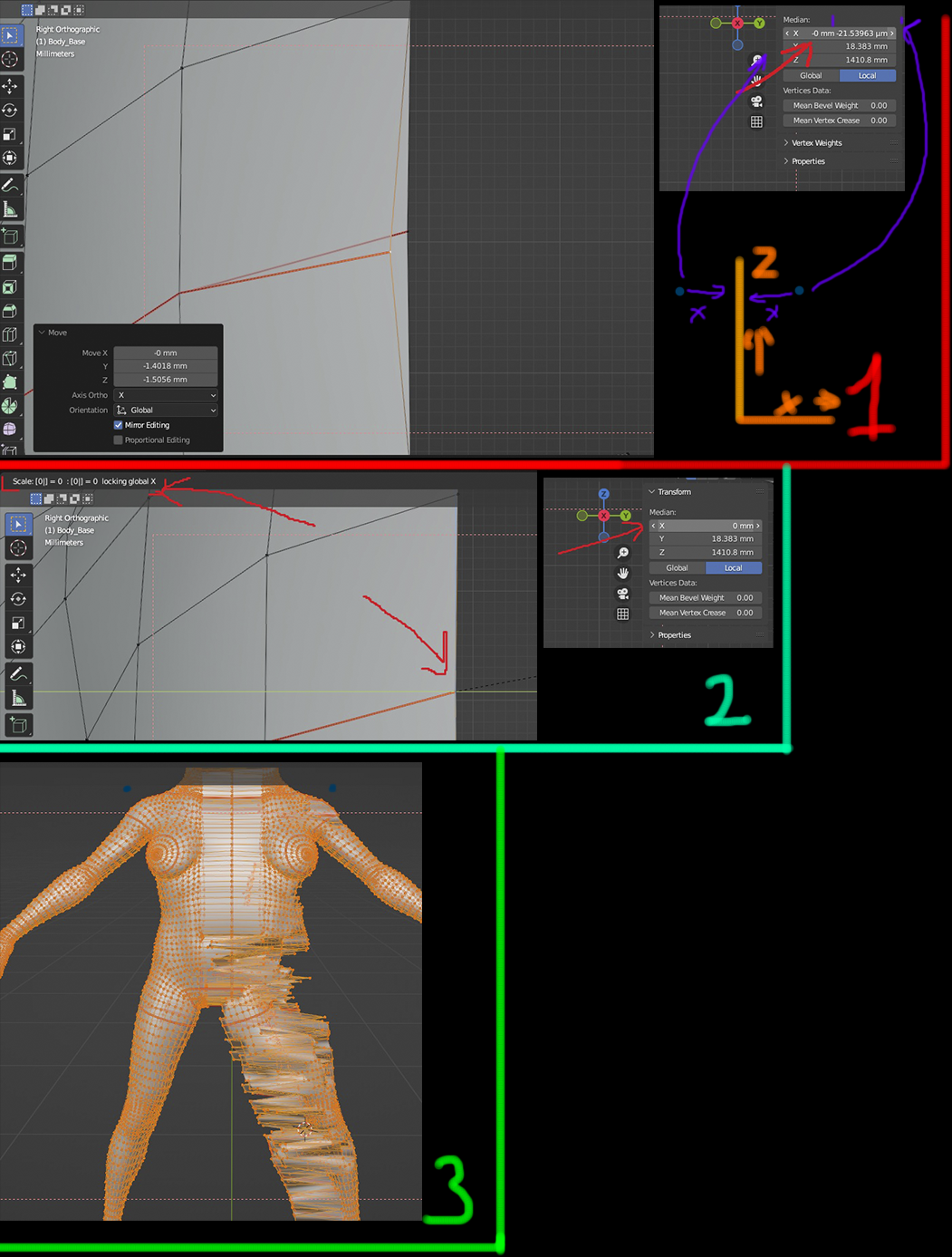
After you've applied the pose, or shapekey you've been sculpting in, you get this - 1st section of image.
From a distance, your model seems to be symmetrical, but it is not. Since proportional editing, or also weight painting, does not mirroring vertex groups due to a slight mismatch of the vertex coordinates relative to the central axis - 1st section of image in corner you can see this very little difference of two parallel selected vertices, it's less than 1 mm, but it's not enough to be counted as symmetrical for blender.
So for correct mirroring, you need to restore the position of the vertices relative to each other so that they are in perfect accordance with their position in space relative to the central axis, then they will be taken into account if it is necessary to mirror. And this is very long proceess, for every pair you need to do this: Select 2 parallel vertices > S > Shift+X > 0 > Enter. In 2nd section of image left upper corner you can see this formula. And after that you need to change Median X coordinates to 0 in Transform tab, of that two selected vertices - 2nd section of image right upper corner, and only after that symmetry will be restored, it's fine when you need to do this with simple model, but when it's something like on 3rd section of image, it will take hours to do.
P.s. Auto-Mirror addon is not working properly for such tasks, because it's so rough and breaking small details near the merge point, also ruins UV map and etc. Key point is to not touch or change any existing information that model have, like UV maps, Vertexgroups, Normals and etc. Only coordinates of selected vertices should be affected.
Conclusion:
So. It would be great to have a simple addon(some kind of Macros) which will add a separate button somewhere or just a hotkey for it(Shift+M for example, if i correct this is free hotkey by default and not doing anything in edit mode, so it can be used for this), which would do this procedure automatically, that is, completely execute the formula described earlier and change the coordinates of the two selected parallel vertices relative to their center along the X axis, which is should be = 0. It will save ton of time for such things.
0 Comments