
NON DESTRUCTIVE BOOLEAN TEXTURE [boolean modifiers]
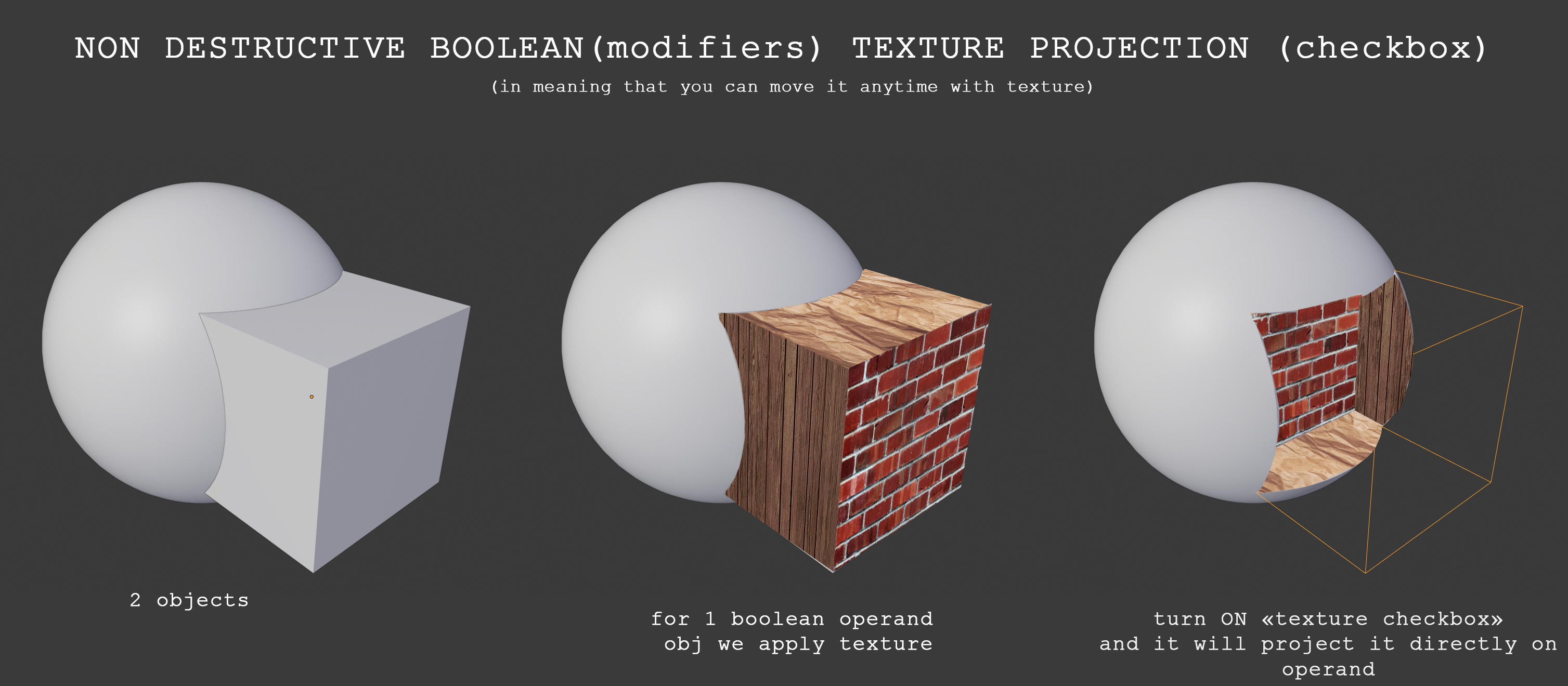
I think will be really helpful (especially for new users-uniors) to put inside Boolean modifiers checkbox that allow to project texture(s) from one operand onto applying operand. (see picture).
And another approach "it would be great if this happened automatically when you made a boolean with an object that had a different material assigned"(by dpdpforlife) in meaning that materials themself will changed in slots to give that affect to avoid 3rd step that need to do in bellow instruction :)
Btw, people in comments tell how we can do it in current moment (it close to proposal, but if you have a lot materials and a lot booleans - it will be a bit slow to do. So see addon below; But will be better if Blender process it automatically like in proposal above by dpdpforlif ):
- Add unique materials (and UVs if needed for the textures) to the sphere and cube. I'll refer to these as SphereMat and CubeMat below.
- Add the Boolean modifier to the sphere and choose the cube as your Boolean object.
- Go to the Material Tab in the properties editor. Right now, the cube should only have one slot with CubeMat. Add a new slot and set it to SphereMat. [example: joxi.net/a2XZ3E0uwQlQxr.jpg ]
If you don't assign the unique materials to the operands first, the approach won't work.
Addon to simplify last stage (in case if you have a lot booleans operands at once) by dpdpforlife: github.com/dpdpforlife/CopyBooleanMats
15 Comments
This can already be done. It doesn't automatically add the materials to the slots of the Operand A, so the workflow could be improved. Using your example image:
If you don't assign the unique materials to the operands first, the approach won't work.
* @dpdpforlife * Great! This is what need. I won't delete this post (maybe it will be useful - your comment to anyone else) but will mark this post as closed.
* @Ruslan * Hey, I made an addon to automate the process. Check it out on my GitHub
* @dpdpforlife * Cool, thank you a lot! It works. Maybe will be usefull for you (dunno) some error was arise, but it apply all materials and works :) [ mega.nz/ ]
* @Ruslan * Oops. I left a return statement out. I updated the python file.
It was no problem to make since I already had a similar addon that cleans up material slots and a small script I use from time to time for naming my modifiers. I just kind of smashed them together and it happened to work :) (minus the error). I thought it might be a useful tool.
* @dpdpforlife * I think not only me but another people will find it usefull, especially in case if will be need to assign a lot bolleans with a lot textures on it :) So, thank you! :)
P.S. :D I can't add updated file to addons (when I press turn it on in addons it arrise: joxi.net/v29PWowIZ4RKPm.jpg ) But maybe i doing something wrong. Anyway you always mihgt put back previous version :)
* @Ruslan * Well Damn. I changed the file directly on github because it was just a single statement. I thought it would work fine...I guess not. I fixed it, though, so it should work fine now.
Amateur mistake.
* @dpdpforlife * Now all works fine :)
* @Ruslan * Since it looks like your proposal has generated an add-on that does what you're looking for, I've taken the liberty of marking the status of this proposal as Done. Woohoo!
I just saw that you changed the description. I wouldn't get rid of the proposal completely. It would be great if this happened automatically when you made a boolean with an object that had a different material assigned. It would really speed things up, and this is the way 3ds Max does it. Blender is notorious for being just as capable as other DCCs, but require a lot more steps than are needed in other programs.
* @dpdpforlife * I've brought it back :)
you mean all in the same shader like a bake? or just pass the materials? You can do something very similar to this image with multiple materials, the "booleaned" object gets the IDs from the "booleaner" you just have to apply the right materials, I use it all the time.
* @Frederico Martins * just "insert" (maybe it mean pass, but not baking; if you will move Cube - textures will be moved too in example; 'Interactive') materials over material operand A ( in exmp it is sphere). Really don't know about this(your) way, will be appreciate if you will give the links on main components of (how to do, WIKI or etc..) your approach. Or shed the light where I can start search it , thanks :)
Yes Yes Yes !!!
* @dodododorian * take a look to the guys approach! It possible to do it right now :)