
Add buttons for next/previous POT values when creating bitmap
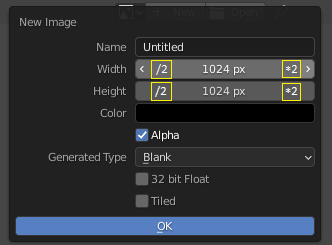
As any technical artist would tell you, all texture dimensions should always be POT values (512, 1024, 2048..) for technical reasons. Therefore it would be really handy if there would be buttons for doubling and halving the default value (which is 1024) when creating a new bitmap. Sure, you can click on the field and add " 2" or " 0.5" to it, but this is tedious especially when working with a tablet.
There is plenty of room for extra buttons next to the < and > buttons. I included a little sketch to this proposal (the *2 and /2 look a bit ugly, so they could be some descriptive icons instead).
Another option would be to just replace the functionality of the < and > buttons completely so that they would double/half the value instead of the +1 and -1 (which frankly is useless in case of bitmap creation). Sure, the +1 and -1 are there probably because the number input control is generic - so maybe there could be an inherited number input control that would do the POT values instead of +1 and -1 which then could be used in appropriate places, like in the bitmap creation dialog.
10 Comments
How about instead of icons:
CTRL+CLICK on the arrows multiplies or divides(or double click, if using a tablet display)
CTRL+ALT+CLICK keeps both width and heigth in sync.
As for "discoverability" some tool tip info maybe?
* @Zafio * Sounds better than the original idea, because it keeps the UI clear
* @Zafio * actually that would be an OK solution too. But yeah, discovery might be a problem. And double click would be problematic because someone might want to tap it fast to increase the number many times (as can be done now). Assuming the same control would be used for any other numeric value field elsewhere in Blender UI.
I think just replacing the < and > functionality in a new "POT version" of number input control would probably be the best solution, as I state in the original post. This "POT version" could then be used where it is appropriate, such as in the new bitmap dialog.
* @jaritheman * thought it would introduce inconsistency in UI
* @-L0Lock- * True, but maybe the arrows should be up/down instead of left/right so there would be a visual clue that they are different from the default numeric input.
* @Zafio * Please add a proposal seperately.
* @mrajendra2150 * I am willing to adjust the original post if we come to conclusion that the keyboard shortcut it the best way to go. Starting a new proposal for slightly different approach for the same end result is probably not the ideal solution if we ever want to see this feature implemented.
In the keyboard shortcut way there is also the problem that the POT value do not always make sense where the number input control is used (im assuming that the same number input widget thorough the Blender UI) - imagine bumping for example subdivision value 4 to 8 by accident - that could possibly hang your system. Therefore Im starting to think maybe we need totally new control that would only be used in places where POT values are the way to go.
Yes! Many parts of Blender could benefit from this - Samples , Tile Size ... Besides, base 2 is superior in every way :)
Just one thing to be careful when implementing this - changing the value with mouse sliding should never trigger this behavior. Sliding just 100 pixels could mean x2^100, rip.
And something related to this - maybe certain values should behave logarithmically, meaning that changing force fields Strength from 16 to 32 should "feel" the same as 4096 to 8192. And the same with super small values - you want to slightly change 0.002? With this you wouldn't need to retype it. I'd love that.
And what about having the same operations directly on the sliders but only accessible with middle click? Currently, it does nothing on values. We could use it to bring more functionality : {attachment numericalOperationsjpg} Gaea have something very similar that is accessible by right clicking, which is quite useful!
* @Shimoon * Interesting idea. Its true that middle click is not utilized at all. But this would require all number inputs to have maximum, minimum and default values to be defined, which is probably not the case at all.
Also the discoverability is an issue. Also all tablet pens might not have a middle click available as easily as a mouse.