
Usability speed regression due to submenus
While submenus can be useful for categorization, they often impede speed of an action that otherwise can be provided by something else.
The change to the modifiers menu is a key & critical example of a reduction in use speed.
This is the 'old' style of modifier add menu.
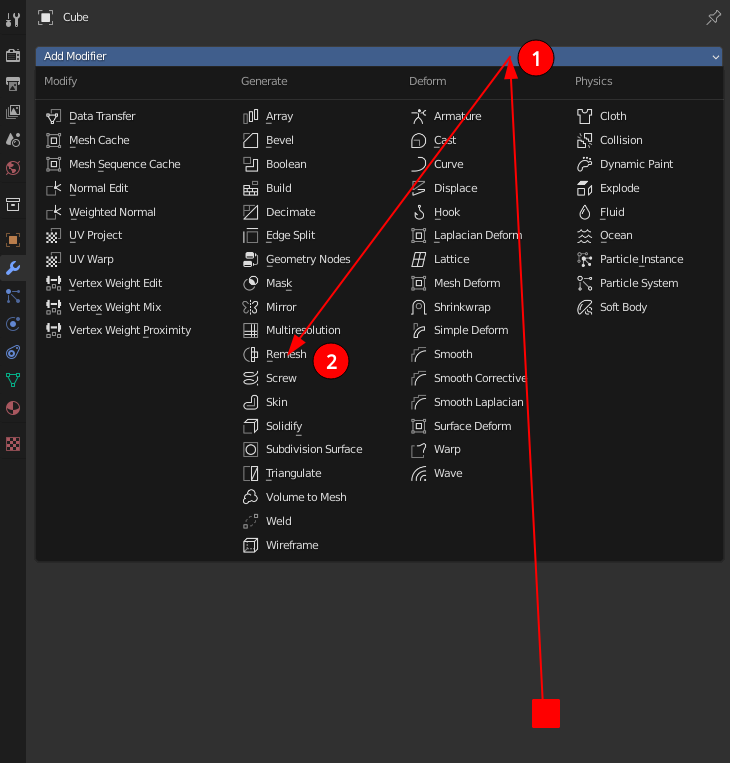 As highlighted, from anywhere,
any
menu item is at maximum two main mouse moves and two clicks away. (calling the menu via hotkey reduces this to 1 for both of them)
As highlighted, from anywhere,
any
menu item is at maximum two main mouse moves and two clicks away. (calling the menu via hotkey reduces this to 1 for both of them)
This is the 'new' menu.
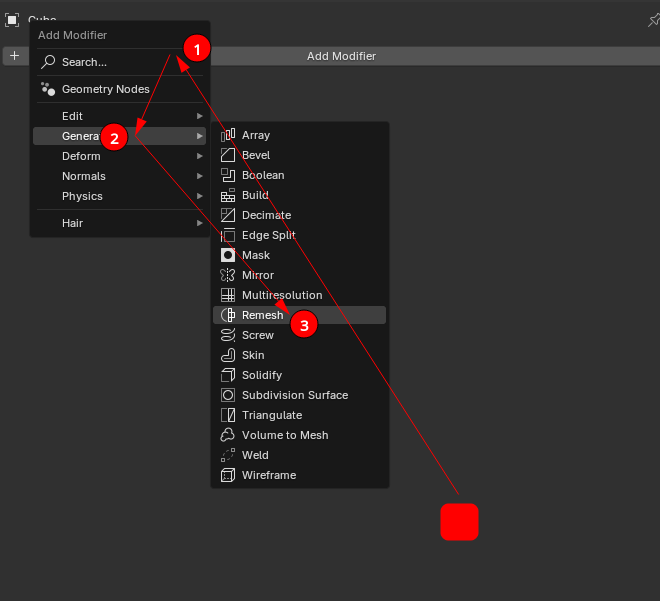 With the exception of Geometry Nodes, all modifier items are now 3 movements
and
3 clicks away.
With the exception of Geometry Nodes, all modifier items are now 3 movements
and
3 clicks away.
There is also another thing that the 'old' layout can do, that the new one cannot. Menus in blender close when the mouse is moved off them (expected & intended behaviour), and because the 'old' layout is effectively all these new submenus stacked next to each other in a single element, moving from Generate to Deform is a single motion. Compare to the 'new' layout where moving from Generate requires a movement & stop onto the root menu, and a second movement & stop into Deform.
I've always found blender's ability to stay out of my way and let me get directly to what I want to be one of its biggest strengths. This gradual introduction of submenus all over the place is making the program slower and more cumbersome to use. There's a reason that an addon was made to revert the modifier menu to the flat show-everything style: It's simply faster to use. This isn't just about the modifiers menu, it's about the slow creep of deep submenus everywhere.
Don't shove everything into as many submenus as you can think of, it's annoying and slow.
3 Comments
I strongly disagree New menu for adding modifiers top!!! You can click on the add button and just tap the letter on the keyboard so that it will find the modifier you need You can press (F2 or F3 I don't remember) in the search menu and also write the first letters of the name of the modifier to add!!! And such a submenu is convenient for custom modifiers when working with Assets!!! And generally work at the computer learn to write with 10 fingers and type commands and your work will speed up!!!
Counterpoint: nowhere did I say to remove the search function.
Also, the time taken to lift my hand off my mouse to move to the keyboard to type, then back, is time wasted. If the search terms can't be done by the left hand at its natural position then it is an impediment to work speed.
Yes I agree, the submenu system is more cumbersome. It may be more beginner friendly but it has a cumulative effect on productivity. The most important goal of all UI changes in PRODUCTIVIITY software should have 3 values in mind above all others: Clarify the action being taken (hierarchy, progressive disclosure and proximity) Reduce mouse travel Reduce clicks necessary to perform the task
The submenu system only achieves the first goal neglecting the other two. The second two items are actually ergonomics related and have an impact on user health long term.