
UV Editor: Better 2D cursor Snapping
Currently snapping is fairly limited in the UV editor compared to the 3D view, and has just two settings: snap to increment, and snap to vertex. I often need to move the 2D cursor in order to scale or rotate selected UVs around a specific point, but unfortunately this doesn't work well at the moment and I either set the absolute position of the cursor, or use the shift+s menu to move the cursor to the selection, which is slow.
Note: I use left-click select, these problems may be different for RCS users.
Problem 1
: When I want to snap the cursor to a UV, I can't enable the snap behaviour temporarily, because if I press SHIFT+CTRL to snap, Blender will do lasso selection, and if I right click before hitting control, the cursor moves instantly, and will not be aligned to the grid. To get around this issue, I enter the exact grid value.
Solution
: Allow "Absolute Grid Snap", as with the 3d view snap.
Problem 2
: Vertex snap does not work at all for the 2D cursor.
Solution
: Maybe this one is a bug? Make the cursor easily snapped to UVs as in the 3D view. This will avoid the need to user the shift+s menu to position the cursor at a vertex.
Problem 3
: The cursor does not snap in grid increments relative to the visible grid.
Solution
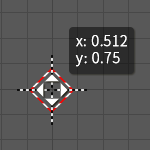
: Make the cursor snap to the current visible grid. It would be nice to show the position of the cursor, whilst snapping too, so the user can easily position it where they need it.
1 Comment
Noooooo! Just Get Rid Of That Thing Already! And "3d cursor" too!
Give us proper snapping instead!
I am not saying I have seen it all but snapping in Blender is by far the worst when talking application that are worth spending time with, Rhino being the best... Not even once I needed somehing like "3d cursor" in any of those yet I miss their snap modes every time I have to manipulate objects in Blender. (UV-Editor being complete hell.)