
Streamlining moving objects towards and away from view
Commonly, animation is done from camera view. And we do have pretty much everything necessary to animate like that, except one thing - moving objects back and forth
Right now it is usually done in two ways
- Get out of camera view, change the position of an object, get back into camera, check if objects are where they're supposed to be, and repeat all of the above to tweak it
- Switch transform orientations to "view", move objects, and switch transform orientations back
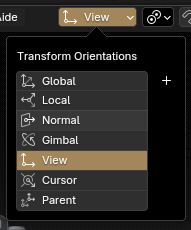
It also gets worse with the transform orientations shortcut being away from regular keys on the right side of the keyboard ( ,< ) and the inability to put orientation modes into quick favorites (Q)
The problem is clear: a lot of unnecessary back and forth regardless of the chosen method
We could just add a modifier key to the "G" shortcut that would restrict objects motion to the view's depth
 Perhaps double-clicking it? That goes along well with the behavior of rotations, where double-clicking "R" gives us another way of manipulating them
2 Comments
Work with 2 view ports, one in camera and the other not. Move objects in any orientation mode you prefer.
Hey, thanks for the advice
However I do so already and I was taking this into consideration when writing the suggestion. The feature remains desirable still
Aligning object to camera from second viewport does require you to approach object from a very specific angle, which is still a bunch slower than to "scale" it from the camera
And the second viewport would work with this feature well too by removing the necessity to snap into and out of camera every time