
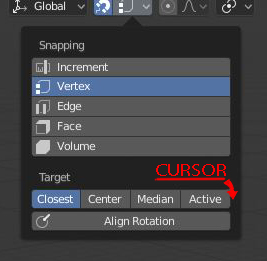
choose the 3D Cursor as a Snap Target
Hello
this could be a cool idea and i feel he deserve the place there , people would stop merging the center of the volume into the 3D cursor all the time just for doing a precise snap operation.
AND , it respond to this demand , its as fast , no need for a new move tool blender.community/c/rightclickselect/3Dbbbc/cad-like-snapping-objects-by-basepoint
any comments ?
4 Comments
wait, I'm missing something: how is this to behave differently from "selection to cursor"?
It behave the same , you just don't have the paint to go to edit mode , Select your point , selection to cursor , go to object mode , shift ctrl alt c ... look at the link He gave , this cursor snap is exacly a solution to this mess
@dorianborremans: still don't get it, I mean the link it's pretty clear in showing the request (and I agree that it would be a very useful option) I just don't see how using the cursor as a target for the snap would achieve that. As presented in the picture it would behave as a target, it means that the object you selected would snap to the cursor (same functionality of selection to cursor as I said) but you would still have to position the cursor where you want the selection to snap (i.e. going into edit mode, selecting the vertex you intend to snap to, cursor to selected and back out of edit mode) ... ... or as I said I'm missing something obvious
The obvious thing you are missing is the ability to snap to the cursor on specific axes. Currently, "Selected to Cursor" affects every axis the same.
Being able to snap to the 3D cursor on 1 or 2 axes instead of all 3 unlocks a lot of potential.