
Negative transform (extrude / move / rotate) defined by mouse direction, without the minus sign (-)
Sorry if this feature is already implemented but I haven't found an option in blender to change the need to include the minus sign to have an extrusion in the negative direction of the axis.
Most softwares (like Autocad, Revit and Sketchup) uses the direction of the cursor to know what the user wants.
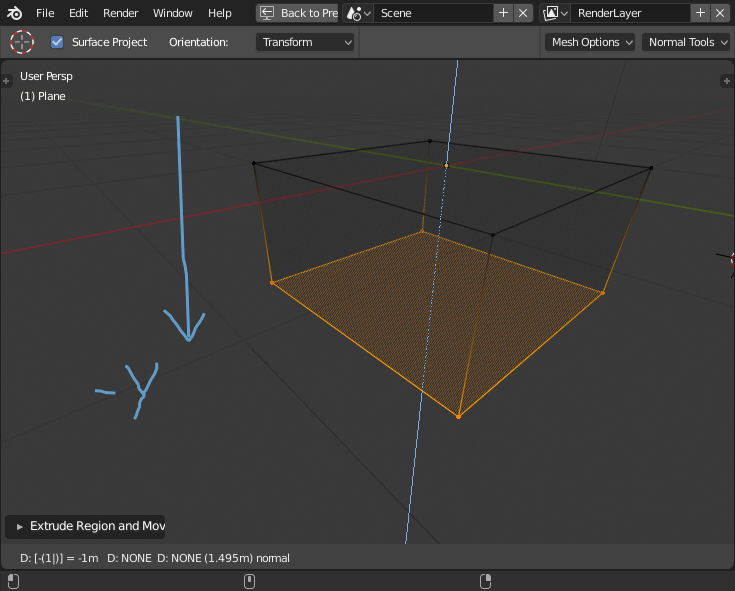
If I want an extrusion of -1 in the Y axis then the software should guess by the cursor going down after the command.
It's annoyng to drag the mouse down to see a preview of the negative extrusion and after pressing "1" the preview goes up and then you remember to include the minus sign and it goes down again.
This should also apply to move and other commands when applicable.
IMHO, it should at least be optional because it's more intuitive and time saver.
10 Comments
This is a very good and important proposal. I've been fighting with this quirk for ages. You have the same problem in all Blenders' transform operators that have numeric input. This is a much more intuitive procedure.
The absolute negative / positive direction in extruding / moving / rotating while doing transformation operations is too complicated. It is just too slow and prone to errors, we are constantly rotating our point of view and often do not know / care which direction is positive. This is especially true for the rotation, which even has one logic in ortho mode and a different one in 3D. I get frustrated every time. Often i have to redo the operation because my move / rotate command was in negative direction. I just don't have the time to check every time the headers if i am going in the positive or negative direction. It just does not matter, just transform the selection in the direction i started to move the mouse, in the amount i typed in. Easy and simple!
Feel free to modify the title to sth like "Negative transform (extrude / move / rotate) defined by mouse direction, without the minus sign (-)", or similar, there is a chance you will get more upvotes.
@Okavango: Thanks for the tip to change the title. It wasn't really clear.
Not only extrusion: also move!
Did anyone find a solution for this ? still very annoying in 2023, especially when you come from other CAD programs
I would love to know if there are any updates; it's one of the few things that is keeping me from fully transitioning from SketchUp to Blender.
Not only extrusion and move - also rotate!
Wow. SEVEN YEARS?
Currently this is my single most annoying UX complaint with Blender's polygon modelling.
It might feel like a small thing, but take the following example in Blender 5.1:
So why do you now have to correct the direction 50% of the time with a minus key?
This is not a feature request. It's a bug report.
what I told on dev talk. they often don't think about ergonomic things and automatic
I don't think this makes sense. The user would sometimes press the minus key to go in positive direction.
@Josephbburg: Thats the idea. If the user press the minus key the extrusion will invert even if it is already in the negative direction. Softwares like Sketchup, Autocad and Revit works like this and it's very intuitive. In Autocad, if the user really wants to use absolute coordinates he needs to press the @ sign first.