
Snap scale transform only to visible grids in viewport (Useful for architecture and hard surface modelling)
Hello guys. I would like to propose a feature that would allow user to set the transform snapping only on visible grids in the viewport.
Currently I believe the snapping still considers the smaller grids that are not visible while using the viewport orthographic mode.
Thanks.
12 Comments
if you turn on absolute grid snap it works like you propose.
* @rabatin.dominik * which version? Ohh i see it's just broken in 2.91..
* @rabatin.dominik * I believe that is not the case. I am using blender 2.90 release. The transform stills snaps in the sub grids that are not visible.
My proposal is specifically implying about the lines/grids that are only visible. Not the grid snapping itself but specifically the visible ones only.
* @johnpdelacruz26 * it works for me...
* @rabatin.dominik * I updated the title of my post. Try doing it with scale. You are right it works on move transform but the scale transform doesn't include absolute grid sapping.
* @johnpdelacruz26 * than I think it's a bug and not a feature request
* @rabatin.dominik * Probably. But I hope this would be fixed.
it uses initial position then it use visible grid size for displacing incrementally. this propose seems about snapping to absolute grid. so it really should work this way
* @impacman * I believe that is not the case. I am using blender 2.90 release. The transform stills snaps in the hidden/sub grids that are not visible when you zoom out.
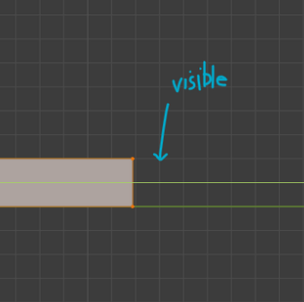
My proposal is specifically implying about the lines/grids that are only visible. In the image sample above. You will see that the transform still snaps to the invisible sub grid.
* @johnpdelacruz26 * Nope. Please confirm that you turned on Absolute Grid Snap and try again.
Your proposal is really to make Absolute Grid Snap on the default which I think almost everyone would agree with.
* @thinsoldier * I may have to update my post. I see what you are trying to say. The move transform already implements absolute grid snapping.
I may have failed to specify the scale issue. I believe the scale doesn't implement absolute grid snapping.
* @johnpdelacruz26 * Yes scaling with absolute grid snap on and Affect scale enabled is not working as expected.