
Subdivide Curves the Blender Way
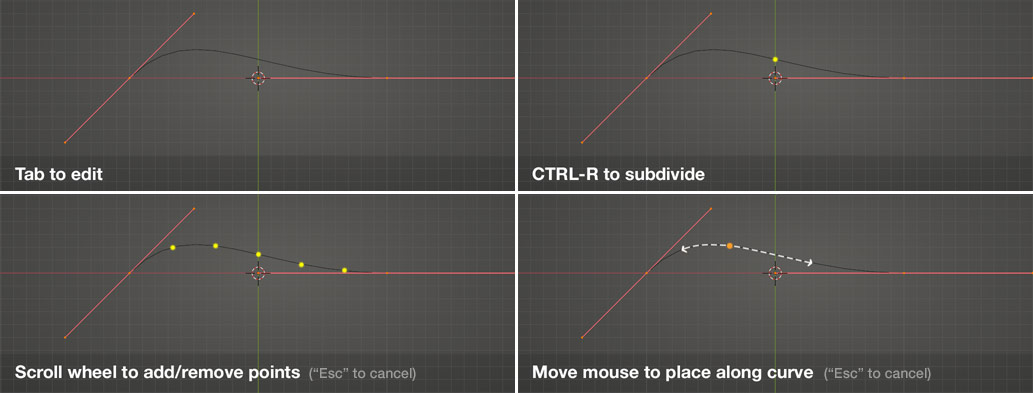
Here's a suggested workflow to be able to add and move points on a curve the Blender way. It involves subdividing using CTRL-R, similar to the way loop cuts are made on mesh.
Process:
- Add curve
- Tab into edit mode
- Press CTRL-R to start subdivision process
- Roll mouse wheel to add subdivisions
- Left-Click to set amount or press "Esc" to cancel subdivision.
- Move mouse left/right to slide anchor point(s) to desired location along curve
- Left-Click to set location or press "Esc" to cancel move.
Additionally, it would be super useful to be able to press "GG" to slide anchor points along curve/spline.
4 Comments
I think you can use subdivision/resolution setting of the curve OR why not use just a mesh object like single vertex for this purpose. Also if you subdivide the curve like that then it will difficult to handle those points when you tweak them
* @mrajendra2150 * Also give a try to the addon "Bezier utilities"
* @mrajendra2150 * Good find! Thanks m8!
Sliding an ancor-point is not always possible as you loose a degree of information. This might cause unexpected behaviour. other than that, I'm all for it.