
Canvas Interaction : Better Sculpt Navigation [Sculpt Mode] Drag Outside Sculpted Model
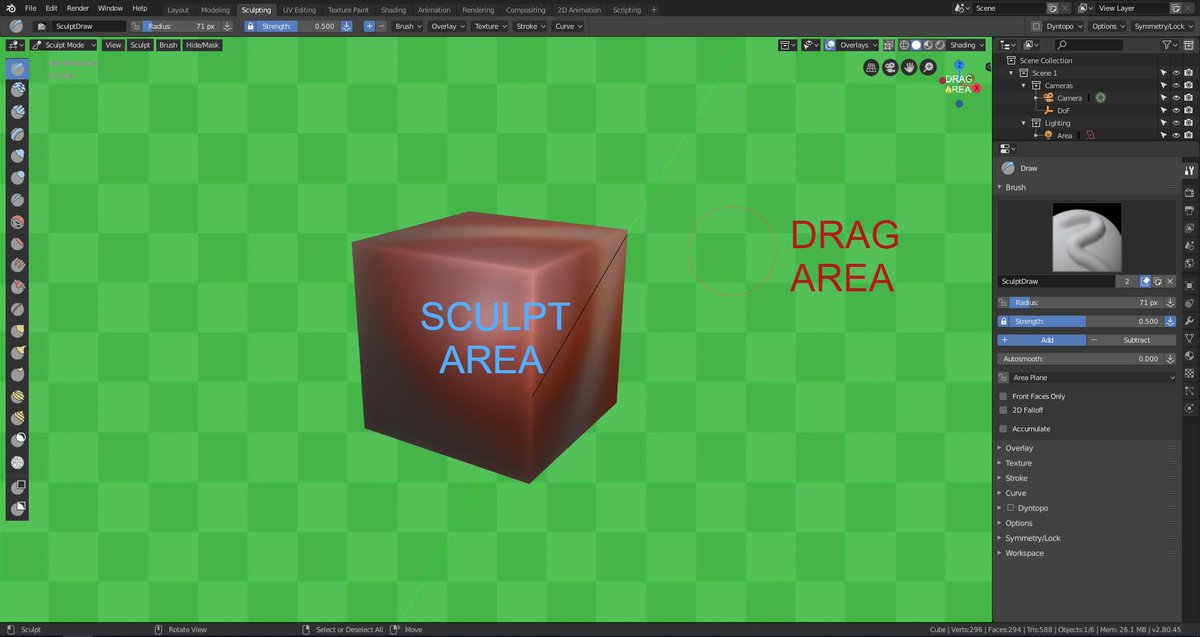
Blender 2.8 lacks "Canvas Interaction" , for example . Point at a mesh and you Sculpt; But when you point OUTSIDE the model you do other things and:
Click+Move to Rotate view around the mesh.
Alt + Click+Move to Drag view Or for example.
CTRL + DRAG Outside The Model to clear masks easily !
SulptGL has the navigation that blender Sculpt mode should have , without needing to hover your Pen or Clicking on a small thing on the top Right
"MouseLook Navigation" addon did this ,but it is not in production since around blender 2.6 , so there is no way to get a Tablet Sculpt Friendly tool for now
Would be GREAT for TABLETS🤩 [the reason why blender sculpting is super hard to use its not the Polygon Limits ,but Tablet Navigation]
Here is an IN-DETAIL video that i made about the subject matter and a bit more that helps to improve the Sculpt Mode youtube.com/watch
13 Comments
I'm upvoting this, the navigation needs some work! Just downloaded 2.90 and tested sculpting for the first time in Blender. Just after 15-20 min my left hand is cramping after using the "emulate 3 button mouse" feature to navigate in the viewport.
Other than that it feels great to sculpt in Blender. Haven't done any sculpting since early 2017 but that was in ZBrush. Will take some adapting as my muscle memory still try to use ZBrush navigation.
* @rubenhansen94 * Google MouseLook Navigation , it is not native ,but it is an addon that does the zBrush navigation pretty well! I like it , You might have to turn it off when doing non sculptural things
Yeah, I think it's possible. Then Upvote. For those who use a pen instead of a mouse is the best option. In fact, pens are already the standard of the 3D industry for a long time. In the future we may even have interactions with VR. We can not just limit ourselves to the three-button mouse.
I loved your interpretation of the problems of Blender's sculpture mode compared to ZBrush's! What else do you think is missing? Or that already has but needs to change, or adapt to some standard? Or even something that already needs more improvement? Here is a video that shows that ZBrush has many tools that software like Blender already has. They just are not in the same places of course:
youtube.com/watch
* @thiagocavalcantecarvalho * well thank you for listening and responding :) , well that's why my main issue was navigation , rather than general tools ! ,blender is wonderfull in that regard , One thing that i use a lot in zbrush is
TRANSPOSE TOOL , its basically a tool that procedually masks an area of a model , by using a ruler to drag the area ,it follows the topological flow in a way , and is not viewport based only its more like a MESH based mask (for example you can mask from , Shoulder to Elbow by doing this
youtu.be/QLyWHI3_irI
* @porkeehunporki6669999 * it would definitly be a great tool to reach unreacheable places, or just by doing things in a more procedual way ,
BY giving the 3D Cursor an even bigger Role :) and make Left clickers actually appreciate it
WUT? I use middle mouse button and pen button for rotation, The same with control to drag. Anywhere. No area split. So it is all okay with tablet navigation
* @ Vyacheslav * not everyone has middle mouse button , plus it is not comfy to use in a sense , the fact that you are not Drawing on it to do it is annoying to me personally , you can middle mouse and Hover ,which is a big meh
then alt +m ? to clear mask? that is too disruptive ,even putting it on another key combination makes it hard , but its not as big as disrupted flow when navigating
* @porkeehunporki6669999 * I see the problem. Imagine complex sculpt with curvy silhoette and holes and you are working on the edge (drag). You miss. Sculpture rotates. The same for painting, especial with stencil. You miss — you lost proper position. So find decent tablet with buttons or cheap button-panel if you don`t want to use main keyboard. Or use softkeys (many tablet have theese). Or emulate mmb on the keyboard.
So I can agree to your variant only as option out of default keymap. If you have pen only with tip, and no eraser, no buttons, no softbuttons — it is not situable for professional work and professional software.
* @ Vyacheslav * dude .. SculptGL , Sculptris , Mesh Molder ecc , are all free and can do what i said , yet blender has to make you hover your damn pen .-. , i don't understand why everytime someone mentiones zBrush , 3dsMax Maya ecc they have to not like the idea , what i'm saying i can use ALL THE TOOLS ABOVE insthead of blender ,but i'd prefeer for blender to be tablet friendly , i do have some buttons on my pen but i lost the springs so now i can use only 1 button and only the tip , so only right click and left click.
there was even an addon in older 2.60 versions or something around that , that made blender behave like an actual sculpting program in Sculpt mode , thign is no one is updating the addon no one is doing anything with it
* @ Vyacheslav * blenderartists.org/t/how-to-navigate-in-sculpt-mode/512839 You can't disagree with this one tho! navigating around the last point sculpted is also pretty great for sculpting
For now what you can do is Sculpt on a point then press " . " on the numpad and it will refocus
* @porkeehunporki6669999 *
Upvoted. This is vital for working on touch tablets.