
File Browser - Save or edit, remove the .blend
Hi
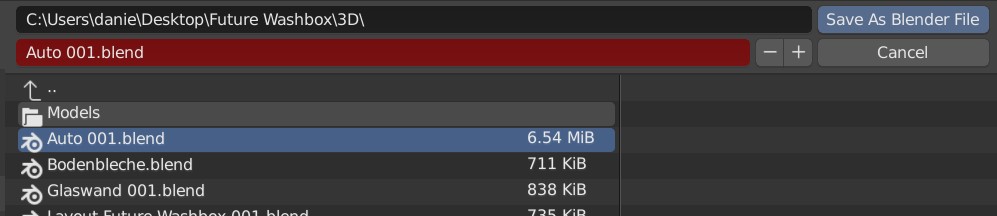
Please remove or hide the .blend in the file browser on the input field (screenshot the red field). Every time to save a file, this .blend is not necessary to see. Alternatively, everything except the .blend so that you can directly write the filename.
Even if you edit a file name. A .blend or .jpeg still has the same ending after the file name change. It is not necessary to change the file ending in blender.
Thanks
4 Comments
Ok, save your file. And now create an other version... like V1, V2, V3 or wath else. Every time you have take your mouse and get to the right position (before .blend), and type the text wat you want. Type V1-A or V1_Test, in booth case you have to move the mouse. The little plus icon dont help you.
Thats not fast ;)
An other version of my spoken problem is: Ad (in the screenshot) becor the "001.blend" an other Text. The way you have go is thake your mouse an klick on the right position or ist the input field not selectet, move the mouse to this, klick, press on the keyboard the arrow to the right and nine times the left arrow.
If the .blend removed you have minus six step plus one more. With five you are faster... also you edit a V1 to Vc.
It's your personal experince, my is that the keyboard are faster tat a mouse in all other "Save-Filebrowser" exept blender. This is not meant bad, it's just a suggestion that annoys me for well over 18 years.
Thanks for reading
* @Ein Kaiser * That's why there's a + button on the right of the filename field. You can also use the <kbd>Numpad +</kbd> button for even faster access.
Please no. The file extension is part of the name. It may be nice if Blender adds that for you, but not showing it is something I personally don't want at all.
* @Jason van Gumster * I agree. If you have a project with different types of files with the same name it's important to avoid the ambiguity.