
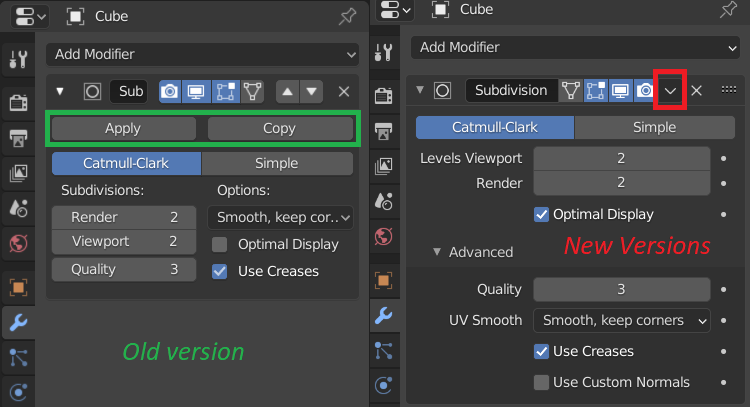
Old Modifier apply button
Having the "Apply" and "Copy" buttons in the modifier panel was very convenient as it was in the previous versions. The new small drop-down menu for "Apply/Duplicate" since version 2.9 feels pretty cumbersome. It would be really awesome to have it the old way.
11 Comments
You can SHIFT D to duplicate, CTRL A to apply, and X to remove, much faster than buttons.
Yeah, the "Apply" shouldn't never be under that drop-down menu... No idea how they came up with this weird stuff lol..
that's not the point though. I'm an experienced user and I know the shortcut, but It's been like muscle memory for me to just change the slider and hitting the button, specially for boolean or decimate etc. Also, a lot of new users will be confused IMO because the dropdown menu looks so hidden. I don't think it makes the user experience any better to have it hidden.
U can try using the shortcut (Ctrl+A). It feels much better than the old button.
* @Ge Ro * Also it allows to apply without expanding. So new version better all ways
Totally agree,older version was better. The people who defend it because of the "Ctrl A" shortcut forget not everyone using the software has two fully able hands.
I think that hiding the "Apply" button in this " v " drop-down menu was a bad UI design choice. And it seems that there are many Blender users who are confused:
developer.blender.org/T80309
developer.blender.org/T77590
blenderartists.org/t/2-9-missing-apply-modifiers-button/1251134
blenderartists.org/t/how-do-i-apply-modifiers/1256500
reddit.com/r/blenderhelp/comments/iob46k/blender_29_modifiers_have_no_apply_button/
reddit.com/r/blenderhelp/comments/i08mt2/cant_apply_modifiers_in_blender_29/
blender.stackexchange.com/questions/193185/how-to-apply-a-modifier-in-v2-9
Hiding the most used functions is what happens when there's no ui/ux designer with 3d background.
Alternatively you can use the "Modifier List" add-on:
blenderartists.org/t/modifier-list-1-6-2/1147752
With the additions of shortcuts, it's basically the same speed for me. But there should be UI layout options in the preferences, since everyone has different preferences.
I think it should have as optional. As animator, i would prefer the new version because we barely touch those buttons. But as modeller, those button are needed the most. Maybe switching from modelling to animation mode switch these for example?