
Dual-Mode inputs using Closures - Design Idea for Geometry Nodes
Blender 5.0 will come with new socket types for bundles and closures.
In this post, I will try to explain a design idea I had regarding the Bundles and Closure update. My design may not be the best fit for the idea, but I would like you to read my post mostly thinking about the IDEA rather than the design. But if you reader happen to be inspired by the idea and have a better design in mind, I would love to share and discuss about it!
The idea came before Closures were announced: What if we could bond inputs from a Node Group/Modifier with a side operator the user have control on, without flooding the Node Group with extra inputs for everything. The idea came mainly during my attempt at creating a fully controlable and user friendly Tree generator tool with Geometry Nodes. -> In Speedtree, each value affecting the tree has little icons on its right, you first set a general value, and then clicking those icons pops up a small window with some operators, such as adding randomisation and controling the main value with a Float Curve. Here's how it looks:
To have similar control behavior in Blender, it was previously complex (4.5 and below), and to illustrate the previous difficulties, and current solutions (and of course future potential solutions for clean UI/UX) I will give the example of a tree generator, so it correlates with the Speedtree example:
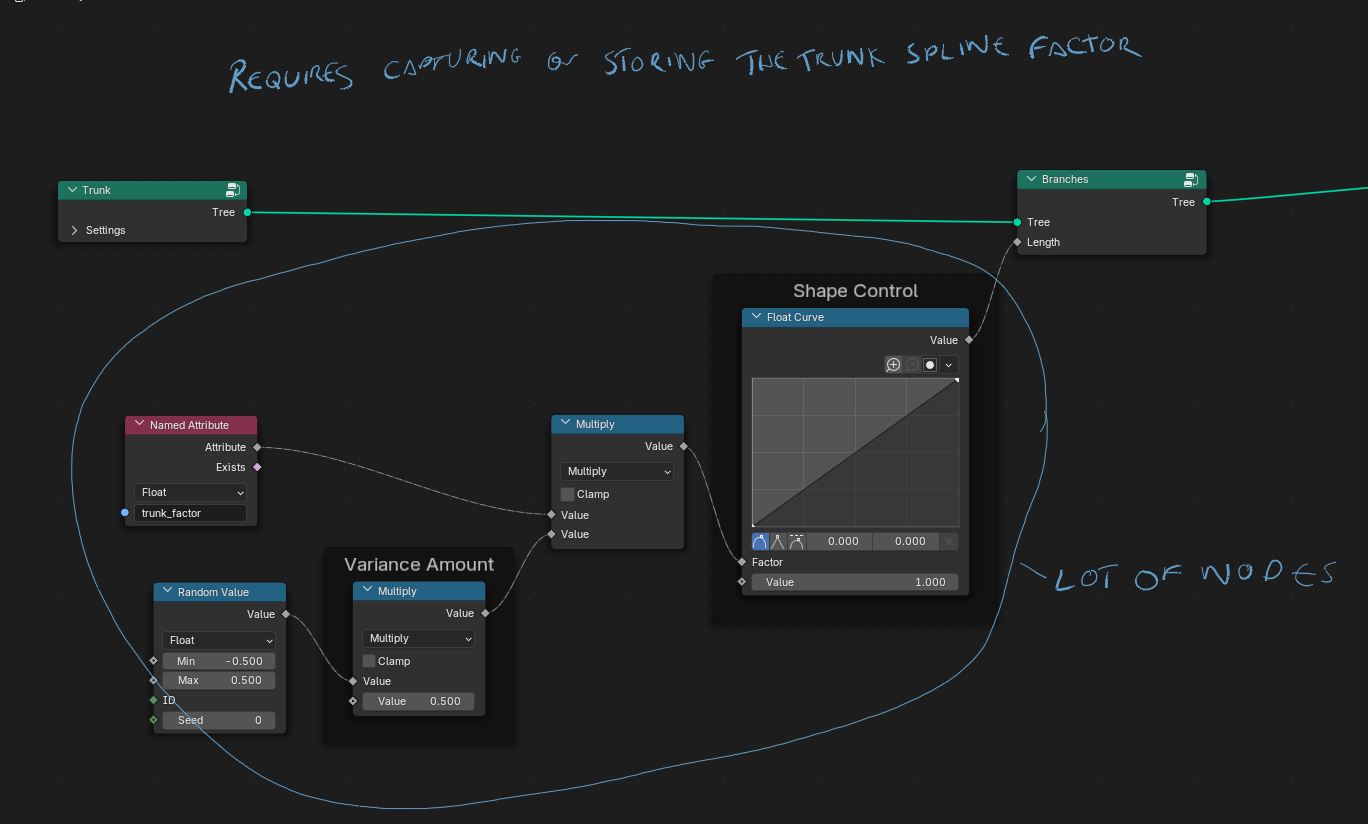
Let's say we have a trunk curve, and we want to instance branches on it, but have some parameters be affected by the factor of the parent branch (the trunk here), so for example the length varies depending on it's position wether it's far away or close to the base of the trunk/parent branch. Previously, we either had to completely close the control to the user (or he had to enter the node group and modify himself the operations) or provide the user a separate node group just for that, meaning we have to override the original value in the node group, and mostly outsource the attribute it's being affected on.
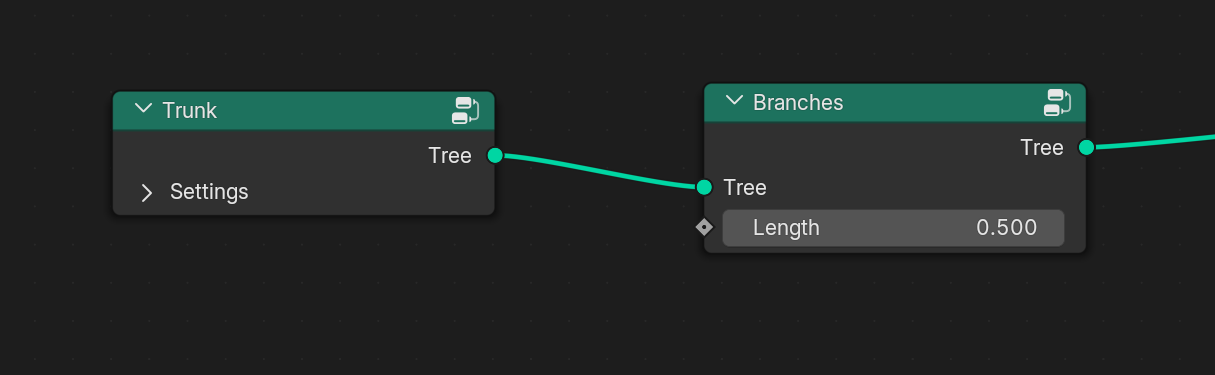
In this screenshot, we would expect the user to pick a length for the first set of branch, and they would all be of a length of 0.5. If the user wants to have smaller branches at the base of the trunk, this could be the best option:
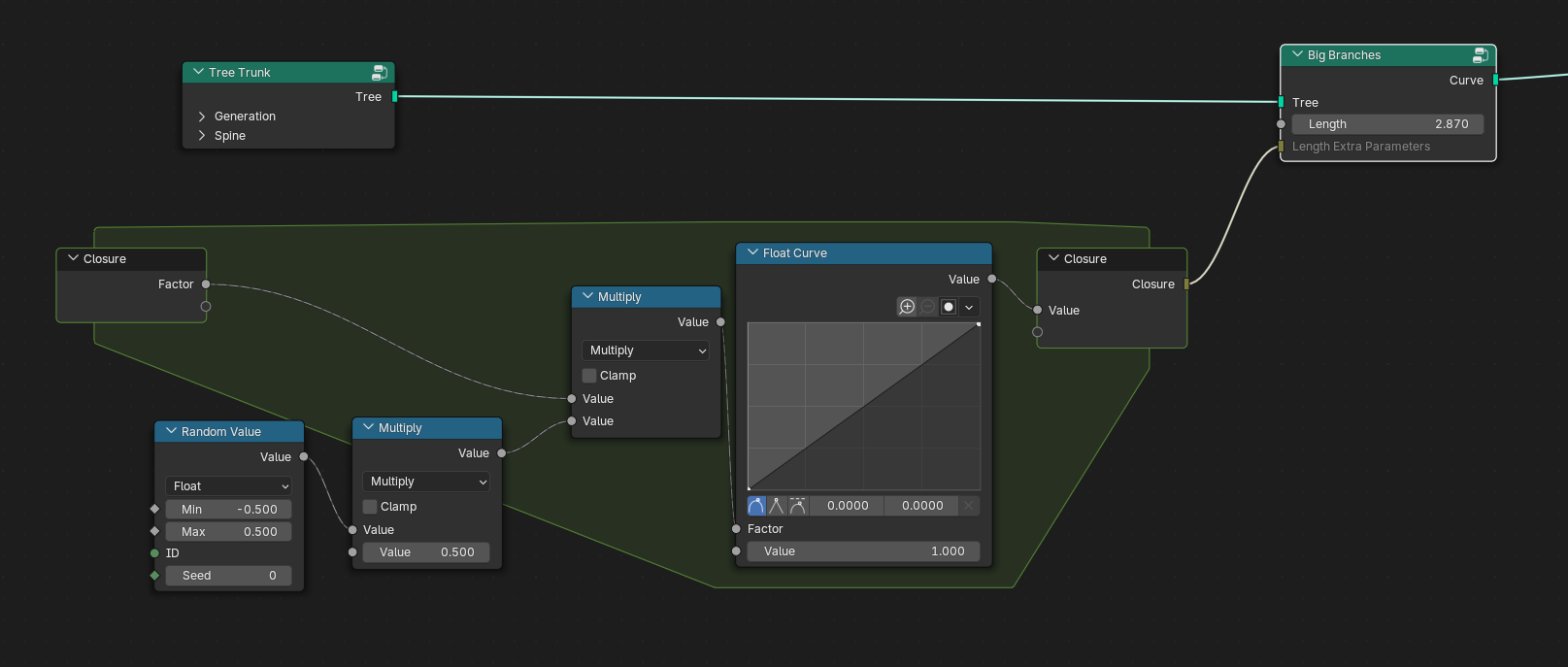
Now, with the upcoming closures, the messy nodes are a fixed issue! Especially with the ability to give access to ramps and curves directly in the node groups. Here's how the updated version might look like:
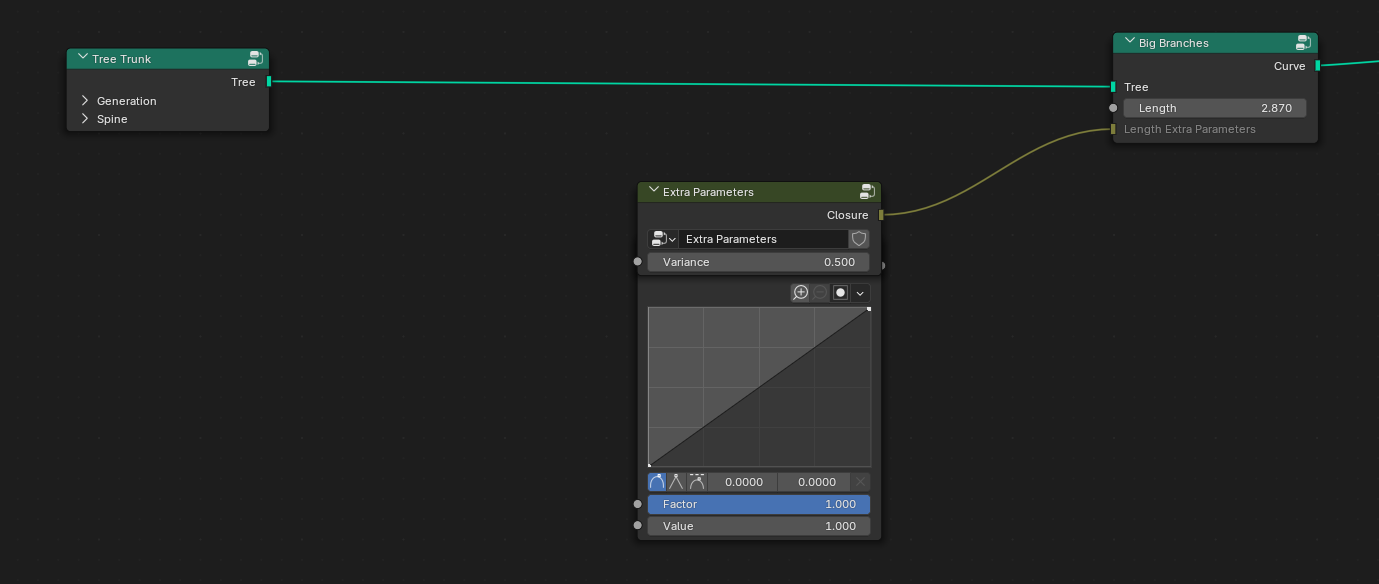
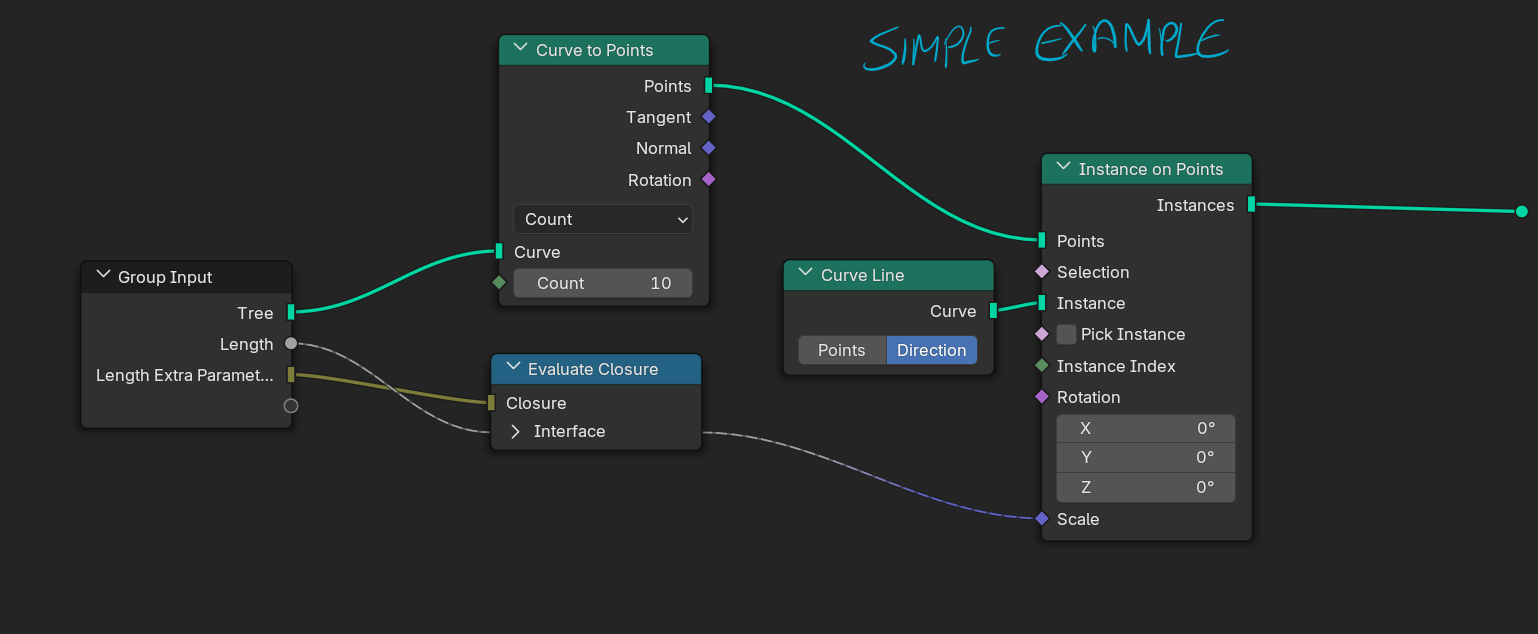 And actually, nothing would stop me from directly giving access to all those parameters with inputs in the original node group! Directly having the Float Curve here below the Length float input.
But here's the issue that is not solved :
And actually, nothing would stop me from directly giving access to all those parameters with inputs in the original node group! Directly having the Float Curve here below the Length float input.
But here's the issue that is not solved :
While this is technically a working option, avoiding the users to enter any node group, it might not be ideal for a node group with many inputs that all requires the possibility to be modified through a closure. In a node group such as one for instancing branches, you will have a numerous amount of inputs: Length, Angle, Radius, Gravity, Noise Amount, Noise Turbulence, Twist, Chance of breaking and many more. Having Float Curves, ramps, and float inputs for each value floating around in the node tree, these will take most of the space! Even hiding them in Panels would take a lot of space. (Imagine having a Panel, or a Closure input for each inputs, it would work but is not a properly breathing option)
And what if I would like each inputs (let's keep thinking about the Length setting) to have default "Extra Parameters" values: Let's say we only have a Variance float slider and a Float curve; I want the user to already have varying length, smaller at the tip, and longer at the base, and some variance in length, and the overall shape is kind of circular - And of course, the user would be able to change it, without overriding it. At the current state of the Blender 5.0 development, there is not proper way offering this possibility without clogging the node groups.
Here's my design idea:
Dual-Modes inputs, a small clickable button on the right side of a regular input, temporarily opening a popup with the other input that you can change, before it disappears when you click away.
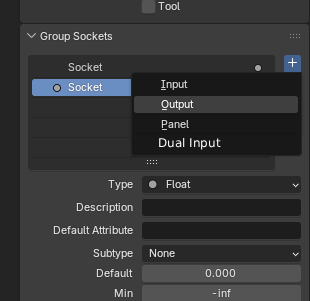
Adding a dual input, in the sidebar would act as a "Panel" making the active selection the "Parent" of the "Children" inputs. You could add for example a simple "Float" input below one, and outside the geometry node it would look like that:
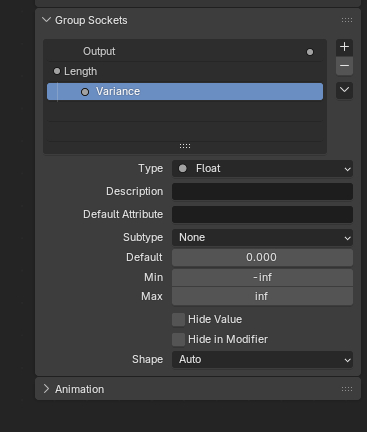
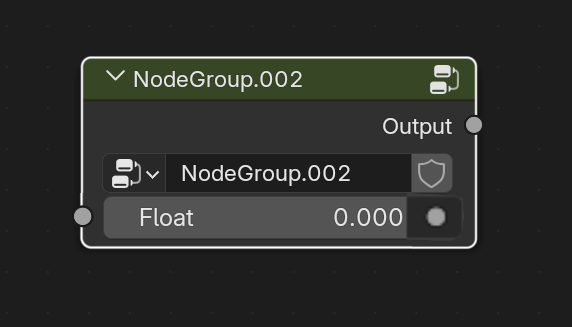
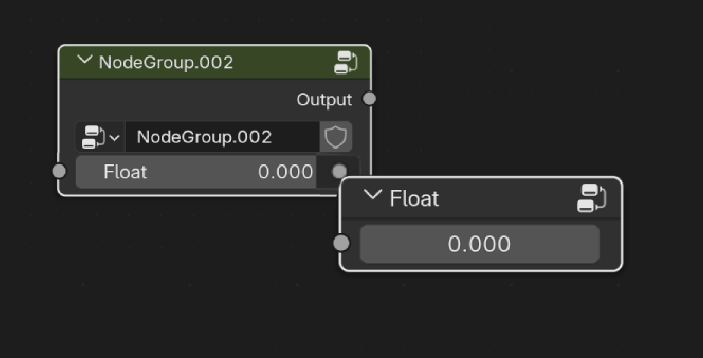
As you can see from the illustration, maybe a little button could appear on the right, with a little color icon representing the data type. Please note that for the illustration, I did a terrible photoshop edit haha, and just placed a node tree on top of the other one, but you could imagine it would look slightly different.
Just to demonstrate the power of this idea, with the upcoming closures and bundles, you could set the data type of the "Sub-inputs" to Closure, and display a Float Curve as default, and essentially allow users to create a shape that will affect the original input value. It could be layered with a second Sub-input, and it would be perfect for a tree generator tool like mine: Give access to a variance amount, and a Float Curve for perfect shape control with clean UI.
I am aware this idea has major design flaws, and the ones I can point out directly are these:
-Blender does not currently have such a thing in it's already existing properties. Not a single modifier or any properties offers a pop-up window with extra controls. This might be conflicting with Blender's vision and maybe too extravagant of an idea.
-What is the purpose of showing inputs tied to another if they're technically not tied inside of the node group? With the current design idea, an input could be simply used for different purpose than changing the Parent one
-Should the editable inputs in the pop-up get a linkable socket ? I can hardly imagine being able to plug something into the temporarily visible inputs, since once they disappear, compared to a panel, where should the link go ? And if they are not pluggable sockets, are they really inputs ?
All these problems make me believe my idea may not be doable in Blender, but I'm sure we can find a better design idea, benefitting from the upcoming Closures.
Thank you for reading, and please comment or contact me (maximegerardincontact@gmail.com) if you have better design ideas, or slightly different idea that may correlate. I'd love to discuss further into this
1 Comment
A much better way for controlling curve mappings and curve profiles and color ramps from a node group would be to add new socket types for them in the source code, or finding a way to add them to existing sockets, or make one socket with multiple subtypes for curves or color ramps. If the subtype option was used, it might work best when inputting values to it, to make it work like the menu socket, which sort of works backwards. What i mean is, if it were one socket with three subtypes for curve mapping, profile, and color ramp, its default_value attribute could be a property of type bpy.types.CurveMapping, bpy.types.CurveProfile, or bpy.types.ColorRamp depending on the subtype. This would then be displayed on the interface, using whatever the C code version of template_color_ramp etc. is. when inputting a value to it, for example with a group input node, or with a constant input node, if one is added for it, to work the same as the menu socket, with a message such as 'Undefined', with a question mark icon, which will display the input value once it is connected to an input on a node. If the non-subtype option was implemented (separate sockets for each type), then this functionality would not be necessary, but if the option for one socket with three subtypes was chosen, then the functionality of not displaying the property in the socket until it is plugged in would make sure that there are no conflicts from different subtypes, for example, plugging a socket with color ramp subtype into a socket with curve mapping subtype. Another option would be to mark the links as invalid if the subtype is different, and act as if it was not connected.