
Multi Target Shape keys
Shape keys are awesome technique in all 3d packages, in blender what is really missing is ability to add multi target to a one Shape key.
As you can see in the sample .gif below the blue eye have a multi Target in it's shape key as the targets are in row next to it(green eyes), so it is opening smoothly without penetrating to the eyeball. in the other hand the red eyelid have just a completely open target as a shape key and because of a liner deformation nature of shape keys it is penetrating to it's eyeball...
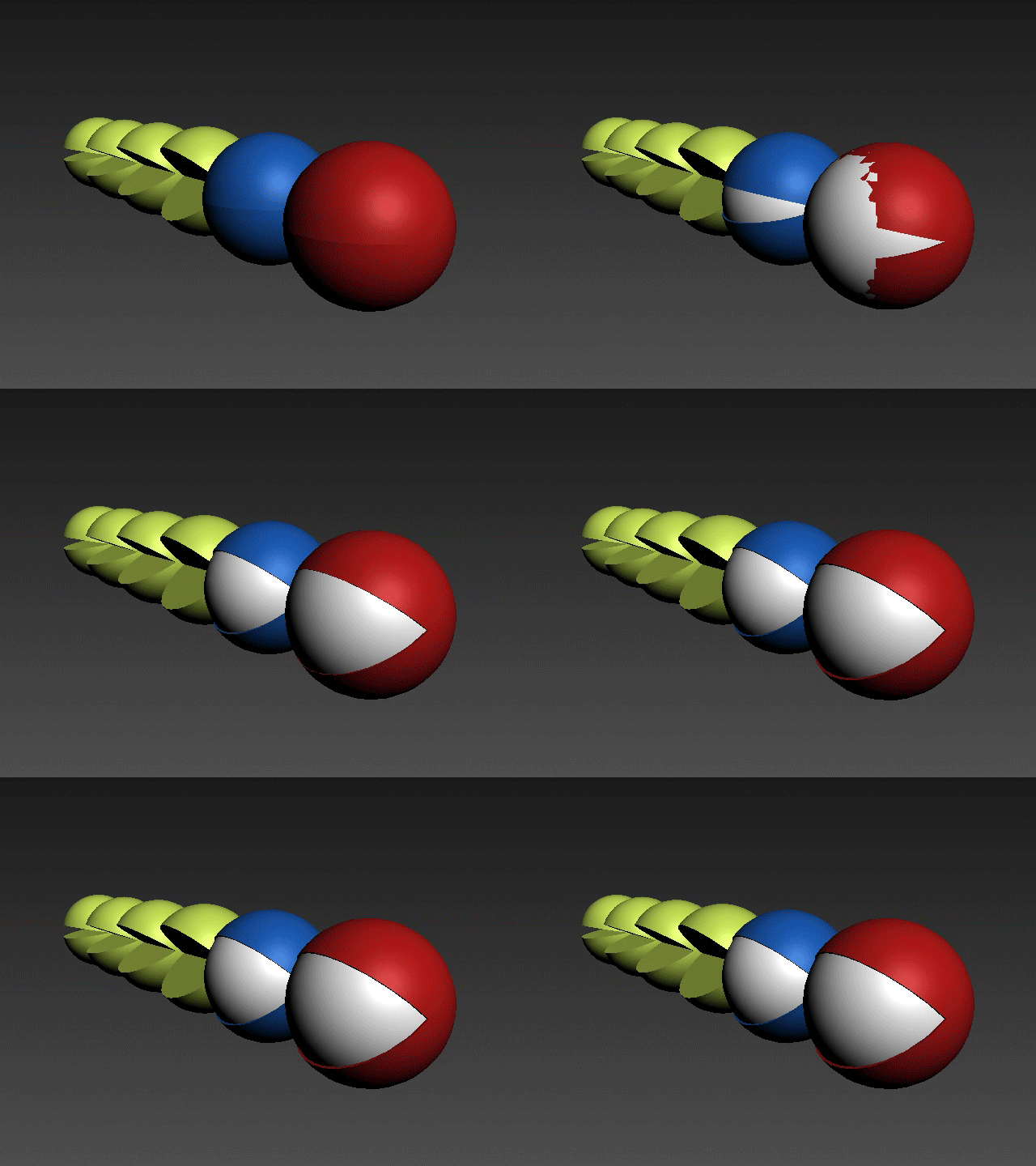 I know there is some trick to do this in Blender but it needs to be clear and easy way to do, with all shape key functionality supported, like mirror and etc...
So for UI part I think there would be nice to able to select a few shape keys and turn them to a new shape key or just a group with a slider that automatically add all selected targets with a proper percentage to act with main slider...
 sorry for my English, hope that I could explain myself enough.
14 Comments
One of the rare things I miss from 3DS Max.
* @-L0Lock- * same here
the idea to group them, and have them as one grant shape key would be nice. could be nice for complex facial expressions as well.
* @peter.boos * I hope we see this feature soon in Blender.
this feels like a feature keymesh would introduce
* @AnityEx * I'm one of the big fans of KeyMesh feature in blender. hope we get soon in here.
Not the exactly the same, but I made an easy way to set up same effect by driving multiple shape keys just by one click.
* @nevilart * just wonderful thanks for sharing it with us, Bro.
I just do it in a naming based system, but could be based on referencing the set states -
* @3dddan * and I know the way that Danny explaind in his great video, But these are a long and time consumption ways of doing this...
* @aslan.tamjidi * Something like the Maya shape authoring would be neat. There'd be also the need for live shape keys though.
* @3dddan * I don't know about Maya but I think this is pretty neat. one shape key got multiple Target, some call it intermediate shape keys...
a way that we got it easily and it fits with blender standard will be perfect.
Yes. This is a huge need. At the same time, it is very important to be able to export to Unity and Ue in this way when we export. Solving it in Blender with Drivers is not enough. It makes us very sad to go to 3dsmax for this. The great savior Blender. Please save us again, as in almost all matters. ♥
I didn't know about that Feature Request when I made mine a few months ago…
blender.community/c/rightclickselect/mYE9/
The general idea is the same, but I address the simultaneous integration of both features that Blender's Shape Keys already possess: Relative & Absolyte systems; although you can't combine both —which is the reason we're having lots of trouble with workarounds.
Basically, you'd pick that UI image and on the "Targets" you'd have inner Shape Key Time (just as it is when you turn OFF Relative Checkbox (then you toggle the Shape Keys Panel system to "Absolute" instead of "Relative".