
Quick Key Value info + Quick Key value access
Hello all , as a fresh new Blender user ( before C4D user ) , I'd like to propose you something which I miss a lot in Blender : a quick display and quick modification of a key value ( in the curves ) :
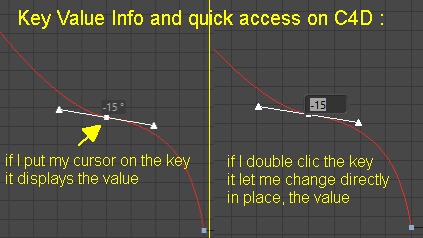
please have a look at the small screenshot joint : it shows a curve where I just put my cursor over a key ( on the left ) and automatically it displays the value . On the right I've made a double clic on the key and it allows me to modify it on the fly ( no need to go in the attribut/coordinates panel etc , we talk about quick access there ) . That's very usefull for working and staying in the Curves panel .
What do you think ? would it be possible to get something similar ? Thanks for your time .
4 Comments
This would also be nice to be added inside the transform functionalities in edit mode. Having the text field available would be very useful when modelling and also will make it easier to monitor what you are currently typing.
Although this is already available on the upper left corner. I fins it somewhat tedious. You always have to look back and forth from the center of the monitor to the upper left corner of the viewport. Makes it very challenging to use the type input functionality which is very important when doing parametric modelling.
I'm working on it!
* @-L0Lock- * nice start :) ! Do you think you can open the editing popup by a double clic on a key ?
* @clement * I guess it will be possible as long as it doesn't conflict with any other shortcut. My goal is to let the user set its shortcut, on top of adding the operator in a menu.