
Sculpt: Add a dedicated "Toggle Radial Symmetry" checkbox
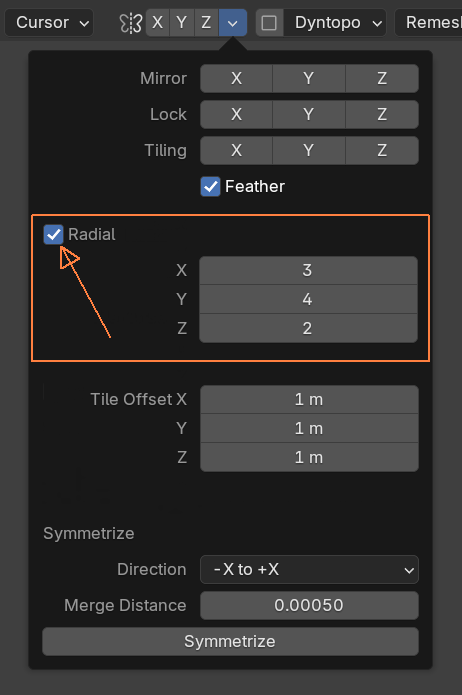
Radial symmetry works fine initially... enter your x/y/z values (e.g., 3/4/2) and you're set. The problem arises when you need to temporarily disable it (you must reset all fields to 1), losing your settings... If you want to re-enable radial symmetry, you have to remember and re-enter those values. Switching back and forth becomes tedious.
My proposal: Add a checkbox to toggle radial symmetry on/off... When disabled, the fields would gray out but preserve their values, allowing you to quickly re-enable radial symmetry with your previous settings intact via a simple checkbox toggle (This toggle should also be assignable to a keyboard shortcut) ....
Mockup:
5 Comments
makes sense mate ✌
Yes, it's incredibly clunky to work with radial symmetry without a quick toggle.
We discussed this at a module meeting recently - there was a question of per-axis toggles vs the proposed single checkbox. I'm curious if there are strong opinions on this, as I personally see there being merit to both options.
Per axis is overkill imo.. I have yet to see an app that does that... Usually there's only a single toggle..
I agree with Wax, one checkbox is the standard, per-axis is a bit much ✌️