
Graph Editor - Synchronize Channels Selection to Curves Display
Foreword
This is a followup of this discussion:
#68962 - Graph Editor: Link Visible and Selected states - blender - Blender Projects
The idea of syncing channels selection to curves display
is not new
. But the proposals made so far didn't account for how Blender functions to detail what needs to be done for the whole thing to work, and the authors of such proposals seem to not be around anymore, so I pick up the torch in hopes to actively involve the community and keep things going!
I intend to polish this post with the community's input, so please bring up any thoughts and any pickles I forgot. The goal is to have a proposal clear and solid enough so to take out as much of the "figuring things out" from the devs.
The base concept
Following the same idea as the Graph's "Only Show Selected" filter affects the channels list, we could have an option to show only the selected channels' curves. Without the need to select first → hide/unhide second.
This would mean that the Graph Editor's filters affect the channels list, and the channel selection affects the curves:
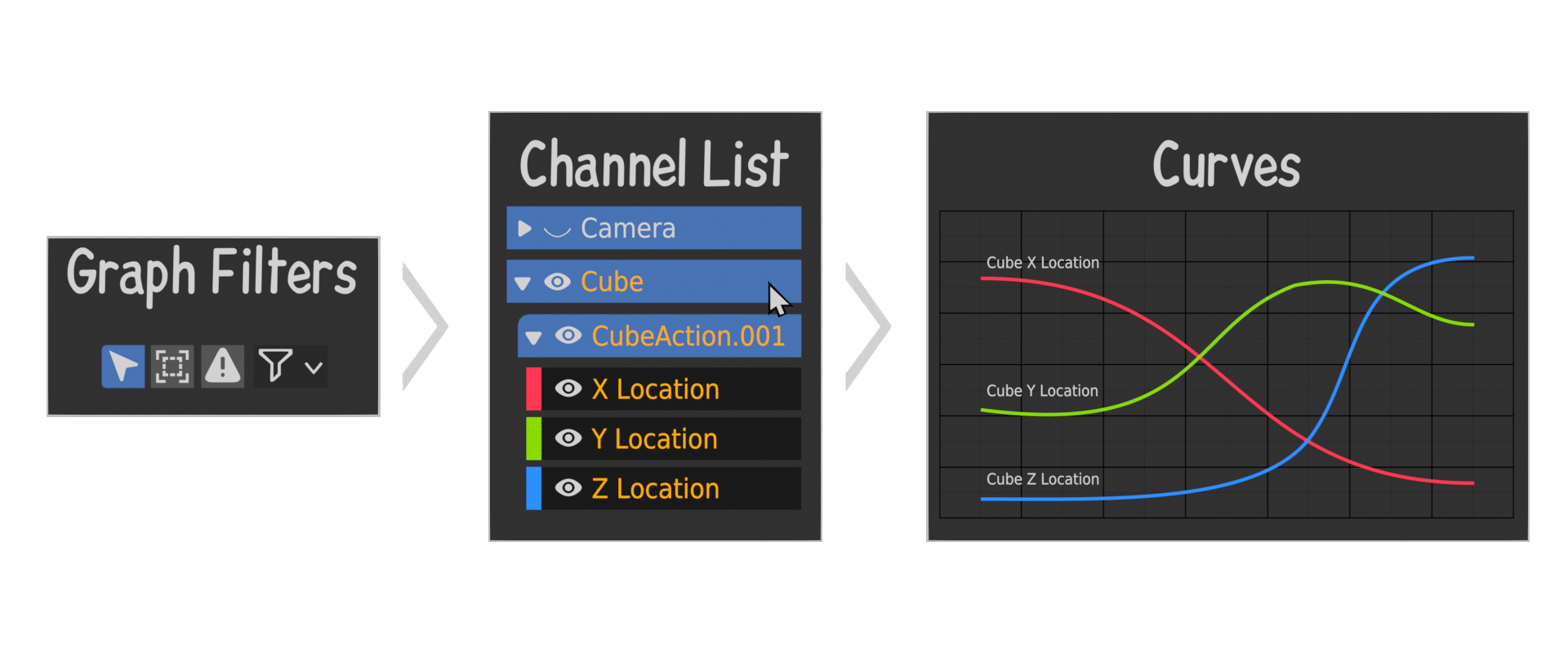 (Exhibit A: Mockup of a linear filtering workflow)
Right now, we are kind of there if we enable these options:
(
link if not working
)
(Exhibit B: current state of channel selection and curve display sync)
But we miss a few things to make this fully powerful and efficient.
1. Make any Parent Channel effect Children
In the above example, if I want to see all curves of the Cube object, I have to manually select each channels. Here it's only three, but it can get unpractical quickly when there's all nine transform channels + other properties + custom properties.
Example:
With a Parent Channel effects Children option, you could select the "Cube" channel as in Exhibit A and have all underlying channels selected and their respective curves displayed.
This is how the "Object Transform" channel works, though that channel doesn't contain custom properties and shapekeys. This part of the proposal would make both the Action and Object channel be selectable and impactful (also perhaps make the "Object Transform" channel unneeded?).
2. Every channel its own settings
Incidentally, for the above to work, it would perhaps mean that every channel type should have the same channel settings on top of visibility:
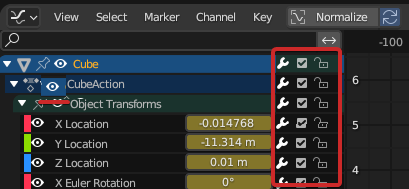 (Exhibit C: mockup of each channel its own settings)
- Curve Visibility
- Channel list pinning
- F-curve Modifiers
- Mute
- Lock
Question:
If selecting a channel is the curve's display condition, do we still need a dedicated button for the same thing in that context?
2. Disable object selection from Channel list
Currently, if you click an Object channel in the graph, it selects the object. It makes for a very confusing experience if the Graph's Only Show Selected filter is enabled (as per default). As people first make a selection from the viewport/outliner, then in the channels list, but doing so here would disrupt the previously made selection.
Example Using Exhibit A again:
Clicking the Cube channel would hide the Camera channel with its children.
The current only way around it is to disable Only Show Selected , but that can lead only to a cluttered channel list anytime you use a rig with dozens if not hundreds of channels just from a basic set of bones.
I am not totally sure when selecting an object from an animation graph is ever really wanted (that role is fulfilled by the viewport and outliner already).
If it was up to me, I would remove that behavior entirely, but this could be done as an option under Preferences > Animation > F-Curves panel.
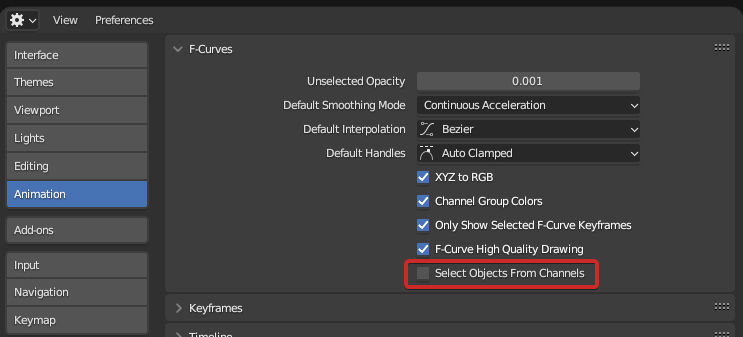 (Exhibit D: mockup of option to select objects from channels)
3. Make all types of channels searchable in the channel search bar
With channels selection becoming an even more important tool in that workflow, being able to search basically any kind of channel, may it be an object, and action, a "group of channels" (I'm thinking of the "Object Transforms" channel)
0 Comments