
Use the Scale cage corners to scale non uniformly, based on mouse position
When I started to use the Scale cage tool, something didn't feel right, like my brain was expecting a different behavior, maybe based on what other software does, since Blender has never had a cage scaling system before.
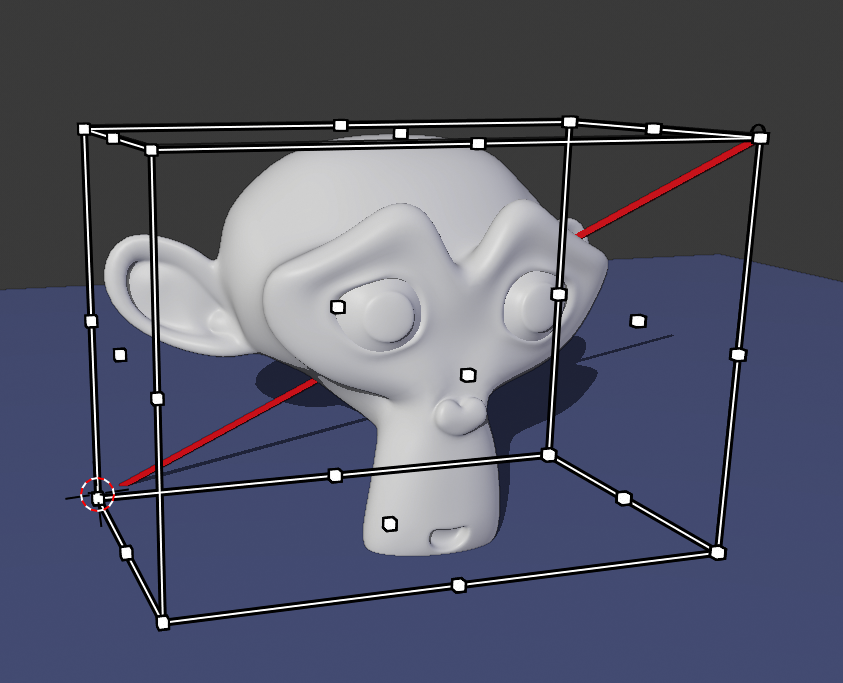
Here's what currently happens, dragging the corners scales the object uniformly across all three axis. The corner dot itself that I'm dragging is always in a straight diagonal line with the opposite corner and it doesn't follow my circular mouse movement.
 Here's what I expected to happen, and what I'm proposing. As far as I'm aware other software does it like this too. The corner moves freely in every direction from the point of view, and the object scales to fit in there, even if non uniform (I made this mockup with drivers to show the behavior, not the look of the UI which could look the same as above)
 By the way, dragging the edges of the cage instead of the vertices currently behaves similarly, except it scales 2 axis instead of 3, but it's also uniform on both axis where it shouldn't be
But what about the old behavior?: It could still be an option in the tool settings called Uniform (sidebar and topbar)
5 Comments
It is important for me to alternate between both options quickly. Like other programs (Krita for example) the initial behavior is like that of your suggestion, but if I leave the "shift" key pressed we change to uniform scale. My vote up :)
* @Luis Perez * Yes, I was thinking the same, as well as another key for center pivot instead of corner pivot. The problem is that blender already uses shift and ctrl for the small increment and the snapping respectively. I guess using shift or ctrl could be used for one thing before starting the drag, and for another while the drag is being performed as a modal
I like it, I would also add: hold control and it will scale toward the center point, so it behaves more like a normal scale gizmo. That's also how the transform tool works in photoshop, etc.
I'd support this idea if the current settings were the default, and say if you also pressed alt or something like that, then it would enable your suggestion. Kind of like in Photoshop.
edit: nevermind