
add preference feature to remove axis lines when using gizmo
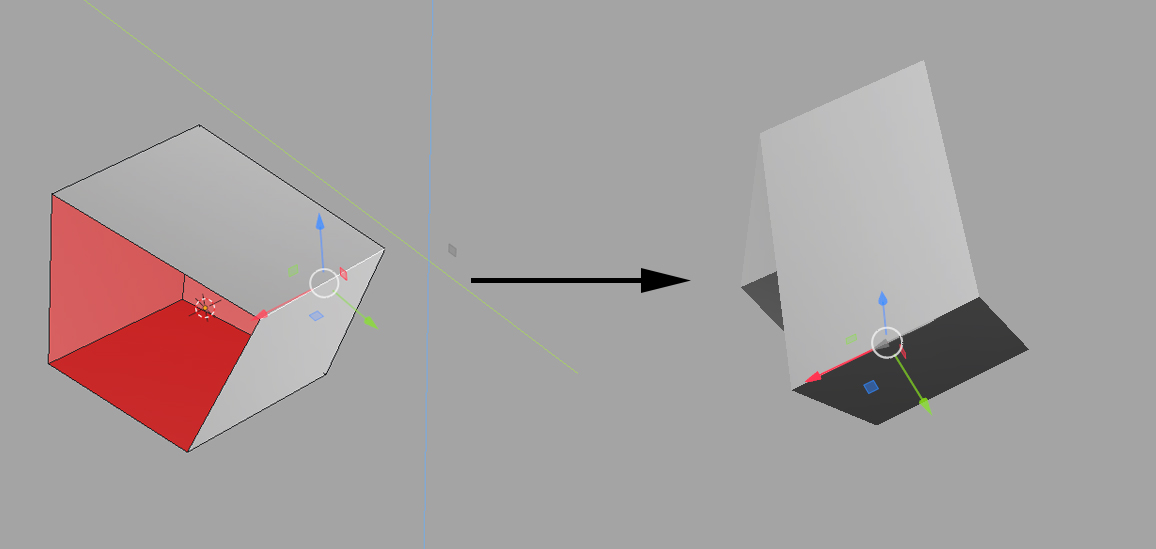 I understand that these lines are made to be informative when you use G,R,S hotkeys but in my opinion they just clutter your viewport when you use gizmos.
in addition, the developers have added the ability to see gizmo when moving objects so why not add these feature just to make vieport a bit cleaner
I understand that these lines are made to be informative when you use G,R,S hotkeys but in my opinion they just clutter your viewport when you use gizmos.
in addition, the developers have added the ability to see gizmo when moving objects so why not add these feature just to make vieport a bit cleaner
4 Comments
Please add a checkbox to disable the colored axis lines whilst allowing us to keep the gizmo visible. I find it so distracting to have the axis lines flashing on and off with every interaction.
In Blender 5.1 Alpha it is possible to disable these axis lines whilst keeping the gizmo visible. Unfortunately there is no toggle present in the 'Viewport Overlays' menu, so all overlays (including the grid) must also be disabled. Please consider adding an option to toggle these gizmo axis indicator lines independently. I know many people coming from other 3D software would really appreciate it.
You already can do this by disabling gizmos. And it is terrible, you can't see anything at all, not even the axis lines. Not to mention that you can just not use the move tool and instead just use the hotkey (G), and then it will behave how you want.
We do not want to disable the gizmos, we just want to disable the axis lines that flash on and off with every interaction. Using (G) to move things is often touted as the superior interaction method by Blender users, however for anyone coming from another 3D package, the gizmo is much more desirable.
A simple checkbox to disable these would mean every user could use Blender as they prefer.